
Table of Contents
By Nick Schäferhoff - Last update on
Plugins are a convenient solution for improving Core Web Vitals on your WordPress website. They allow you to boost performance and make your site more user-friendly without coding knowledge.
Which are the top WordPress plugins that are most effective to optimize Core Web Vitals performance speed? That’s what we want to cover in this post. Below, we’ll go over the best WordPress plugins to optimize your site for Core Web Vitals. We’ll cover their features, strengths, which metrics they target, and who they are most suitable for.
| Key takeaways Only have a minute? Here’s what you need to know: ✅ Core Web Vitals (LCP, INP, CLS) measure the real-world user experience on websites, specifically loading speed, interactivity, and visual stability. They impact your performance in Google search results. ✅ WordPress plugins can help improve Core Web vitals on your site through optimizations like caching, code improvements, streamlining the loading process, and image optimization. ✅ WP Rocket combines a comprehensive feature set, sensible default settings, and a beginner-friendly interface into one extension, making it a complete choice. For best results, pair it with an image optimization plugin like Imagify. |
What Are Core Web Vitals (And Why Do They Matter?)
Core Web Vitals are performance metrics introduced by Google in 2021. They track the real-life user experience on web pages, specifically loading performance, page interactivity, and visual stability. These metrics influence search rankings.
The current Core Web Vitals are:
- Largest Contentful Paint (LCP): Measures the time it takes for the largest content element (e.g., an image, video, or text block) to become visible on the screen. A good LCP score is 2.5 seconds or less.
- Interaction to Next Paint (INP): This one tracks how quickly a web page responds to user interactions (e.g., clicks, taps, or keyboard inputs) throughout its lifespan. A passing grade is 200 milliseconds or less.
- Cumulative Layout Shift (CLS): A metric for the visual stability of a page. It quantifies unexpected layout shifts. Your page’s CLS should be 0.1 or less.
Speed testing tools like PageSpeed Insights can tell you your site’s scores.
Best WordPress Plugins for Core Web Vitals Optimization
Which WordPress plugins work best if your Core Web Vitals need to be improved? Keep reading!
1. WP Rocket
Main strength: Comprehensiveness, ease of use
Best for: All users
Core Web Vitals targeted: LCP, INP, CLS
WP Rocket is an all-in-one WordPress performance plugin. It comes with extensive features, both automatic and optional, to optimize overall site speed and target Core Web Vitals.
Main Features
Once you install and activate WP Rocket on your site, it implements these improvements by default:
- Caching (with a separate mobile cache)
- Critical image optimization
- Gzip compression
- Preconnect to external resources
- Code minification
- Lazy rendering
The plugin also comes with many additional features you can activate with a click:
- Remove unused CSS
- Defer JavaScript
- Delay JavaScript execution
- Lazy loading
- Preload fonts
- Self-host Google Fonts
- Database cleanup
- CDN integration, for instance RocketCDN
- Add image dimensions
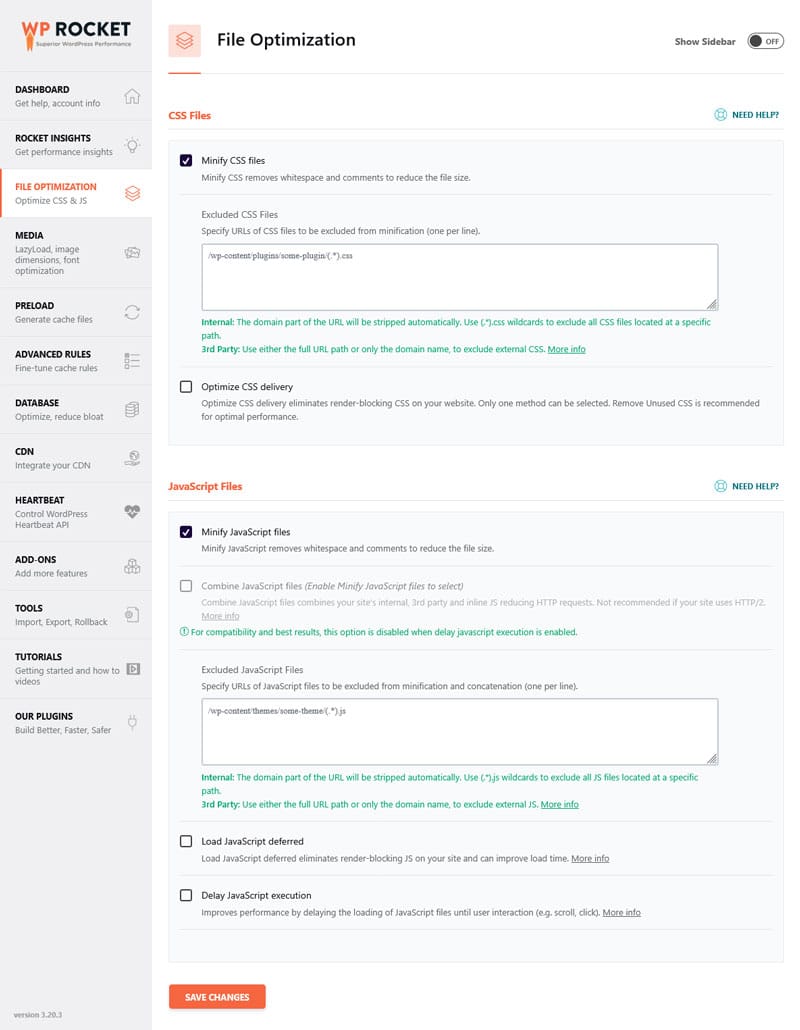
Enabling these options is as easy ticking a few boxes in the settings.
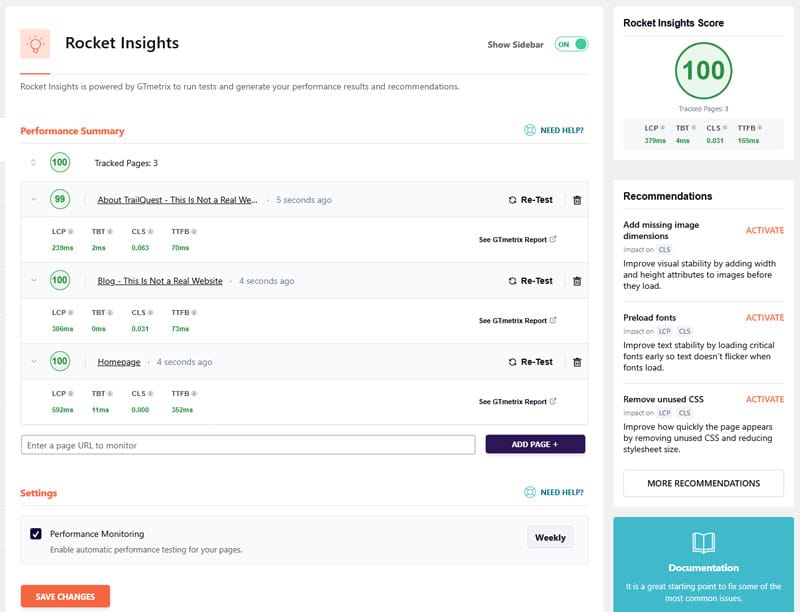
Finally, there’s Rocket Insights. Powered by GTmetrix, it’s a performance hub allowing you to track your site’s global and page-level performance scores and metrics. The feature helps you understand what’s affecting your loading speed and recommends specific WP Rocket features to improve performance.
Why Consider This Plugin?
What makes WP Rocket particularly helpful is its holistic approach and beginner-friendliness. It implements 80% of performance best practices as soon as it becomes active on your site. Additionally, it includes features to address every Core Web Vitals metric, with an easy-to-use interface for managing them.
The plugin is recommended for users of every level, and it works with practically every WordPress website.
Pricing
WP Rocket is a premium-only plugin. A single-site license costs $59/year (final price may vary depending on your country and applicable taxes). There is a 14-day money-back guarantee, so you can try it out before fully committing.
2. W3 Total Cache
Main strength: Caching
Best for: Technical users
Core Web Vitals targeted: LCP, INP, CLS
W3 Total Cache is one of several popular WordPress caching plugins. It’s live on more than 900,000 WordPress websites.
Caching is one of the main mechanisms to make websites faster, and different types of caching exist. If your goal is to improve your WordPress website’s Core Web Vitals, caching is one of the main tools to do so.
Main Features
The free version of W3 Total Cache lets you enable page, browser, database, object, and CDN caching for different parts of your website. It can also:
- Minify HTML, CSS, and JavaScript
- Defer non-critical CSS and JavaScript
- Lazy load and optimize images
- Connect your site to a CDN
- Disable WordPress bloat (e.g. emojis)
- Connect your site to PageSpeed Insights
There is also a paid version with even more features, including:
- Remove unused CSS and JavaScript
- Eliminate render-blocking resources
- Preload critical resources
- Serve the entire website from a CDN
- Caching for dynamic content and the REST API (for headless WordPress installs)
- Built-in performance statistics
- Unlimited image conversions (100/month in the free version)
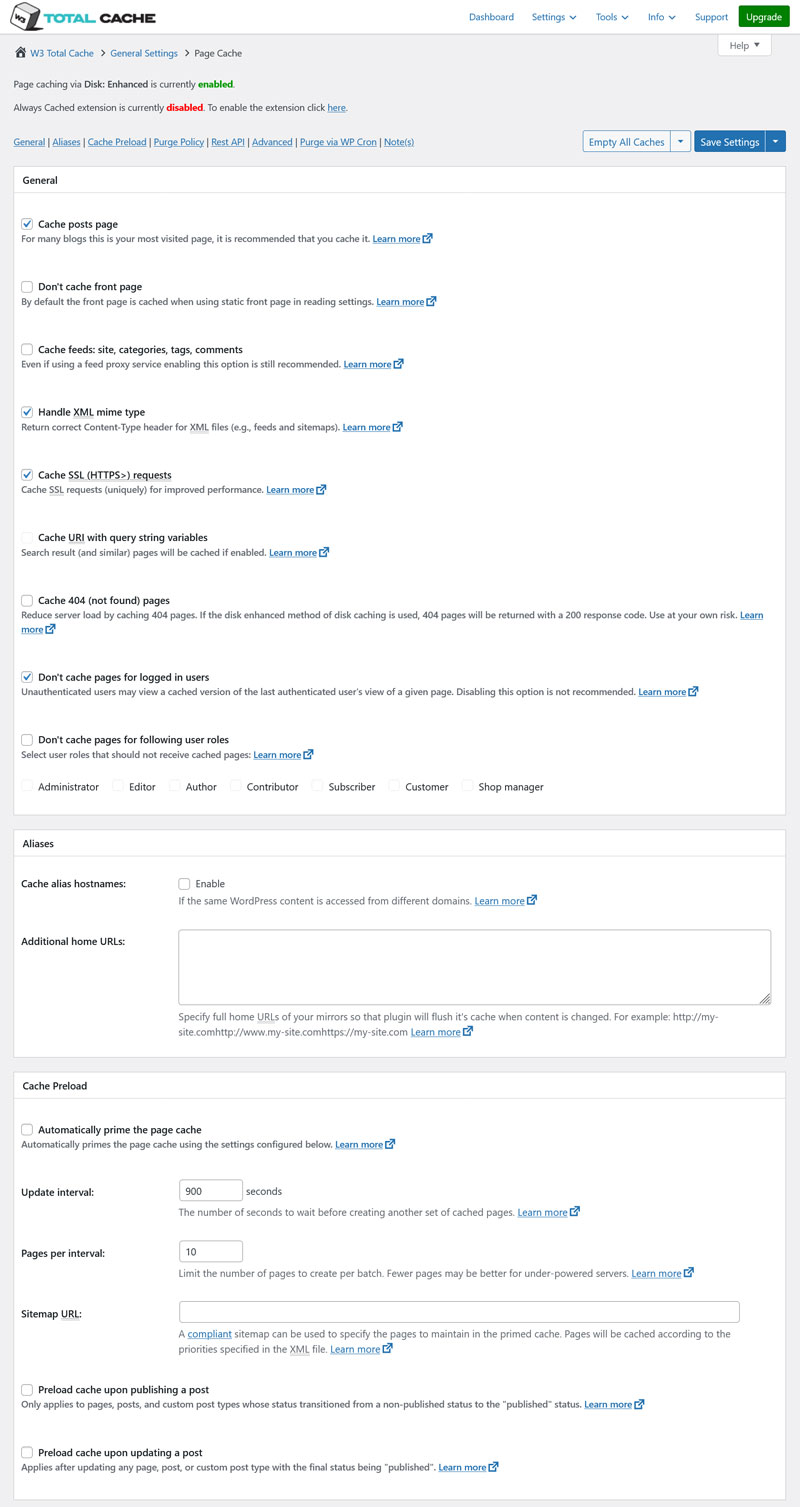
Unfortunately, the interface of W3 Total Cache is complex to the point of being overwhelming. It consists of 19 menu items, each of which comes with its own settings page, and each page is long, technical, and text-heavy.
Why Consider This Plugin?
W3 Total Cache has a wide feature set and can make a big difference in your site’s loading speed. In fact, its makers are so confident they promise a ten-fold improvement in overall site performance when the plugin is fully configured.
As mentioned, however, getting it there could be more user-friendly. While there is a setup guide, it comes with few default settings or automatic improvements.
Pricing
W3 Total Cache is available for free in the WordPress directory. The Pro plan starts from $99/year for one website. On higher plans, the W3 Total Cache team sets up the plugin on your site for free. There is a 30-day money-back guarantee.
3. Nitropack
Main strength: User friendliness
Best for: Most users
Core Web Vitals targeted: LCP, INP, CLS
Our next candidate is Nitropack. It has more than 100,000 installs and, similar to other entries in this list, takes a holistic approach to website performance. The plugin promises to help your WordPress site improve all three Core Web Vitals.
Main Features
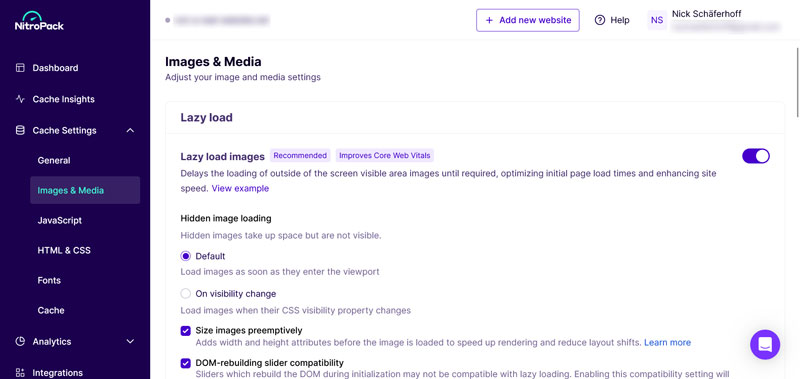
Nitropack requires that you connect your site to their services. You also manage most optimization in your Nitropack account, not in the WordPress back end.
The plugin’s free plan has these features:
- Caching (including the option to pre-cache pages)
- Preconnect to external resources
- Code minification
- Remove render-blocking resources
- Combine CSS and generate critical CSS
- Optimize loading order
- Lazy load for images and iframes
- Image resizing and optimization
- Integrated CDN
- Optimizing font rendering via the font-display rule
On paid plans, you can also:
- Finetune the cache
- Delay loading of non-critical resources
- Lazy load self-hosted videos
- Use adaptive image sizing (automatically resize images to fit their container)
- Preload the LCP element
- Combine JavaScript and delay script loading
- Remove unused CSS
- Optimize interactive elements
- Optimize fonts (e.g. remove unused subsets)
- Remove the Nitropack branding from your site
Note that not all features are available on all plans. Some are reserved for higher levels.
Additionally, the UI is clean and very beginner friendly. For example, you can choose which pages to optimize with simple toggles.
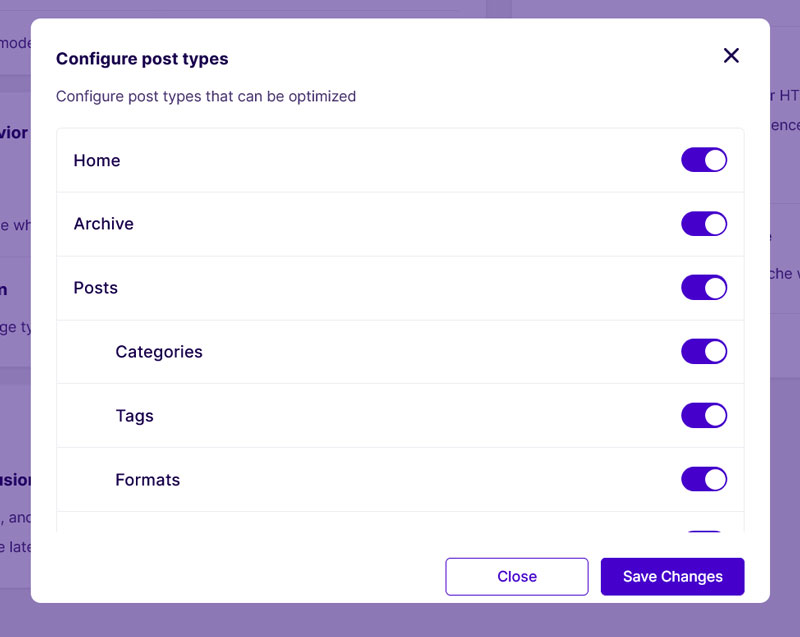
Why Consider This Plugin?
Nitropack’s features are comprehensive and the plugin comes with sensible default settings. That means, it improves website performance from the moment you switch it on.
What’s a bit irritating is that the plugin takes you out of the native WordPress environment, making it feel more like a SaaS solution.
Additionally, the paid plans have monthly limits for optimized pageviews and CDN traffic and, compared to other entries on this list, are relatively expensive.
Pricing
Nitropack’s free plan includes 1,000 monthly pageviews, 1 GB of CDN bandwidth, and shows a badge on your website.
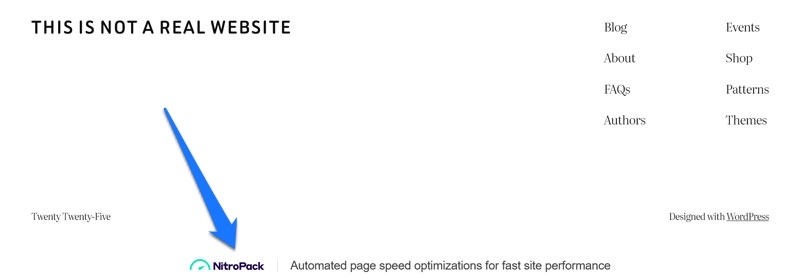
Paid options start at $7/month for a yearly plan for one website. It supports 8,000 pageviews and 5 GB of CDN traffic per month.
Higher plans are $18/month (40,000 pageviews, 25GB CDN) and $27.67/month (540,000 pageviews, 270 GB CDN bandwidth shared across up to three websites). There is also an agency plan, starting from 10 websites.
The plugin has a 14-day money-back guarantee.
| 💡Check our WP Rocket vs Nitropack comparison. |
4. Autoptimize

Main strength: Multi-pronged performance improvements
Best for: Technically adept users
Core Web Vitals targeted: LCP, INP
Autoptimize is another WordPress performance plugin. It has 900,000+ installs in the WordPress directory and covers several angles of Core Web Vitals optimization.
Main Features
Among others, here’s what Autoptimize can do:
- Aggregate, minify, and cache CSS and JavaScript files
- Inline critical CSS
- Optimize and lazy-load images
- Optimize Google Fonts
- Load JavaScript asynchronously
There’s also Autoptimize Pro, which additionally comes with:
- Page caching
- Improved image optimization and CDN
- Automatic critical CSS rules
- Adaptive images
- Delayed JavaScript, iframes, HTML, and CSS
- Serving JavaScript and CSS from a CDN
- Removing unneeded JavaScript or CSS on a site or page level
Why Consider This Plugin?
Autoptimize is popular for a reason. The plugin has a well-rounded feature set, offering many ways for users to improve Core Web Vitals on their WordPress sites.
Where it could use a bit more work is its UI.
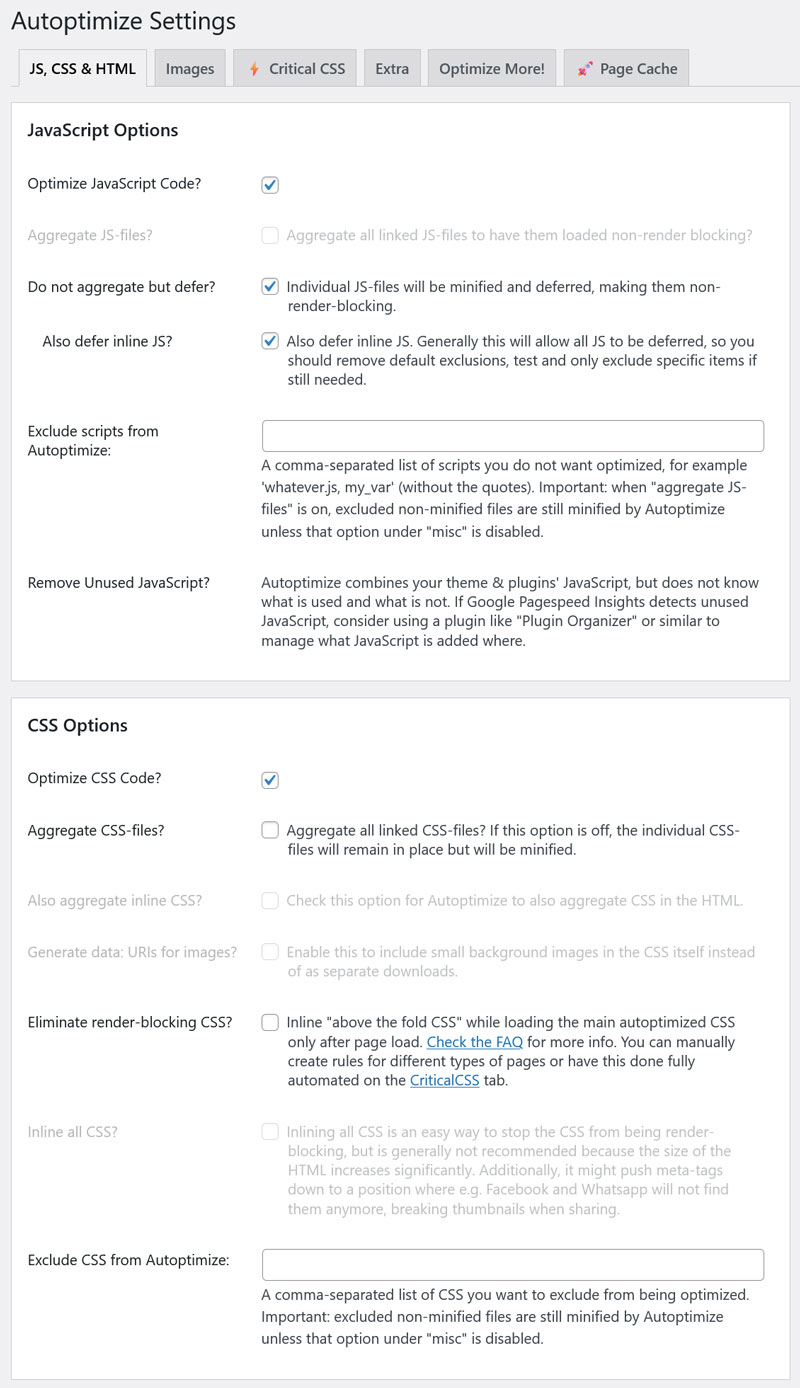
The interface is rather basic and text-heavy, making it potentially intimidating for beginner users. It also comes with few default settings, meaning users have to make most decisions themselves.
Pricing
You can get Autoptimize for free in the WordPress directory. A single-site license of the Pro version is $89/year, which includes a 42% discount for first-time subscribers. The plugin sells via Freemius, a shop that has a rather restrictive refund policy.
| 💡By the way, you can use Autoptimize together with WP Rocket. |
5. Asset CleanUp
Main strength: Website asset management
Best for: Site owners who want a lot of individual control
Core Web Vitals targeted: LCP, INP
Asset CleanUp is another popular plugin option with 100,000+ installs. Its main purpose is to help get rid of unnecessary CSS and JavaScript in order to minimize code, eliminate render-blocking resources, and reduce HTTP requests on your website.
Main Features
The main function of Asset CleanUp is to control what CSS and JavaScript files load on different pages of your website. To do that, it scans assets loaded on pages and gives you the option to disable what isn’t needed — both inside the WordPress editor and plugin settings.
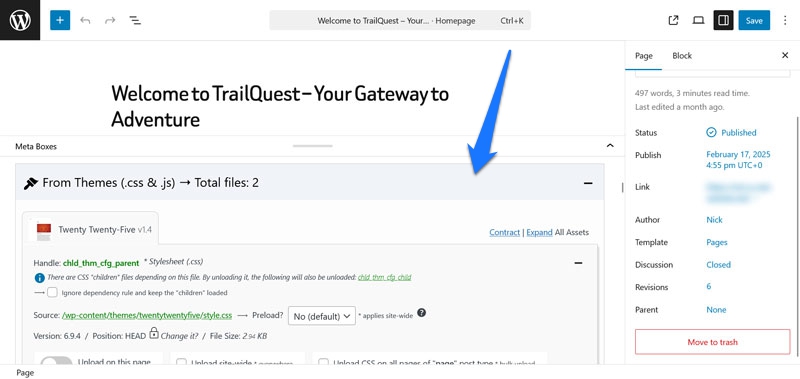
The plugin can also:
- Preload CSS and JavaScript files, local fonts, and Google Fonts
- Improve Google Font delivery
- Minify and combine code files
- Inline CSS files and defer JavaScript
- Disable WordPress functionality like emojis and dashicons
- Reduce page HTML code
- Run critical path CSS
Unfortunately, Asset CleanUP’s interface is very, very text-heavy and has lots of options.
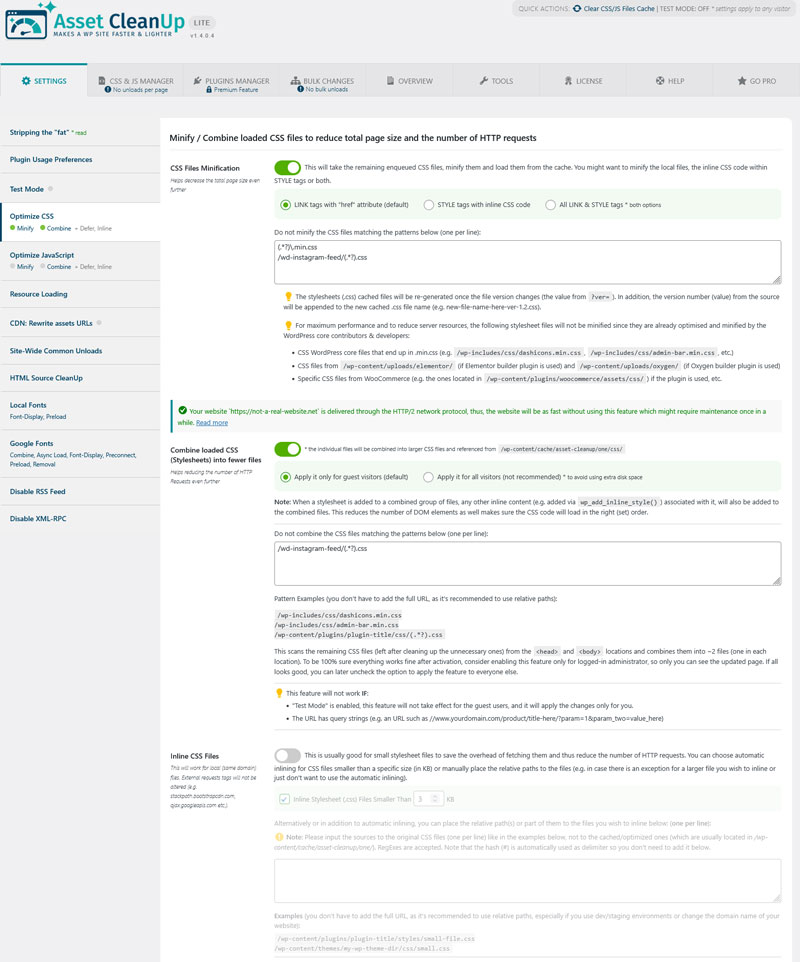
It takes considerable time to understand what each setting does and decide which makes sense to enable and which doesn’t.
The plugin also has a Pro version that additionally allows you to:
- Unload asset on additional pages, e.g. archives
- Load JavaScript asynchronously or deferred
- Control when CSS and JavaScript files load
- Load files according to screen size
Why Consider This Plugin?
Asset CleanUp is powerful but could be more user-friendly. Especially as a beginner, its sheer number of settings and the amount of information each of them comes with can be overwhelming.
Note that the plugin states on its own page that it works best in combination with a caching solution. Therefore, while a great option to help improve your Core Web Vitals, it’s not complete on its own.
Pricing
Asset CleanUp Pro starts at $49 for a single-site license with a year of support and updates (30% off at renewal). You can get a refund within the first 30 days of purchasing it.
6. Perfmatters
Main strength: Front-end optimization
Best for: Beginner users
Core Web Vitals targeted: LCP, INP, CLS
Perfmatters is a front-end optimization tool, meaning it focuses mostly on improving the visitor-facing side of your WordPress website. Its goal is to prevent unnecessary files and code from loading, so your pages appear faster.
Main Features
Perfmatters has many settings to disable or optimize features built into WordPress, such as:
- Emojis
- Dashicons
- XML-RPC
- RSS feeds
- Shortlinks
- WooCommerce widgets
- jQuery Migrate
- The WordPress REST API
- Global CSS styles
Many of these are small improvements, but they add up. Perfmatters provides an easy way to disable or modify them.
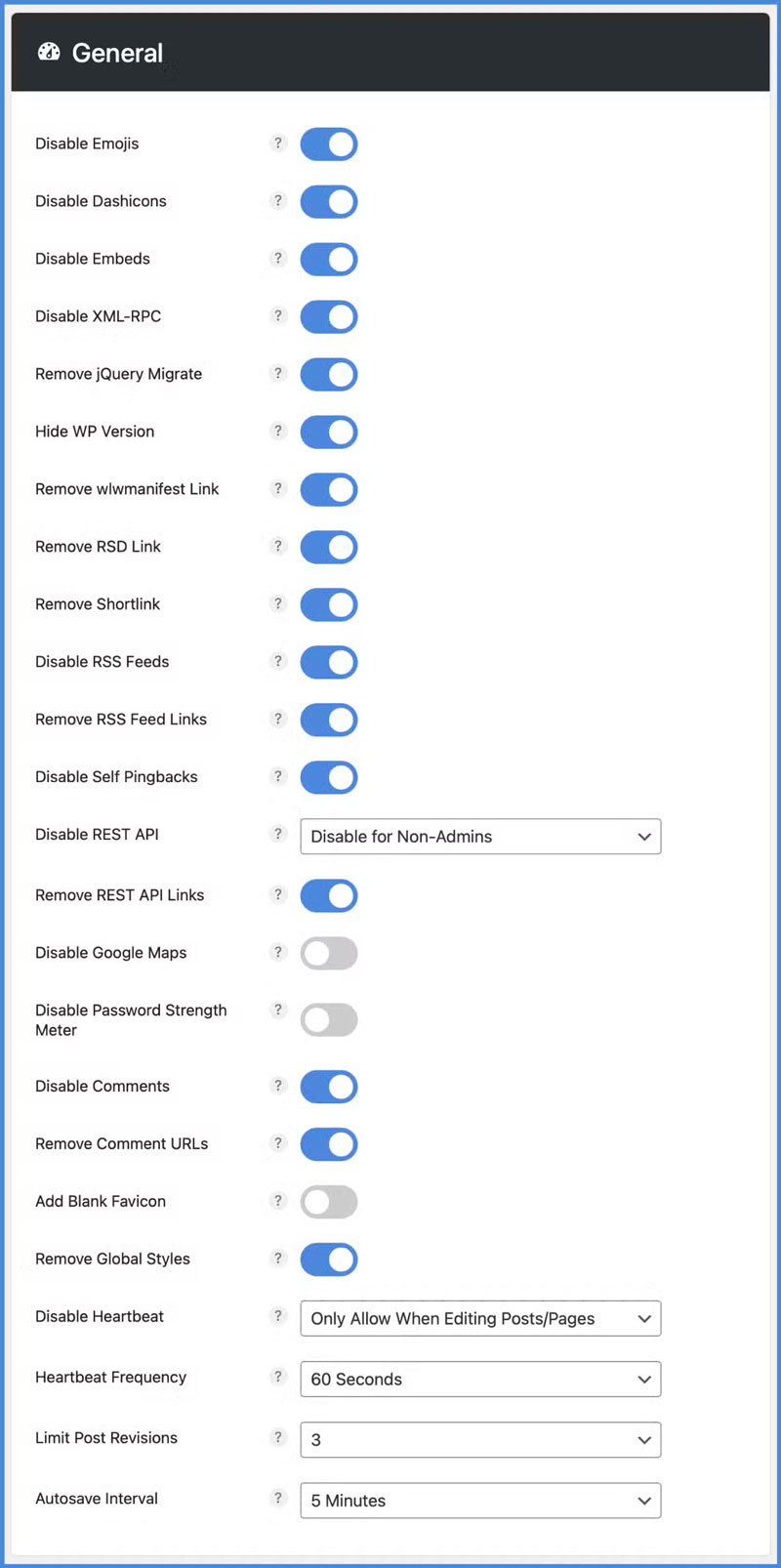
In addition, the plugin comes with a script manager that lets you control which JavaScript files load, globally or on a per-page basis. It also has features to optimize your database and further improves your Core Web Vitals through these options:
- Lazy loading for images, videos, iframes, CSS backgrounds
- Exclude critical images from lazy loading
- Add missing image dimensions (helps improve CLS)
- Connect to a CDN
- Host Google Analytics and Google Fonts locally
- Preload assets
- Defer and delay JavaScript
- Remove unused CSS
- CSS and JavaScript minification
Why Consider This Plugin?
Perfmatters has a very solid feature set and a beginner-friendly user interface. It targets all three Core Web Vitals metrics, though it’s not a complete solution on its own. The plugin’s own homepage recommends using Perfmatters alongside a caching plugin.
Pricing
The plugin is a paid-only option. You can get a license for one website with a year of support and upgrades for $29.95, including a 30-day money-back guarantee.
7. FlyingPress
Main strength: Ease of use
Best for: Beginners, non-technical users
Core Web Vitals targeted: LCP, INP, CLS
FlyingPress is another all-in-one and premium-only plugin. It promises to address all Core Web Vitals on your WordPress site.
Main Features
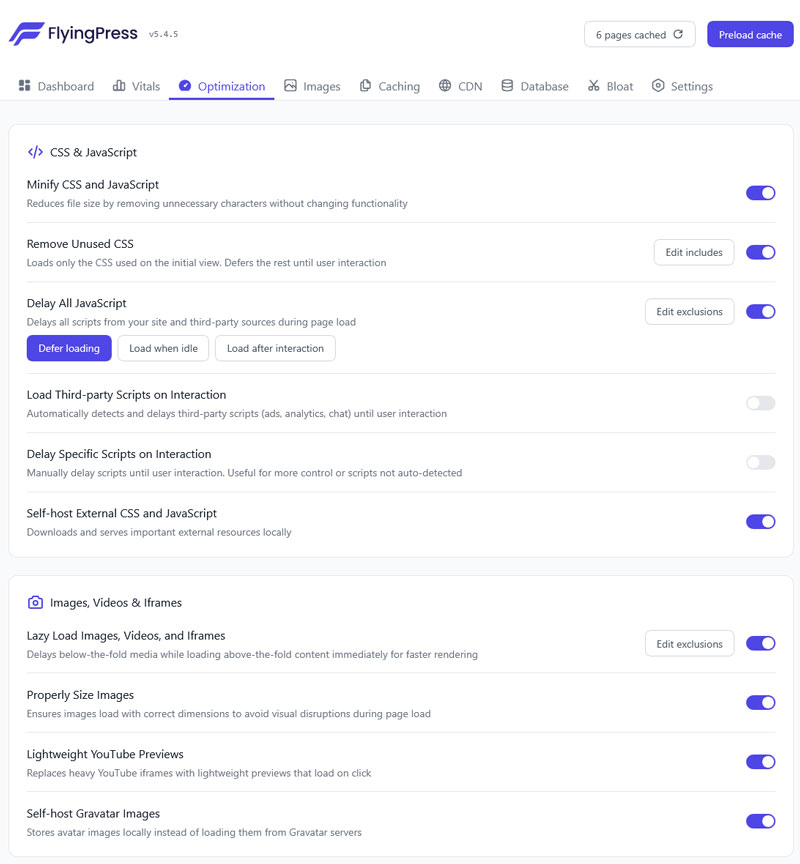
Here’s what FlyingPress can do for your website:
- Page caching and cache preloading (with an option for a separate mobile cache)
- Image optimization (convert to AVIF/WebP, compression)
- Real-life Core Web Vitals tracking
- Remove unused CSS
- Defer and delay JavaScript
- Code minification
- Lazy loading for images, HTML, videos, and more
- Critical resource prioritization
- Preloading for links
- Google Font optimization
- Add missing image height and width attributes
- Database optimization
- Remove WordPress bloat (emojis, etc.)
- CDN integration
The plugin also has a clean and beginner-friendly user interface. You can enable and disable most features with simple switches right inside the WordPress back end.
Why Consider This Plugin?
FlyingPress is a solid option. It comes with a great feature set and is easy to use. The plugin also offers sensible default options, meaning it has an effect on your website from the moment it becomes active.
Pricing
FlyingPress costs $59/year for a single-site license. There is a free 14-day trial. You can sign up and cancel anytime, your credit card is not charged until the trial is over.
| 💡 Find out how FlyingPress compares to WP Rocket. |
8. Imagify

Main strength: Image optimization
Best for: Visual-heavy websites
Core Web Vitals targeted: LCP, CLS
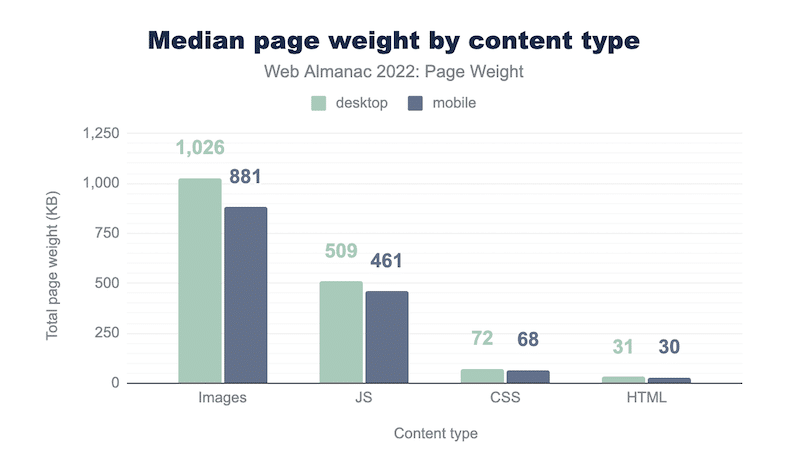
Imagify does only one thing: Optimize your images. Visual content most often makes up the bulk of a web page’s weight, so ensuring they load faster goes a long way in improving overall website performance.
Main Features
Imagify is a complete solution for making the footprint of images on your website as small as possible without compromising quality. It does so by:
- Converting visuals to the space-saving WebP and AVIF formats
- Automatically replacing images on your site with the lighter alternatives
- Offering lossless compression
- Resizing large images
Imagify can perform these actions automatically when you upload new images to your site. It allows you to optimize existing visuals in the same way, both individually and in bulk.

Why Consider This Plugin?
Image optimization is an often-overlooked aspect of improving Core Web Vitals in WordPress. Imagify automates the process, making it convenient for website owners.
Pricing
The free version lets you process 20MB of images per month. Paid plans including 500MB/month or unlimited bandwidth are $4.99 or $9.99/month respectively on a yearly plan.
9. LiteSpeed Cache
Main strength: Integrating WordPress with the LiteSpeed cache engine
Best for: WordPress sites running on LiteSpeed-enabled servers
Core Web Vitals targeted: LCP, INP, CLS
As the name suggests, LiteSpeed Cache started as a caching plugin but has added more performance optimization features over time. It works best for websites on servers that include the LiteSpeed cache engine.
Main Features
LiteSpeed Cache comes with two sets of features: one that’s available for all users and one exclusive to sites with LiteSpeed enabled.
The general features include:
- Page, browser, object, and CDN cache support
- Image optimization and lazy load (also for iframes)
- Combine CSS/JS
- Minification for CSS, JavaScript, and HTML (incl. inline and third-party)
- Asynchronous CSS loading
- Automatic critical CSS generation
- Defer/delay JavaScript
- Database cleaner and optimizer
- HTTP/2 Push and DNS prefetch
Note that, to take advantage of some features, you need to connect your site to the Quick.cloud external service. You also need to find your way around the user interface, which has many settings, is text and jargon-heavy, and leaves many decisions up to you.
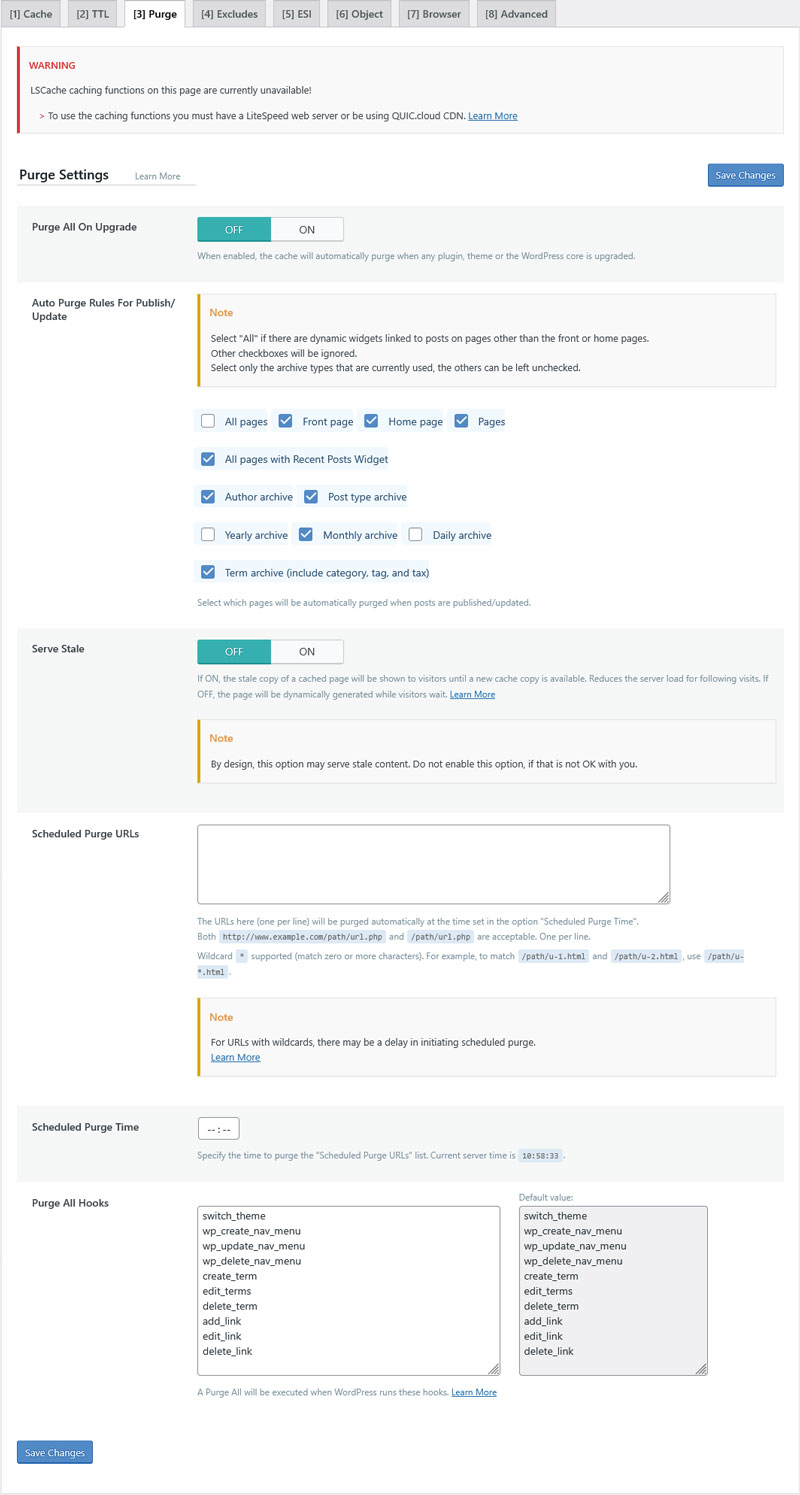
On LiteSpeed servers, you additionally benefit from:
- Automatic page caching and purge
- Private cache for logged-in users
- Caching for WordPress REST API calls
- Separate caches for desktop and mobile views
- Advanced cache management (e.g. purge scheduling)
- Smart preload crawler
Why Consider This Plugin?
LiteSpeed Cache has a wide range of powerful features. Unfortunately, it has a problem that’s common on this list, which is an overly complex user interface.
To make up for it, LiteSpeed Cache comes with five one-click presets that gradually ramp up the level of performance optimization.
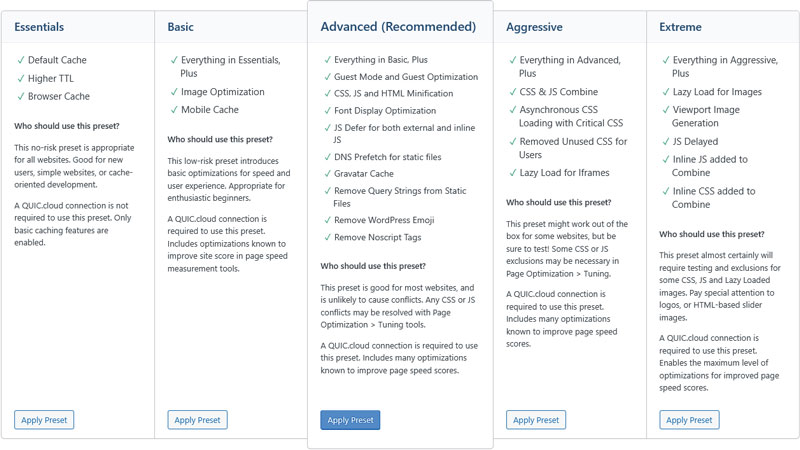
It’s a nice touch, especially for beginners, and the medium preset is active by default for instant effects.
Pricing
The LiteSpeed Cache WordPress plugin is completely free to use. There is no pro version and no upsells. The only thing you may pay extra for is if you exceed your monthly quota for image optimization, CDN usage, or other external services.
Comparing the Top WordPress Plugins for Core Web Vitals Optimization
| Plugin | Key Features | Core Web Vitals Targeted | Pros | Cons | Pricing |
| WP Rocket | Caching, code and image optimization, lazy loading and rendering, performance monitoring | LCP, INP, CLS | Beginner-friendly, holistic, automatic improvements | Paid only (no free version) | $59/year (single site) |
| W3 Total Cache | Several types of caching and code optimization, lazy load for images, eliminating WordPress bloat | LCP, INP, CLS | Wide feature set | Complex UI with many options | Free (Paid version from $99/year) |
| Nitropack | Caching, preconnect, code and loading order improvements , font and image optimization | LCP, INP, CLS | Comprehensive features, sensible defaults, beginner-friendly UI | Managed outside WordPress, monthly traffic limits for optimization | Free plan with 1,000 pageviews, 1GB CDN (Paid from $7/month) |
| Autoptimize | CSS/JS aggregation/minification,image optimization and lazy loading, Google Fonts optimization | LCP, INP | Feature-rich, powerful optimizations | Text-heavy UI, few defaults | Free (Paid version from $89/year) |
| Asset CleanUp | Disable unused CSS/JS, preload assets, minify/combine code, critical CSS | LCP, INP | Granular control, reduces HTTP requests, works with caching plugins | Very text-heavy UI, steep learning curve | Free (Pro from $49/year) |
| Perfmatters | Disable WordPress bloat, script manager, lazy loading, CDN, local fonts/analytics, add missing image dimensions | LCP, INP, CLS | Easy UI | Paid only, recommends pairing with a caching plugin | $29.95/year (single site) |
| FlyingPress | Caching, image optimization, real-life CWV tracking, code improvements,remove WordPress bloat | LCP, INP, CLS | Comprehensive features, beginner-friendly UI, sensible defaults | Premium-only, no free version | $59/year (single site) |
| Imagify | WebP/AVIF image conversion, lossless compression, bulk optimization, auto-resizing | LCP | Automated, high-quality, reduces image weight significantly | Limited free tier | Free (20MB/month), paid from $4.99/month (yearly) |
| LiteSpeed Cache | Multiple types of caching, image and code optimization, database cleaner, additional improvements forLiteSpeed servers | LCP, INP, CLS | Wide range of features, one-click presets | Complex and text/jargon-heavy UI, need to connect to external service for some features | Free (no Pro version) |
Case Study: Addressing Core Web Vitals with a WordPress Plugin
To test the impact the right plugin can have on your WordPress website’s Core Web Vitals, we set up a demo site with a default theme, a few standard plugins, and some dummy content. Its initial PageSpeed Insights readings were as follows:
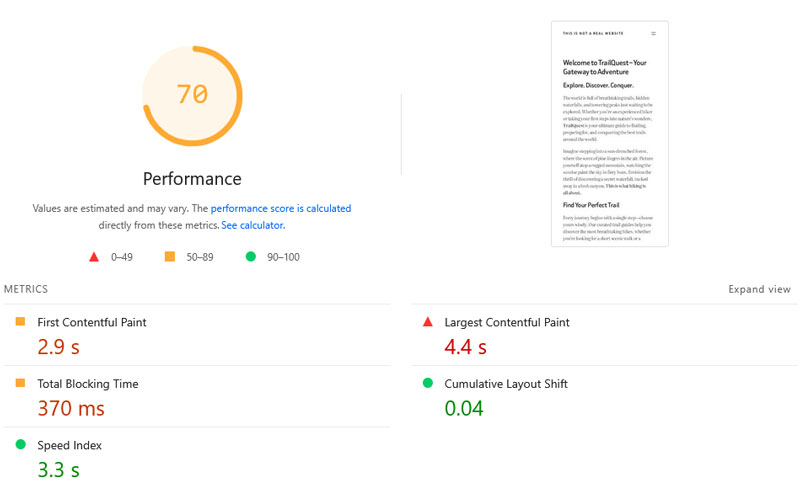
Since the site has no real traffic, we can only measure LCP and CLS. Especially LCP could use some improvements.
To facilitate it, we installed and activated WP Rocket along with these features:
- Remove unused CSS
- Defer and delay JavaScript
- Lazy loading for images and videos
- Add missing image dimensions
- Preload fonts
Upon retesting, PageSpeed Insights showed these values:
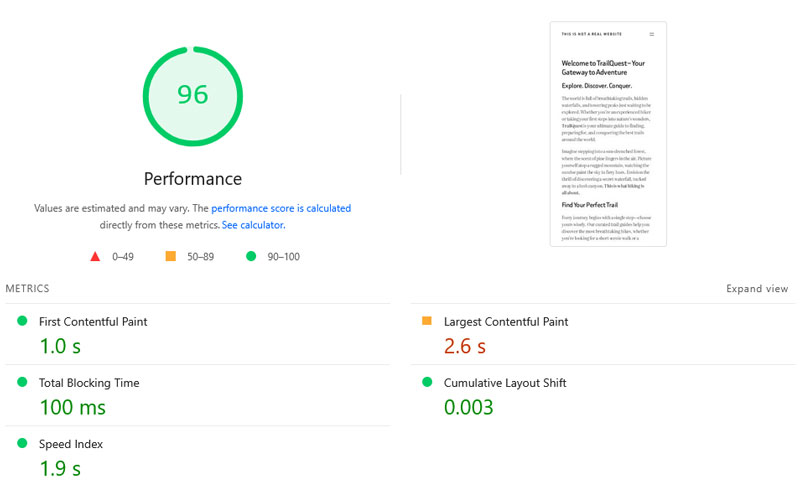
Besides LCP and CLS having both markedly improved, all other performance metrics also got better. And it literally took three minutes to implement. Here’s a comparison of the test results before and after using WP Rocket:
| Value | Before | After |
| Mobile Performance score | 70 | 96 |
| First Contentful Paint | 2.9s | 1.0s |
| Largest Contentful Paint | 4.4s | 2.6s |
| Cumulative Layout Shift | 0.04 | 0.003 |
| Speed Index | 3.3s | 1.9s |
FAQs
Finally, let’s go over some frequently asked questions on this topic.
How can I check my site’s Core Web Vitals?
Use Google’s PageSpeed Insights for lab and real-user data. Other tools like GTmetrix and WebPageTest also provide Core Web Vitals metrics.
How do WordPress plugins help improve Core Web Vitals scores?
Plugins automate optimizations like caching, image compression, lazy loading, and code minification. They help target specific metrics and make the process quicker and easier.
Which WordPress plugin is the best for each of the Core Web Vitals metrics?
WP Rocket is a great all-in-one solution, as it combines features to improve all three Core Web Vitals metrics in a single, beginner-friendly plugin.
What should I look for when choosing a performance plugin?
Prioritize plugins that address your weakest metrics. Look for ease of use, compatibility with your setup, and features that target your site’s shortcomings.
How do I evaluate if the plugin I chose is working?
Re-test your site in PageSpeed Insights or GTmetrix before and after installation. Monitor real-user data in Google Search Console’s Core Web Vitals report. Check for improvements in LCP, INP, and CLS scores.
Improve Your Core Web Vitals with the Right WordPress Plugin
Optimizing your site for Core Web Vitals doesn’t have to be complicated. Plugins help you automate improvemtns for speed, interactivity, and visual stability without touching a line of code.
Make sure to test your pages to understand your needs first. It helps you choose the right solution for your site.
For a plugin that addresses every single Core Web Vitals metric, choose WP Rocket. Its best-in-class default settings and beginner-friendly interface make optimizing your site’s user experience convenient and easy. Test WP Rocket risk-free for 14 days!