


The Best WordPress Caching Plugins in 2026 (Free and Paid)
Table of Contents
By Marine Larmier - Last update on
Speed matters. A slow WordPress site can frustrate visitors and hurt conversions. One of the easiest ways to speed things up? Caching!
Caching works by keeping ready-made copies of your pages instead of rebuilding them for every visitor. This reduces server work and helps your website load faster.
A caching plugin handles this automatically. But with so many free and paid options, which one should you choose?
In this guide, we compare the best WordPress caching plugins based on performance, ease of use, features, and pricing to help you find the right fit.
Short answer: If you’re on LiteSpeed hosting and don’t mind configuring, use the free LiteSpeed Cache. If you want a free plugin that just caches pages on any host, WP Super Cache is the simplest. If you want caching plus file and media optimization that works without tuning, WP Rocket is the easiest paid option.
Key Takeaways
✅ WP Rocket and FlyingPress lead the performance comparison: The comparison tables show FlyingPress at 100/100 and WP Rocket at 99/100 after optimization.
✅ You don’t have to pay for good caching: WP Super Cache is a great free option for beginners, while LiteSpeed Cache offers advanced features for websites on compatible hosting.
✅ Caching alone isn’t enough: Choose a plugin that also offers CSS, JavaScript, and image optimization if you want to tackle more performance issues and improve Core Web Vitals.
✅ Your hosting provider may already handle caching: You don’t necessarily need two caching layers. A performance plugin can complement hosting-level caching with additional optimization features.
✅ The best plugin depends on your needs: Consider your budget, technical skills, and desired level of automation. Some plugins work with minimal setup, while others offer more advanced control.
Best WordPress Caching Plugins at a Glance- Quick Picks Table
A WordPress caching plugin speeds up your website by storing ready-made versions of your pages instead of generating them from scratch for every visitor. This reduces server work, improves loading times, and can benefit user experience, SEO, and conversions.
Getting started is simple: install a caching plugin, activate it, and adjust the settings if needed.
Not sure which caching plugin to choose? Here’s a quick comparison to help you find the best fit for your website, budget, and technical skills.
| Caching Plugin | Go for it if… |
| WP Rocket | You want an easy-to-use performance plugin that automatically enables many optimizations upon activation, plus additional powerful options with a click. Bonus: Rocket Insights provides optimization recommendation and performance monitoring with any licenses. |
| W3 Total Cache | You have technical skills and want advanced control over caching and server resources. |
| WP Super Cache | You want simple, free page caching without extra features. |
| WP Fastest Cache | You want straightforward caching with a one-time Premium payment instead of a subscription. |
| Hummingbird | You want caching, performance scans, and get PageSpeed Insights optimization recommendations. |
| LiteSpeed Cache | You’re on LiteSpeed hosting and want advanced caching and optimization features for free. |
| FlyingPress | You want an all-in-one paid solution with caching, code optimization, and built-in image compression. |
| NitroPack | You prefer a fully managed, cloud-based service for caching, image optimization, and CDN delivery. |
| 💡 Hint: Explore our WordPress caching guide to understand how caching works and how to configure it properly. |
Our Testing Methodology
To keep the comparison fair, each plugin is evaluated on the same WordPress website and hosting environment in Paris, France.

Our test site features a typical business homepage with a hero image, content sections, call-to-action (CTA) buttons, and customer testimonials.
We compare performance at three different stages:
- Before installing a caching plugin: We measure the website’s initial performance without caching to establish a baseline.
- Default settings (cache only): We enable page caching if needed, without manually activating extra CSS, JavaScript, or image optimizations. Settings enabled automatically by a plugin remain unchanged.
- After 15 minutes of optimization: We spend up to 15 minutes configuring each plugin’s available features and test again to see how much additional performance we can gain with minimal effort.
Each stage uses three mobile GTmetrix tests, with the median result reported to reduce fluctuations.
The Performance Metrics We Compare
- Overall performance score: The overall performance score provided by Lighthouse, ranging from 0 to 100. It evaluates several loading speed and responsiveness metrics. The higher the score, the better the performance, with 90–100 considered good.
- Largest Contentful Paint (LCP): It’s one of Google’s Core Web Vitals and it measures how quickly the largest visible element, such as the hero image, appears on the screen. For reference, a good LCP is 2.5 seconds or less.
- Time to First Byte (TTFB): It measures how long it takes for the browser to receive the first byte of data from the server. A lower TTFB generally means a faster initial response.
We also considered ease of use, available optimization features, and hosting compatibility.
Our goal? To find out which plugins deliver the best performance with the least amount of effort, whether you’re a WordPress beginner or a more experienced user.
The 8 Best WordPress Caching Plugins in 2026
Let’s compare eight popular WordPress caching plugins, from free solutions to premium tools that go beyond caching with CSS, JavaScript, and image optimization. Performance can vary depending on the site, hosting environment, and optimization settings.
Prices checked October 2026. All prices are in USD, excluding applicable taxes and promotional discounts.
1. WP Rocket
WP Rocket is a premium WordPress caching and performance optimization plugin designed to make websites faster without complicated settings. It automatically applies several speed optimizations upon activation, making it a convenient choice for beginners and professionals alike.
🎯 Best for: Beginners, agencies, freelancers, business and ecommerce owners who want an easy-to-use performance plugin that automatically applies around 80% of web performance best practices upon activation, with minimal configuration.
✨ What it does well:
- Automatic optimization: Upon activation, WP Rocket automatically enables page caching, GZIP compression, critical image optimization, and CSS and JavaScript minification. You can also activate advanced features like Remove Unused CSS and Delay JavaScript Execution to further improve loading performance.
- Rocket Insights: Its built-in performance hub uses GTmetrix data to monitor up to 10 URLs per website. It tracks key performance metrics, identifies bottlenecks, and recommends which WP Rocket features to enable next. It’s included at no additional cost.
- MCP integration: Introduced in WP Rocket 3.23, MCP lets you connect AI assistants like Claude and Codex to your real performance data and WP Rocket settings. It’s particularly useful for agencies managing multiple client websites, as you can analyze performance, adjust settings with approval, and generate reports through AI.
- Highly rated customer support: WP Rocket provides dedicated technical support, detailed documentation, and assistance with compatibility issues. Its positive customer reviews on Trustpilot are another advantage for users who value reliable help.
- Broad WordPress compatibility: WP Rocket is compatible with the most popular WordPress themes, plugins, and page builders, including WooCommerce, and is accepted by the top managed WordPress hosts.
⚠️ Where it falls short: WP Rocket doesn’t offer a free version, although a 14-day free trial is available. Licenses renew annually, and page caching may overlap with functionality already provided by managed WordPress hosting. Also, image compression and WebP/AVIF conversion require a separate solution like Imagify.
💰 Price: WP Rocket offers three plans: Single at $59.95/year, Plus at $119.95/year, and Multi starting at $299.95/year for 50 websites, with additional pricing options for 100 and 500 websites.
📊 Our performance test
| KPI | No Caching Plugin | Default Settings (Cache Only) | After 15 Minutes of Optimization |
| Mobile performance score | 76/100 | 96/100 | 99/100 |
| LCP | 2.6s | 2.1s | 1.8s |
| TTFB | 950ms | 350ms | 310ms |
2. W3 Total Cache
W3 Total Cache is a powerful caching plugin developed by BoldGrid. It offers extensive control over different caching methods, making it particularly interesting for developers and advanced WordPress users.
🎯 Best for: Experienced WordPress users and developers who want detailed control over caching and server resources.
✨ What it does well:
- Multiple caching methods: It supports page, browser, database, and object caching. Depending on your hosting environment, you can also use Redis or Memcached to reduce database processing.
- Advanced configuration: It lets you customize caching methods, expiration rules, file minification, and CDN integration.
- File optimization: It includes HTML, CSS, and JavaScript minification, with additional optimization features available in the Pro version.
- Broad hosting compatibility: It works across shared hosting, VPS, and dedicated servers, giving experienced users flexibility over their setup.
⚠️ Where it falls short: W3 Total Cache offers so many settings that beginners may find it overwhelming. Incorrectly configured database or object caching can even reduce performance on certain servers. Some advanced features, including removing unused CSS and JavaScript, require the Pro version.
💰 Price: A free version is available. W3 Total Cache Pro starts at $99/year for one website.
📊 Our performance test
| KPI | No Caching Plugin | Default Settings (Cache Only) | After 15 Minutes of Optimization |
| Mobile performance score | 76/100 | 80/100 | 92/100 |
| LCP | 2.6s | 2.4s | 1.9s |
| TTFB | 950ms | 810ms | 385ms |
3. WP Super Cache
Developed by Automattic, WP Super Cache is a free plugin that focuses on one essential task: creating static HTML versions of WordPress pages to reduce server processing and improve loading times.
🎯 Best for: Beginners, bloggers, and small website owners who want basic page caching without spending money.
✨ What it does well:
- Simple page caching: It generates static HTML files that your server can deliver instead of rebuilding WordPress pages for every visitor.
- Three caching methods: It offers Simple, Expert, and WP-Cache modes. Simple mode is recommended for most users, while Expert mode provides more advanced server-level delivery.
- Cache preloading: It can generate cached versions of posts, categories, and tags in advance.
- Basic cache management: It lets you configure cache expiration, scheduled cleanup, and selected exclusions.
⚠️ Where it falls short: WP Super Cache focuses on page caching rather than complete website optimization. It doesn’t include advanced CSS, JavaScript, or image optimization features, so you may need additional plugins. Caching must also be enabled in its settings after activation.
💰 Price: WP Super Cache is completely free, with no premium version.
📊 Our performance test
| KPI | No Caching Plugin | Default Settings (Cache Only) | After 15 Minutes of Optimization |
| Mobile performance score | 76/100 | 79/100 | 88/100 |
| LCP | 2.6s | 2.5s | 2.1s |
| TTFB | 950ms | 820ms | 385ms |
4. WP Fastest Cache
WP Fastest Cache is a freemium caching plugin with a straightforward interface and several useful optimization features. Its main advantage over many premium competitors is its one-time payment option.
🎯 Best for: Budget-conscious WordPress users who want simple caching and the possibility of upgrading without an annual subscription.
✨ What it does well:
- Easy configuration: It uses a checkbox-based interface to enable page caching, browser caching, GZIP compression, and other optimizations.
- Cache management: It supports cache preloading, automatic clearing, expiration rules, and exclusions for specific pages.
- Additional optimization features: It offers HTML and CSS minification in its free version, while Premium adds advanced JavaScript optimization, LazyLoad, image optimization, and WebP conversion.
- Lifetime pricing: Its Premium license comes with a one-time payment, including ongoing updates and support.
⚠️ Where it falls short: Several important features, including image compression, WebP conversion, and advanced JavaScript optimization, are available only in Premium. Most optimizations also require manual activation rather than working automatically out of the box.
💰 Price: A free version is available. Premium starts at $49 as a one-time payment for one website, with lifetime updates and support.
📊 Our performance test
| KPI | No Caching Plugin | Default Settings (Cache Only) | After 15 Minutes of Optimization |
| Mobile performance score | 76/100 | 80/100 | 90/100 |
| LCP | 2.6s | 2.4s | 1.9s |
| TTFB | 950ms | 820ms | 380ms |
5. Hummingbird
Developed by WPMU DEV, Hummingbird combines caching, performance scans, and file optimization features in one plugin. It focuses on helping users identify performance issues and apply improvements from their WordPress dashboard.
🎯 Best for: WordPress users who want caching alongside performance reports and guided optimization recommendations.
✨ What it does well:
- Performance analysis: It scans your website for performance issues and provides actionable recommendations.
- Multiple caching options: It supports page caching, browser caching, and Gravatar caching to reduce unnecessary server requests.
- Asset optimization: It lets you minify, combine, and defer CSS and JavaScript files to improve page rendering.
- Safe Mode: It allows you to test asset optimization changes before applying them publicly, reducing the risk of broken layouts.
- WPMU DEV integration: It works alongside other tools in the ecosystem, such as Smush for image optimization.
⚠️ Where it falls short: Some useful features, including critical CSS generation, advanced JavaScript optimization, and the global asset CDN, are reserved for Hummingbird Pro. Page caching also needs to be enabled separately, and image compression requires another solution.
💰 Price: A free version is available. Hummingbird Pro is included in WPMU DEV Pro Basic, regularly priced at $60/year for one website.
📊 Our performance test
| KPI | No Caching Plugin | Default Settings (Cache Only) | After 15 Minutes of Optimization |
| Mobile performance score | 76/100 | 80/100 | 91/100 |
| LCP | 2.6s | 2.4s | 1.9s |
| TTFB | 950ms | 840ms | 430ms |
6. LiteSpeed Cache
LiteSpeed Cache is a free WordPress caching and optimization plugin developed by LiteSpeed Technologies. Its biggest advantage is its integration with LiteSpeed’s server-level caching technology, which can deliver cached pages without repeatedly processing WordPress.
🎯 Best for: Websites hosted on LiteSpeed-compatible servers, especially users who want advanced performance features for free.
✨ What it does well:
- Server-level caching: It integrates directly with LiteSpeed Web Server or compatible infrastructure to deliver cached pages efficiently and reduce TTFB.
- Advanced optimization features: It includes CSS and JavaScript minification, deferred loading, lazy loading, and database optimization.
- Image optimization: It supports image compression and modern formats such as WebP and AVIF through its image optimization services.
- Granular cache rules: It lets you configure exclusions based on URLs, cookies, and user agents, as well as cache expiration and purging rules.
- WooCommerce compatibility: It includes features for handling dynamic eCommerce content and managing relevant cache exclusions.
⚠️ Where it falls short: Full-page caching requires compatible LiteSpeed infrastructure or QUIC.cloud. Although other optimization features work on different servers, you won’t get the same caching benefits everywhere. The plugin also has a steep learning curve, and some QUIC.cloud services may involve additional costs.
💰 Price: The plugin is completely free. Compatible LiteSpeed hosting and certain QUIC.cloud services may involve additional costs.
📊 Our performance test
The performance test has not yet been carried out. LiteSpeed Cache will be tested on compatible LiteSpeed hosting to ensure its server-level page caching features work correctly.
7. FlyingPress
FlyingPress is a premium WordPress performance plugin that combines page caching, CSS and JavaScript optimization, image compression, and Core Web Vitals monitoring in a single solution.
🎯 Best for: Website owners and agencies looking for an all-in-one performance plugin with built-in image compression and advanced optimization features.
✨ What it does well:
- Page caching and preloading: It creates static HTML files, automatically preloads cached pages, and refreshes them when website content changes.
- Advanced file optimization: It can remove unused CSS, defer JavaScript, delay non-critical scripts, and optimize font loading.
- Built-in image optimization: It compresses JPG and PNG images and converts them to WebP or AVIF without requiring a separate image compression plugin.
- Core Web Vitals monitoring: It tracks real-user metrics such as LCP, INP, CLS, and TTFB to help identify performance issues.
- Cloudflare integration: It supports caching pages through Cloudflare without requiring an API subscription.
⚠️ Where it falls short: FlyingPress doesn’t offer a permanently free version, and licenses renew annually. FlyingCDN is a separate service, and more aggressive CSS or JavaScript optimizations may require testing to avoid compatibility issues.
💰 Price: FlyingPress starts at $59/year for one website, with a 14-day free trial.
📊 Our performance test
| KPI | No Caching Plugin | Default Settings (Cache Only) | After 15 Minutes of Optimization |
| Mobile performance score | 76/100 | 90/100 | 100/100 |
| LCP | 2.6s | 2.1s | 1.4s |
| TTFB | 950ms | 410ms | 300ms |
8. NitroPack
NitroPack takes a different approach to WordPress caching. Rather than functioning only as a plugin, it’s a managed performance optimization service that combines caching, file optimization, image optimization, and CDN delivery.
Most optimizations happen automatically through NitroPack’s cloud infrastructure.
🎯 Best for: Business owners and agencies who prefer a managed performance optimization service with minimal manual configuration.
✨ What it does well:
- Automated performance optimization: It combines page caching, HTML, CSS, and JavaScript optimization to speed up page delivery and rendering.
- Integrated CDN: It delivers optimized content through a global CDN, reducing loading times for visitors in different locations.
- Image optimization: It compresses images, converts them to WebP, and adjusts image delivery to reduce unnecessary downloads.
- Performance presets: It offers predefined optimization levels, helping users improve performance without manually adjusting every setting.
- Cache management: It includes automatic cache warming, cache invalidation, and exclusion options for dynamic content.
⚠️ Where it falls short: NitroPack relies on an external cloud service, and its subscription plans include pageview and CDN bandwidth allowances. If your traffic exceeds these limits, optimization may stop unless you upgrade or enable paid overages. Some advanced features are also restricted to higher-tier plans.
💰 Price: A limited free plan includes 1,000 monthly pageviews and 1 GB of CDN bandwidth. The paid Starter plan costs $8/month, or $7/month when billed annually, and includes 8,000 monthly pageviews and 5 GB of CDN bandwidth.
📊 Our performance test
| KPI | No Caching Plugin | Default Settings (Cache Only) | After 15 Minutes of Optimization |
| Mobile performance score | 76/100 | 84/100 | 98/100 |
| LCP | 2.6s | 2.3s | 1.5s |
| TTFB | 950ms | 700ms | 260ms |
Looking for a WP Rocket Alternative?
WP Rocket is a powerful performance plugin, but it may not fit everyone’s budget or needs. Whether you’re looking for a free solution, a one-time payment, or a different approach to optimization, here are four alternatives worth considering:
- Best free alternatives – LiteSpeed Cache or WP Super Cache: LiteSpeed Cache offers advanced optimization features if you’re on compatible hosting, while WP Super Cache is a simpler option for basic page caching.
- Best paid alternative – FlyingPress: It offers page caching, CSS and JavaScript optimization, and image optimization in one plugin.
- Best without a subscription – WP Fastest Cache: It offers a free version and a Premium upgrade with a one-time payment instead of annual renewals.
- Best cloud-based service – NitroPack: It handles caching, optimization, and CDN delivery through a managed service. Ideal if you prefer an automated solution, but keep its subscription costs and usage limits in mind.
Hosting Cache vs. Caching Plugin: Do You Need Both?
Did you know your hosting provider might already cache your WordPress site? Managed hosts like Kinsta and Elementor Hosting offer built-in caching, so you may not need another plugin for page caching.
But which solution gives you better performance and more control?
1. Hosting-Level Caching
Your hosting provider stores ready-made versions of your pages directly on its infrastructure, often serving them before WordPress even runs.
✅ Pros:
- Faster server response: Can reduce Time to First Byte (TTFB) by delivering cached pages directly from the server.
- Little maintenance: Your hosting provider handles most of the setup and configuration.
- No extra plugin required: Page caching is usually included in your hosting plan.
❌ Cons:
- Host-dependent flexibility: Custom URL exclusions, cookie-based rules, and cache expiration settings may be limited or require contacting support.
- WooCommerce requires attention: WooCommerce recommends excluding Cart, Checkout, and My Account pages because they contain customer-specific information. Some hosts, including Kinsta and Elementor Hosting, handle these exclusions automatically, but others may require manual configuration.
- Limited front-end optimization: Hosting-level page caching alone doesn’t necessarily optimize CSS, JavaScript, or images.
2. WordPress Caching Plugin
A caching plugin lets you manage caching directly from your WordPress dashboard, often alongside additional performance optimization features.
✅ Pros:
- More control: Depending on the plugin, you can customize cache exclusions, expiration times, and caching rules.
- Automatic WooCommerce compatibility: Some plugins handle essential exclusions automatically. For example, WP Rocket detects WooCommerce and automatically excludes Cart, Checkout, and My Account pages from its page cache.
- Some plugins also clear cached product pages when products or variations are updated, helping keep prices and stock information accurate. Advanced rules can let you exclude custom URLs and cookies, which is useful for personalized content and WooCommerce features.
- Extra speed features: Plugins like WP Rocket or FlyingPress also optimize CSS, JavaScript, and media to improve loading performance and Core Web Vitals.
❌ Cons:
- Potential conflicts: Running two independent page-caching systems without proper coordination can cause outdated content or unexpected behavior.
- Additional setup or costs: Some plugins require manual configuration, while premium solutions require a paid license.
So, Should You Use Both?
Not necessarily! Two page caches don’t automatically mean twice the speed.
For example, Kinsta automatically disables WP Rocket’s page caching to avoid duplication. You can still use WP Rocket’s CSS, JavaScript, and media optimizations alongside Kinsta’s built-in caching.
When your host manages page caching, it’s usually best to configure cache exclusions through your hosting provider.
Here’s a quick comparison to help you choose between hosting-level caching and a WordPress caching plugin:
| ✅ Pros | ❌ Cons | |
| Hosting-level caching | Fast server response (lower TTFB). | Cache exclusions and settings depend on your host. |
| Little setup or maintenance. | Limited CSS, JavaScript, and image optimization. | |
| Usually included in your hosting plan. | WooCommerce exclusions may require manual configuration. | |
| WordPress caching plugins | More control over cache rules, URL and cookie exclusions. | Some plugins require technical configuration. |
| Some automatically handle WooCommerce exclusions and clear outdated product caches. | Free versions may have limited features; premium plugins cost extra. | |
| Plugins like WP Rocket and FlyingPress also optimize CSS, JavaScript, and media. | May conflict with existing hosting cache if not properly configured. |
| 💡 Hint: Check your hosting provider’s caching features first. If page caching is already included, a performance plugin can still be useful for additional optimizations without duplicating the same functionality. |
How to Choose the Best WordPress Caching Plugin
Not sure which caching plugin is right for your site? The answer depends on your budget, technical skills, and what actually needs optimizing.
Here are five questions to help you decide:
- What’s your budget? If you’re looking for a free solution, WP Super Cache is a good starting point for basic caching. If you’re on LiteSpeed hosting, LiteSpeed Cache offers more advanced features for free.
- What’s your technical level? Are you comfortable adjusting cache settings, excluding files, and troubleshooting potential conflicts? If not, choose a plugin that works automatically upon activation. WP Rocket is a good example of a beginner-friendly solution, while W3 Total Cache gives experienced users more control.
- Do you only need caching or more advanced optimization? Caching alone won’t fix every performance issue your site experiences.
Here’s a great example of why caching alone isn’t always enough:
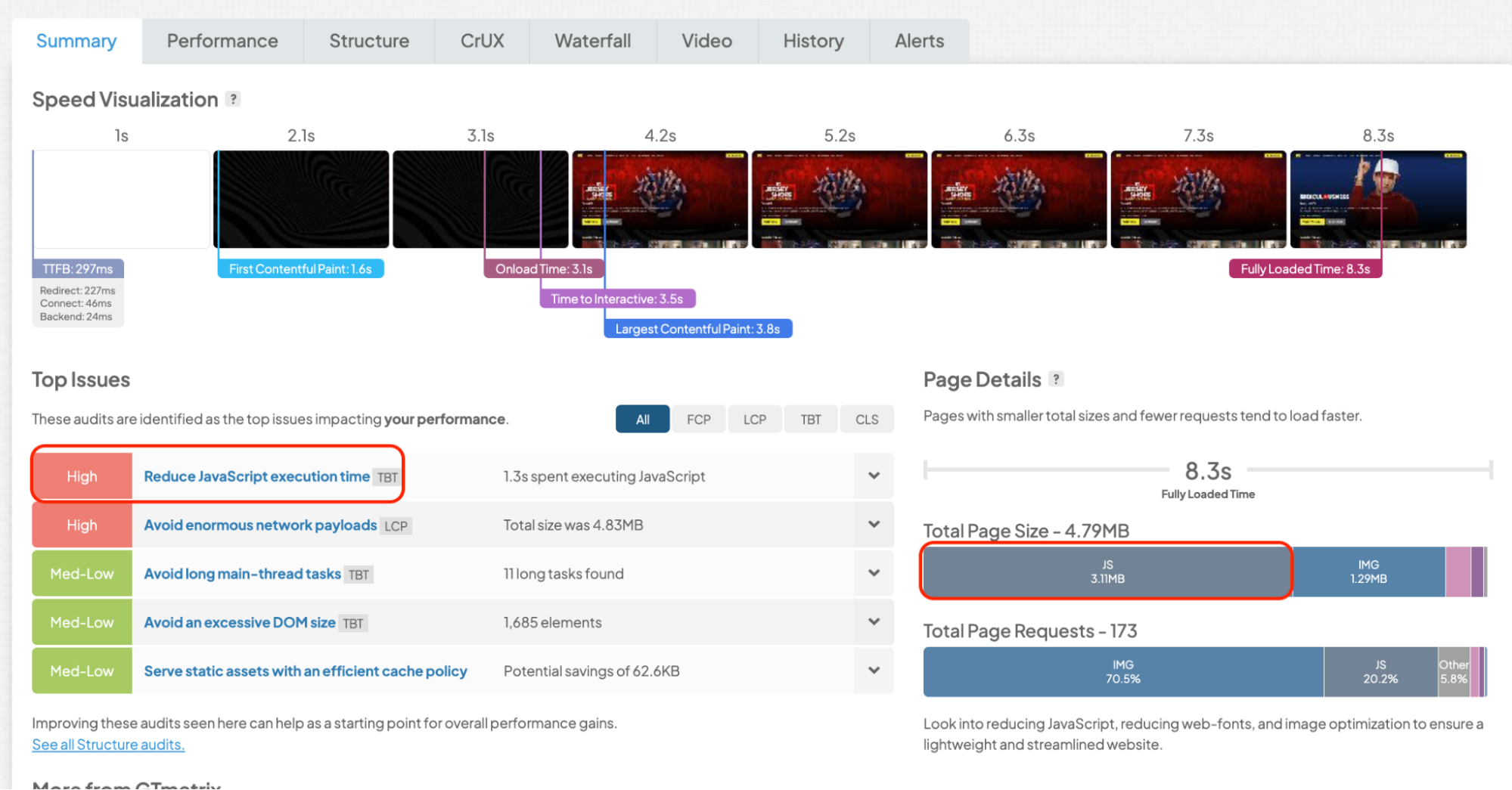
In this GTmetrix report, JavaScript accounts for 3.11 MB of the 4.79 MB page, and GTmetrix flags JavaScript execution time as a major performance issue. In this case, simply enabling caching won’t solve everything. The website would also benefit from JavaScript optimization.
| 💡 Hint: Before choosing a caching plugin, run a performance test with GTmetrix to identify what’s actually slowing down your site. Follow our GTmetrix guide to learn how to read the report and prioritize the right optimizations. |
- What does your hosting already offer? Check whether your host includes page caching and whether your chosen plugin is compatible. You don’t want to duplicate features unnecessarily or introduce caching conflicts.
- What type of website do you run? A simple blog may only need basic page caching. A WooCommerce store needs more careful handling of dynamic pages, while a media-heavy website may benefit from image optimization and a CDN.
Frequently Asked Questions About WordPress Caching Plugins
What is a WordPress caching plugin?
A WordPress caching plugin stores static versions of your pages so the server does not have to generate them on every visit. This reduces server load and improves page loading speed.
Do I need a caching plugin if my hosting already includes caching?
Hosting-level caching helps, but it usually does not cover browser caching, file optimization, or front-end performance improvements. A caching plugin complements hosting features by optimizing how pages and assets are delivered to visitors.
Is caching enough to fully speed up a WordPress site?
No. Caching improves delivery speed, but real performance gains also depend on optimizing CSS, JavaScript, images, and loading behavior. This is why many performance solutions combine caching with additional optimizations.
What’s the difference between free and premium caching plugins?
Free caching plugins usually focus on basic page caching and require manual setup. Premium plugins often include automation, additional performance optimizations, and a simpler setup process.
I’m not a performance optimization expert. Which WordPress caching plugin is easiest to use?
Plugins that work out of the box with minimal configuration are generally easier for beginners. WP Rocket is often chosen for this reason, as caching and several performance optimizations are applied automatically upon activation.
Can a caching plugin improve Core Web Vitals?
Yes. Caching plugins can help improve metrics like Largest Contentful Paint by reducing server response time. When combined with file optimization and JavaScript control, they can also support better Interaction to Next Paint scores.
Can I use more than one caching plugin at the same time?
No. Using multiple caching plugins can cause conflicts and unpredictable behavior. It’s best to choose one caching solution and pair it with other tools only if needed for specific optimizations.
What is the best free caching plugin for WordPress?
LiteSpeed Cache is an excellent free option if you’re on compatible LiteSpeed hosting and want advanced features. For straightforward page caching on other hosting environments, WP Super Cache is one of the simplest choices.
What’s the best alternative to WP Rocket?
FlyingPress is a paid alternative offering caching and advanced optimization features. For free options, consider LiteSpeed Cache or WP Super Cache. WP Fastest Cache offers a one-time premium license, while NitroPack is worth considering if you prefer a managed optimization service.
Is WP Rocket better than free caching plugins?
It depends on your needs. Free plugins can deliver excellent caching performance, especially LiteSpeed Cache on compatible hosting. WP Rocket’s main advantage is its combination of automatic caching, CSS and JavaScript optimization, and ease of use, making it a convenient choice if you want more than basic caching without extensive configuration.
Wrapping Up: Which WordPress Caching Plugin Should You Choose?
The best WordPress caching plugin depends on your website, budget, and how much time you want to spend on optimization.
Free plugins can do a great job with basic caching, but if you’re looking to improve your overall website performance, consider a solution that also handles CSS, JavaScript, and media optimization, with built-in performance monitoring and guidance on which features to activate.
Ready to speed up your WordPress site?
Try WP Rocket free for 14 days and see how caching, code optimization, and LazyLoad can help speed up your site without complicated settings. Prefer to purchase straight away? You’re covered by a 14-day money-back guarantee. Give your website the speed boost it deserves!
