

Table of Contents
By Nick Schäferhoff - Last update on
Hiring WordPress speed optimization services is helpful if you lack the expertise to improve website performance yourself or are looking to outsource the work.
Because having your website load fast is essential; it boosts your user experience, conversion rates, Core Web Vitals, and search engine rankings.
In this post, we’ll explore what WordPress speed optimization services are, what to look for when considering your options, some of the best in the business, and alternatives to hiring someone to speed up your website.
| TL;DR Too busy to read the entire post? Here’s your at-a-glance summary: ✅ WordPress speed optimization services help improve your site’s loading speed, user experience, and search rankings. They are especially useful if you lack technical skills or time to optimize your site yourself. They come as both one-time fix offers and ongoing maintenance plans. ✅ Ideally, choose a provider with WordPress-specific experience, transparent pricing, and clear performance guarantees. Avoid those with unrealistic promises or poor reviews and always check their own website’s speed as a benchmark. ✅ Alternatively, you can also use a performance plugin like WP Rocket for quick, automated optimizations. Note that speed optimization is an ongoing process, so periodically check your site’s loading speed or use a monthly maintenance service. |
What Are WordPress Speed Optimization Services?
WordPress speed optimization services are services provided by a company or individual that help improve how quickly your website loads. They usually come in two types of models:
- As part of a regular maintenance package, where someone takes care of all your site’s upkeep tasks (security, backups, software updates, etc.), usually for a monthly fee.
- Targeted, one-time services. Someone checks your site for performance issues, implements necessary changes or makes recommendations, and you pay them a lump sum. You can hire them again later as needed.
What exactly do these service providers do? WordPress speed optimization services may include:
- Configuring the hosting environment
- Source code audits
- Implementing caching
- Optimizing images and other media
- Improving the loading time of third-party resources
- Database optimization
- Setting up and configuring a Content Delivery Network (CDN)
- Uptime monitoring
- Core Web Vitals (CWV) optimization
Outsourcing these tasks makes sense if you, as a website owner, aren’t familiar with how to implement them. Even if you do, working with a professional can save time and, ultimately, be cheaper than learning or doing everything yourself.
Finally, many speed optimization service providers also offer other website services, such as SEO, content marketing, and the aforementioned maintenance tasks. That means, you could remove more than one task from your to-do list for the same price.
What Should You Look for in a WordPress Speed Optimization Provider?
When hiring someone to help speed up your WordPress site, ensure they offer what you need and look for experience, guarantees, and transparency.
The most important thing is that you choose a plan or package with performance guarantees. For example, that may mean a PageSpeed Insights score above 90 and all Core Web Vitals metrics in the “good” range for your most important pages.
You should also get regular reports about the work done and results achieved from those efforts. Avoid providers that have unrealistic pricing (both too low and too high) or don’t have WordPress-specific experience.
Additionally, run a speed test on the website of the service provider you are considering. Look for a provider whose website shows the kind of performance you want.
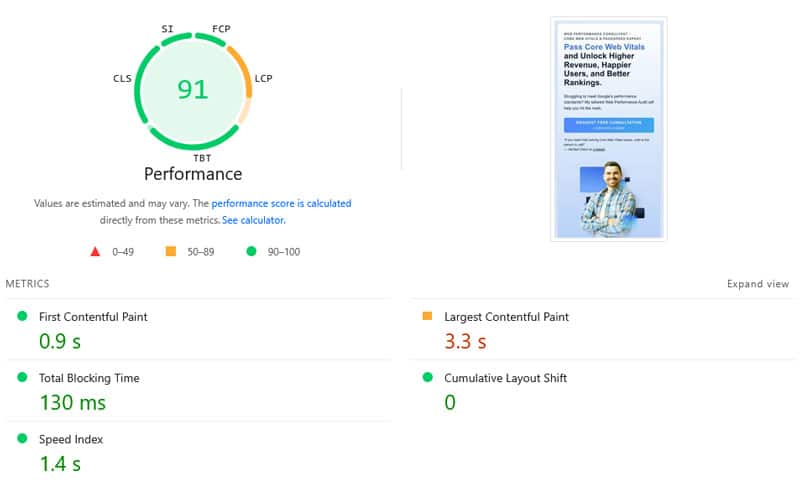
If they couldn’t even bother to fix their own site, what guarantees do you have they will do a better job with yours?
Finally, how much should you expect to pay for this kind of service? Based on our recommendations below, price ranges for one-time fixes are about $50–$1,000, while monthly plans start at $50–$60/month. Dedicated Core Web Vitals optimization often costs extra, ranging from $225 to $1,000+.
5 of the Best WordPress Speed Optimization Services to Consider
Looking for help with speeding up your site? Here are some great companies and individuals to get the support you need.
1. FixRunner

Main strength: General speed improvements
Best for: SMEs, online shops, and enterprise clients
FixRunner is a WordPress website management service. They offer maintenance and optimization services, including for online shops built with WooCommerce. Their services are available as both one-time fixes and monthly plans that include speed optimization. However, Core Web Vitals optimization is a separate service.
FixRunner additionally offers services like malware cleanup, custom development, security, updates, and a free website review (not just for speed, but also backups, security, etc.). Their speed improvement service typically takes 24-96 hours to implement, and they offer a 30-day money-back guarantee if you’re not satisfied.
Fixrunner appear to be right to be this confident. Trustpilot users give them a solid 4.9 out of 5 stars.
Key Features
- Server tuning and optimization (incl. hosting migration if necessary)
- Caching and CDN setup
- Code minification
- Image optimization
- Plugin audit (replace and remove outdated or unnecessary extensions)
- Mobile optimization
- Database tuning
- E-commerce optimization to improve the shopping experience
- Performance monitoring
| Pros | Cons |
| – Comprehensive speed optimization services – 24/7 live support – Detailed reports on all site changes – You can choose from one-time support or a monthly plan – Generous guarantee | – Core Web Vitals optimization is a separate service and doesn’t come with a clear-cut guarantee – Phone support is only available with the most expensive plan |
Pricing
Monthly plans start at $59/month. A one-time performance optimization costs $149. If you want to purchase the Core Web Vitals optimization service, you have to get in touch for an estimate—the price starts around $1,000.
Alternatively, you can get the Enterprise plan for $500/month, where Core Web Vitals optimization is included (but you have to subscribe for at least three months).
2. Joshua Clare-Flag

Main strength: In-depth, real-life performance audits
Best for: Websites of all sizes
Joshua Clare-Flag is a web performance consultant with 15 years of experience and on the advisory board of a speed testing tool. He offers tailored web performance audits with a strong focus on Core Web Vitals.
It starts with a free consultation to discuss your goals and challenges. After about two weeks, you receive a tailored audit with prioritized recommendations. Joshua checks the server, website admin, Google Tag Manager, SFTP, and CDN.
You can hire him to implement his recommendations as well, or he will provide a roadmap and break down how to do it yourself. Follow-up work, e.g., ongoing support, performance monitoring, and answering questions, are also part of his portfolio.
Does his work live up to his promises? It appears so. Joshua’s clients are singing his praises on his LinkedIn page.
Key Features
- Identify sources of slow load times
- Create a tailored roadmap for your site
- Both mobile and desktop performance analysis
- Code snippets for fast implementation
| Pros | Cons |
| – Highly experienced – Core Web Vitals focus instead of just general speed improvements – Does both analysis and implementation if desired – Thorough analysis of all parts of your website | – Only available through email and LinkedIn – Not WordPress-focused – No clearly stated performance guarantee |
Pricing
There is no information how much the website analysis costs, however, Joshua charges £100 per hour for implementing speed improvements.
3. WP Speed Consultant

Main strength: Targeted speed optimization services
Best for: Business websites
WP Speed Consultant is a company specialized in just WordPress speed optimization, with no other services. They work with business sites, e-commerce stores, membership, and content sites and have reportedly helped 5,000+ clients.
WP Speed Consultant offers solid speed guarantees (a score of 90-100 on desktop, 88-90+ on mobile) and a 30-day 100% success guarantee. Their process starts with a free speed test and consultation where they identify and discuss your website’s needs. Then they analyze your WordPress setup and implement optimization techniques. You receive detailed reports before and after the optimization.
To get a better idea of their work, you can check out the case studies on their website.
Key Features
- Speed analysis
- Image optimization (compression, modern formats, lazy loading)
- Configuration of website cache
- Plugin analysis and recommendations
- Code minification and optimization
- Database improvements
- Before/after performance reports
| Pros | Cons |
| – WordPress-only focused optimization – Specific speed guarantees – Free consultation and speed analysis – 30-day post optimization support | – No other services available – Contact via email only (or book a consultation straightaway) |
Pricing
WP Speed Consultant offers three pricing tiers: Speed Boost (£597), Performance Pro (£797), and Enterprise Speed (£997). Which one is right for you depends on the complexity of your site. The lowest plan is for up to 20 pages, the highest for e-commerce and very complex sites.
Additionally, the higher the plan, the faster the turnaround: 2-3 days for the highest plan, 7-10 for the lowest. Ongoing performance plans are available on discussion.
4. W3 SpeedUp

Main strength: Fast turnaround with concrete guarantees
Best for: Agency-level needs
W3 SpeedUp is another company specializing in WordPress speed optimization services, with more than ten years of experience. You can use them for WordPress blogs, business sites, and WooCommerce stores.
What stands out is their guarantee for a 90+ PageSpeed Insights score, a grade A on GTMetrix, and page loading time under two seconds. They also promise to do the work within 48 hours.
In the process, they evaluate your site for areas of improvement, then share their recommendations, and help you select the right plan for your needs. Dedicated plans for server-side optimization, Core Web Vitals improvements, Core Web Vitals maintenance, and general performance maintenance are also available.
W3 SpeedUp scores a solid 4.3/5 on Trustpilot.
Key Features
- Code cleanups and CSS/JavaScript minification
- Image and other media optimization
- File compression to reduce overall website size
- Optimizing render-blocking and third-party scripts
| Pros | Cons |
| – Chat, phone, and email support – 100% money-back guarantee – Free speed report before purchasing a plan | – Core Web Vitals optimization only available on highest plan or as a separate service |
Pricing
Plans start at a one-time fee of $49. The optimization package for Core Web Vitals costs $225. There is also an expert plan for Core Web Vitals, which has a one-time price tag of $900.
Speed optimization maintenance plans start from $50/month (less if you purchase time ahead). Core Web Vitals maintenance is available from $100/month.
5. Daan van den Bergh
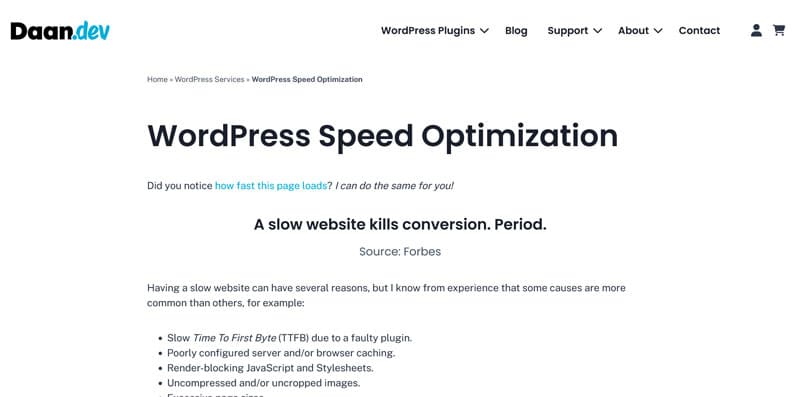
Main strength: Extensive WordPress development experience
Best for: Resolving back-end performance issues
Daan van den Bergh is a well-known name in the WordPress sphere. He is the maker of several plugins, some of which also help speed up your website, for example, through self-hosting Google Fonts.
In short, he is a skilled developer who also puts his abilities to use in providing WordPress performance optimization services. To help your website load faster, he examines its entire loading chain and eliminates any performance impediments.
Key Features
- Plugin analysis and replacement
- Server configuration
- Browser caching setup
- Eliminating render-blocking resources
- Image optimization
- Reducing HTTP requests
- Hosting migration if necessary
| Pros | Cons |
| – Highly experienced developer – Personal one-on-one support – Holistic optimization approach – Step-by-step pre-analysis and detailed optimization report | – No stated performance guarantees – Contact only via email/contact form |
Pricing
Daan charges €85/hour and provides a quote before starting the work. You can also hire him for other development work. To do so, get in touch via his contact page.
Alternative: Improve Website Performance Using WordPress Plugins
If purchasing WordPress speed optimization services isn’t possible or desirable for you for some reason, an alternative is to use a performance plugin like WP Rocket.
Automatic and Default Performance Improvements
Once you install and activate it on your site, it immediately implements a number of speed improvements on your WordPress site, among them:
- Caching (with a separate mobile cache): Reduces server work and browser downloads so your website loads faster
- Critical image optimization: Prompts the browser to load images above the fold faster and prevents them from being lazy loaded.
- Gzip compression: Shrinks the size of your website files so they download more quickly.
- Preconnect: Adds rel=”preconnect” hints to external resources to establish early connections for faster file transfers.
- Minification: Further reduces file size by removing non-essential characters like line breaks or comments.
- Lazy rendering: Prevents website elements further below on the page from loading until visitors scroll towards them. This helps improve initial load times.
Note that some of these, like caching and compression, are automatic settings. Others (e.g. minification) are default features, meaning you can switch them off if you wish to. You can find more info on this in the documentation.
Additional Optimization Options
In fact, WP Rocket implements 80% of performance best practices without you having to do anything. Besides that, it comes with many optional features you can activate manually to further improve your website’s speed:
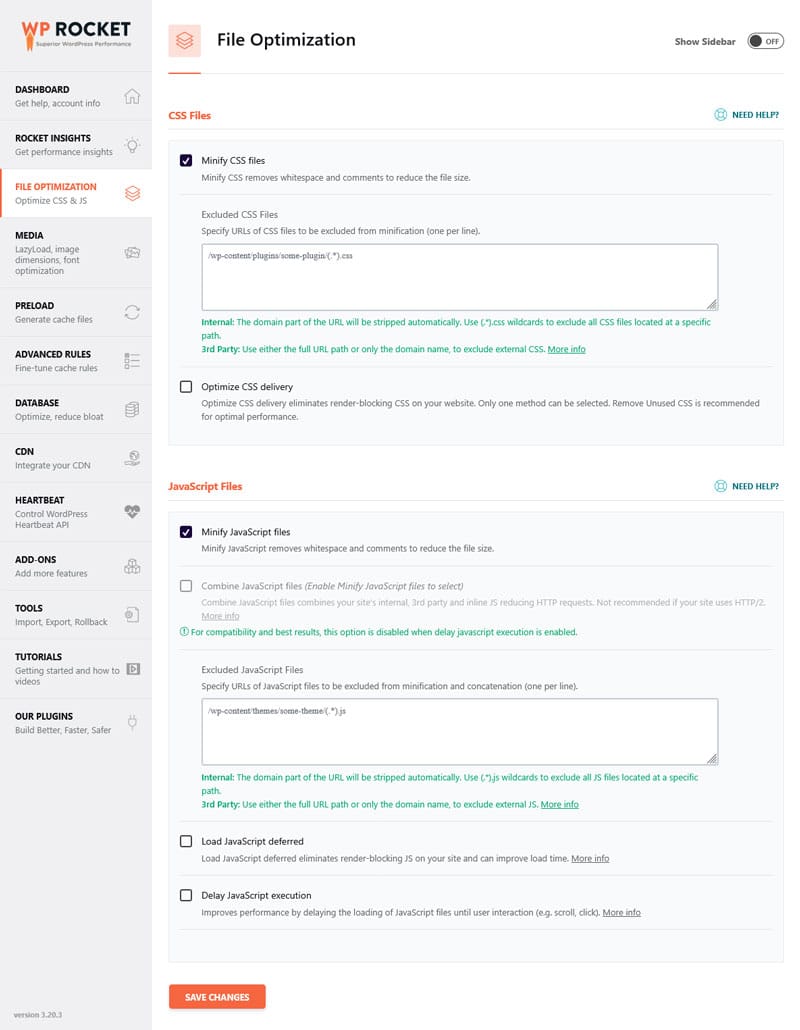
- Remove unused CSS: Eliminates rules from your pages that don’t contribute styling while increasing load time.
- Defer JavaScript: Loads non-essential scripts toward the end of the loading process, so they don’t block more important files.
- Delay JavaScript execution: Stops JavaScript files from running until required for visitor interactions. Improves page responsiveness.
- Lazy loading: Like lazy rendering but for images.
- Preload fonts: Loads fonts that appear at the top of the page early, so they appear quickly.
- Self-host Google Fonts: Reduces HTTP requests by storing and loading font files locally.
- Database cleanup: Removes revisions, drafts, spam, and optimizes database tables for better performance.
- CDN integration: Connects your site to Content Delivery Network to serve its files and content faster for global users.
Enabling these options is as easy ticking a few boxes in the plugin settings.
Rocket Insights and RocketCare
Another useful feature of WP Rocket is Rocket Insights, the plugin’s performance monitoring hub. Powered by GTmetrix, it shows both global and page-level performance scores and key metrics.
This helps you clearly understand what’s affecting your site’s loading speed. Additionally, Rocket Insights gives you targeted recommendations for which WP Rocket features to activate to improve performance.
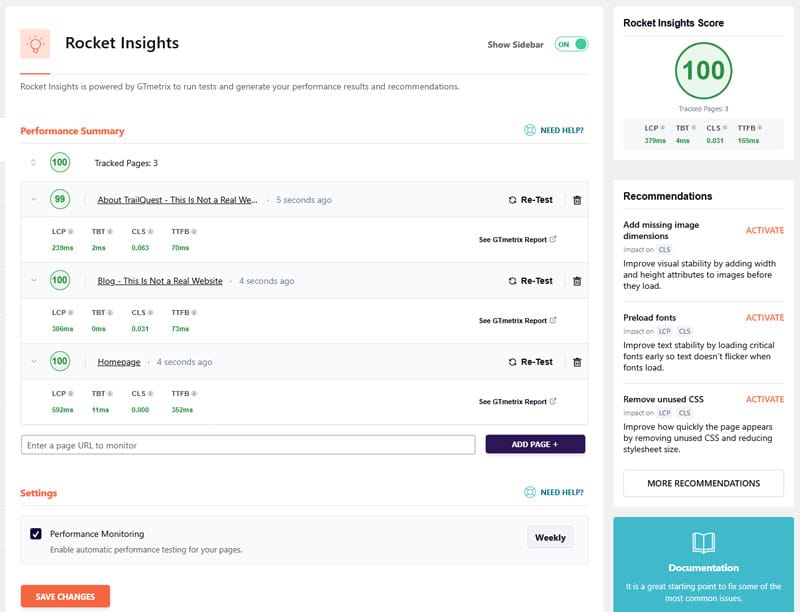
You get unlimited (re-)tests so you can see the impact of your changes. Automatic monitoring on a daily, weekly, or monthly basis is also possible.
Rocket Insights puts you in control of your website’s performance and shows you what actually works instead of guessing. All of that without leaving the WordPress dashboard. The tool is part of every WP Rocket license at no extra cost and you can learn more about Rocket Insights here.
Additionally, should you want some help setting up the plugin correctly for your individual website, there is RocketCare. It means our team sets up and finetunes WP Rocket to fit your site and environment, answers questions, and gives you additional tips. You can get RocketCare together with your WP Rocket license.
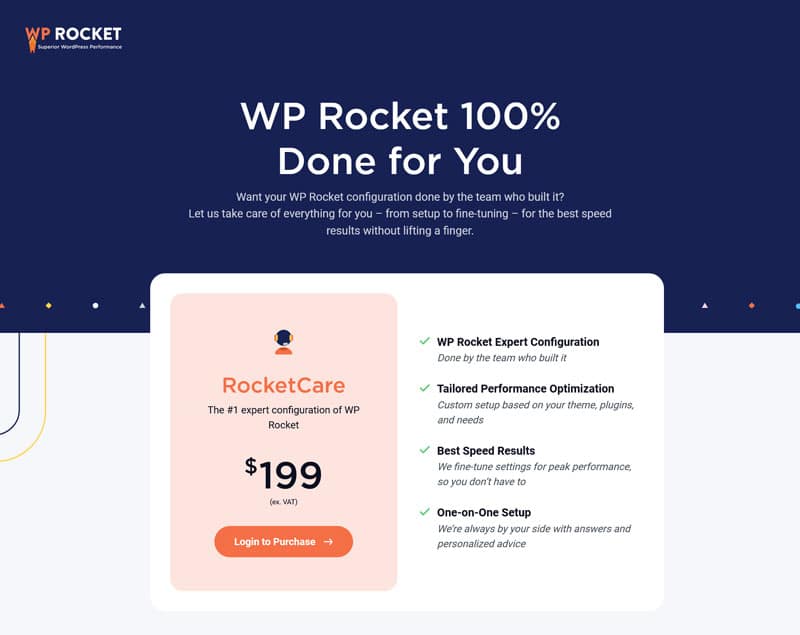
Image Optimization With Imagify
Finally, if you want to further optimize your website’s performance, you can optimize your images using Imagify. It’s an image optimization plugin for WordPress that allows you to automatically convert visuals uploaded to your site to the WebP and AVIF formats.
It can also compress and resize images (new and existing) without loss of quality, both individually or in bulk.

WordPress Speed Optimization Options: Comparison Table
Here are all the performance optimization options we’ve covered above in one table.
| Provider | Main Strength | Best For | Pricing | Turnaround Time | Contact/ Support |
| FixRunner | General speed improvements | SMEs, online shops, enterprises | One-time: $149; Monthly: from $59 | 24-96 hours | 24/7 live support, email |
| Joshua Clare-Flag | In-depth performance audits | Websites of all sizes | As required (£100/hour) | ~2 weeks | Email, LinkedIn |
| WP Speed Consultant | Targeted speed optimization | Business websites | One-time: £597-£997 | 2-10 days | |
| W3 SpeedUp | Fast turnaround with guarantees | Agency-level needs | One-time: $49-$900; Monthly: from $50 | 48 hours | Chat, phone, email |
| Daan van den Bergh | Extensive WordPress development experience | Back-end performance issues | As required (€85/hour) | Dependent on effort | Email/ contact form |
| WP Rocket | Automatic plugin-based optimization | DIY users, instant setup of performance best practices | $59/year (Final price may vary depending on your country and applicable taxes) | Instant (plugin) | Email, Help Center, Documentation, RocketCare |
Case Study
To test WP Rocket as an alternative to WordPress performance optimization services, we set up a demo site with a default theme, a few standard plugins, and some dummy content. PageSpeed Insights showed these initial readings:
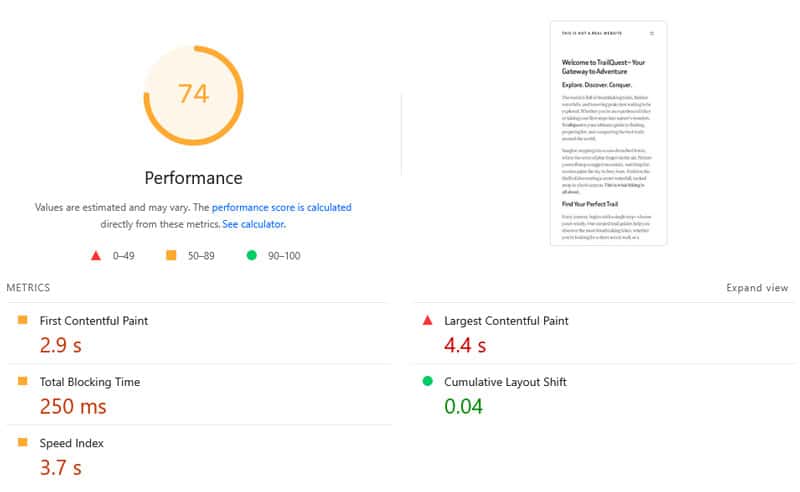
While not bottom of the barrel, they definitely could use some improvement. To provide it, we installed and activated WP Rocket along with these features:
- Remove unused CSS
- Defer JavaScript and delay its execution
- Enable lazy loading for images, iframes, and videos
- Preload fonts
After that, a repeat speed test showed much better results.
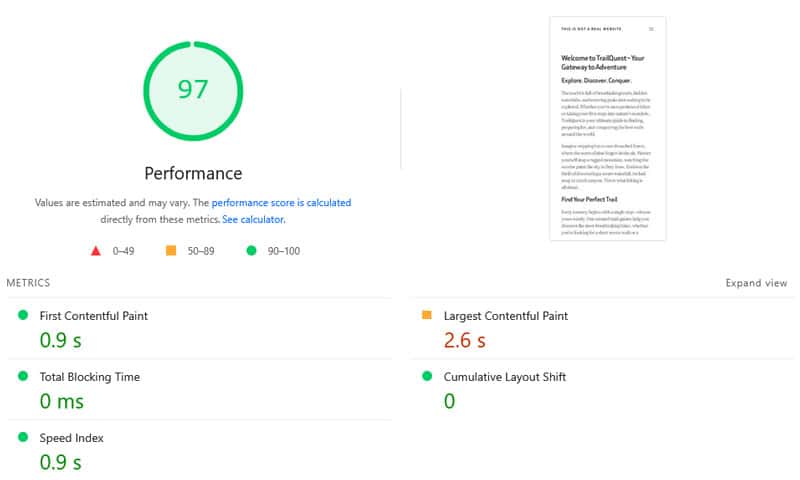
Another highlight: implementing these optimizations literally took three minutes. You can see a comparison of the test results before and after using WP Rocket in the table below.
| Value | Before | After |
| Mobile Performance score | 74 | 97 |
| First Contentful Paint | 2.9s | 0.9s |
| Largest Contentful Paint | 4.4s | 2.6s |
| Speed Index | 3.7s | 0.9s |
FAQs: WordPress Speed Optimization Services
Finally, let’s go over some frequently asked questions on this topic:
When should you use a WordPress speed optimization service?
Use a speed optimization service if your website’s performance is poor and you lack the technical expertise or time to address it yourself. You may also consider it if performance optimization is part of a more general website maintenance service you are using.
How do you choose the right WordPress performance provider for your needs?
Look for providers with WordPress-specific experience, clear performance guarantees (e.g., 90+ PageSpeed scores), and transparent pricing. Check their portfolio, client reviews, and whether they offer ongoing support or one-time fixes. Run a speed test on their website to gauge their credibility.
What are the risks of hiring WordPress speed optimization services?
Working with a speed optimization service means giving someone access to sensitive parts of your website. This has the potential to worsen performance, break functionality on your site, or take it offline completely. For that reason, be sure to verify the provider you’re hiring is trustworthy by asking for case studies or references.
What should I prepare when hiring a WordPress speed optimization service?
Provide access to your WordPress admin, hosting account, and other website parts that influence site performance. Share your challenges and goals, such as target load times or Core Web Vitals scores. Clarify if you need ongoing maintenance or a one-time optimization.
How long does it take to see improvements after hiring a service?
Most providers deliver results within 24–96 hours for basic optimizations, while complex sites may take up to a week or longer. Core Web Vitals improvements might require additional time. Ask for a timeline upfront and expect a detailed before/after report.
Is speed optimization an ongoing process or a one-time fix?
Speed optimization is ongoing. Websites slow down over time due to updates, new content, or plugin changes. While a one-time fix can help, regular monitoring and maintenance are key for sustained performance. Many providers offer monthly plans for continuous support.
What are alternatives to WordPress speed optimization services?
Use performance plugins like WP Rocket or Imagify for automated optimizations. You can also manually improve site performance, for example, by optimizing images, minifying code, or enabling text compression on the server. Changing hosting can also help, especially if you choose managed hosting, which often includes performance optimization.
Find Help to Speed Up Your WordPress Site
Optimizing your WordPress website’s loading speed isn’t optional, and professional services can fill the gap if you’re lacking time or expertise. When choosing a service, consider your needs and budget to find a provider that ticks all the necessary boxes and check their work beforehand.
From the providers discussed, FixRunner is ideal for comprehensive, ongoing support, while WP Speed Consultant and W3 SpeedUp offer strong performance guarantees. Joshua Clare-Flag and Daan van den Bergh are excellent choices for personalized, expert-led optimization.
Alternatively, if you want a middle ground between going full DIY or hiring a professional, use WP Rocket. It implements the most important speed optimization techniques automatically or with a few clicks. Test it risk-free with our 14-day money-back guarantee!