
Table of Contents
By Marine Larmier - Last update on
Do you want to know how your website is really performing? We’ve lined up the best website optimization tools so you can start your diagnosis.
Is your site fast enough? Since speed is a ranking factor in Google’s algorithm, even small delays can impact your visibility and traffic. Are your SEO rankings competitive? Is your purchasing process truly frictionless?
In this guide, you’ll learn what website optimization is, the key areas to measure, and the tools you need to boost website speed, user experience, and conversions.
| TL;DR Website optimization tools help you improve website speed, SEO, user experience, and conversions. No single tool can do everything, which is why you need a combination of tools across performance, SEO, UX, and analytics. Website optimization works as a virtuous cycle: measure performance, identify issues, implement improvements, test results, and repeat. Key Takeaways ✅ WP Rocket is the best website optimization tool to improve website speed, Core Web Vitals, and overall performance. ✅ Tools like Rank Math and SEMrush help improve rankings, visibility, and technical SEO. ✅ Google Analytics and Hotjar help you understand user behavior, reduce friction, and improve conversions. ✅ Image optimizers like Imagify reduce page weight and improve loading time without sacrificing image quality. ✅ Website performance tools like GTmetrix help you track results, detect issues, and continuously optimize your site. |
What is Website Optimization?
Website optimization is the process of improving your site, so it loads faster, feels easier to use, ranks better on search engines, and converts more visitors into customers. In simple words, it is about creating the best possible experience for your users while helping your business grow. Website optimization is not a one-time task; it is an ongoing system in which every element works together to deliver better results over the long term.
You can think of website optimization as five main axes working together:
- Performance optimization focuses on speed and technical efficiency, so your site loads quickly and runs smoothly on every device.
- User experience optimization ensures your website is intuitive, accessible, and enjoyable to navigate from the first click to the final action.
- SEO optimization improves your visibility on search engines, helping the right audience find your content at the right time.
- Conversion optimization aims to turn visitors into customers by reducing friction and guiding users toward meaningful actions.
- Monitoring and analytics help you understand user behavior, measure performance, and make informed decisions to continuously improve your site.
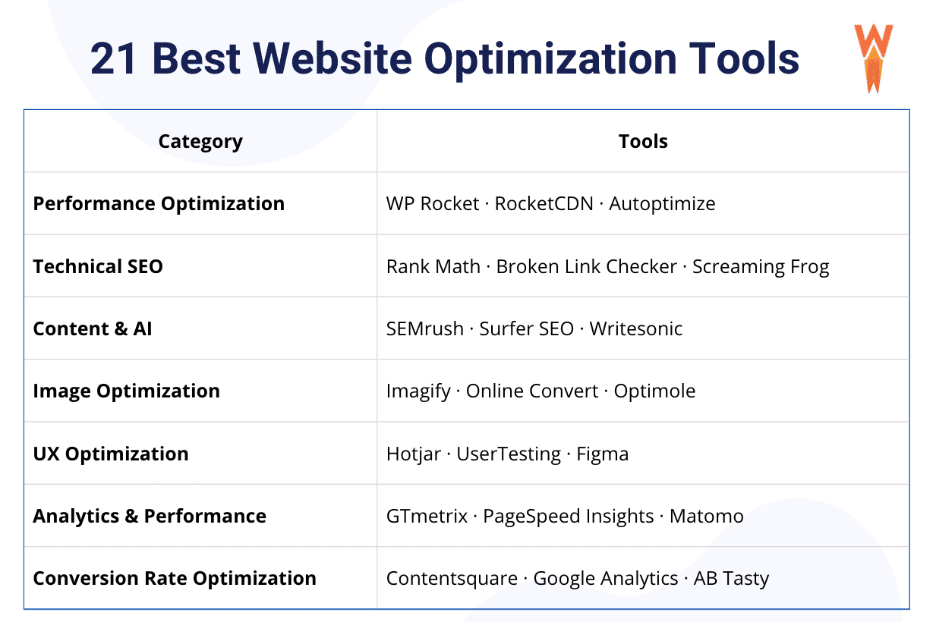
21 Best Website Optimization Tools
Website optimization requires a combination of tools to improve speed, SEO, user experience, and conversions. To help you choose the right stack, we’ve organized the best website optimization tools by category.
All these categories, including performance, technical SEO, content and AI, image optimization, user experience, analytics, and conversion rate optimization, are part of website optimization and help improve your site’s speed, visibility, and results.
In each category, there is a curated list of our top 3 tools. It’s time to discover them!
Performance Optimization Tools
1. WP Rocket
The most powerful performance plugin for WordPress that applies around 80% of performance best practices upon activation, including caching, GZIP, JS/CSS minification, and critical image optimization. It also goes further by optimizing how CSS and JavaScript are loaded.
💡 What stands out: Rocket Insights is included for free. It’s a performance hub inside WP Rocket that lets you monitor your website speed with clear recommendations to optimize speed and track improvements without guesswork.
🎯 Perfect if: You need an immediate speed boost and long-term performance by optimizing code, database, critical content, and fonts without technical knowledge.
2. RocketCDN
A CDN designed to improve global website speed by delivering content from servers closer to users.
💡 What stands out: Seamless WordPress integration with automatic setup (no manual CNAME configuration).
🎯 Perfect if: Your audience is international and you want fast loading times everywhere, even if your server is in one region.
3. Autoptimize
A free WordPress plugin focused on optimizing and aggregating your website’s CSS, JavaScript, and HTML files.
💡 What stands out: Fine control over script and style optimization, including aggregation, minification, and async loading.
🎯 Perfect if: You want more granular control over front-end optimization or a lightweight alternative to improve performance.
Technical SEO Optimization Tools
4. Rank Math
A powerful SEO plugin to optimize on-page and technical SEO directly in WordPress.
💡 What stands out: Built-in SEO audit and advanced optimization suggestions.
🎯 Perfect if: You want to improve rankings, metadata, and site structure easily.
5. Broken Link Checker
A tool that scans your website for broken links and errors.
💡 What stands out: Automatic detection of broken internal and external links.
🎯 Perfect if: You want to maintain a healthy site structure and avoid SEO penalties.
6. Screaming Frog SEO Spider
A website crawler that scans your pages the way search engines like Google do to identify technical SEO issues.
💡 What stands out: In-depth crawling with detailed reports on URLs, metadata, redirects, and errors.
🎯 Perfect if: You want to audit your website, detect issues (like missing tags or duplicate content), and improve technical SEO.
Content and AI Optimization Tools
7. SEMrush
An all-in-one platform for keyword research, competitor analysis, and SEO tracking.
💡 What stands out: Deep competitive insights and advanced keyword tracking powered by AI.
🎯 Perfect if: You want to grow organic traffic, analyze competitors, and monitor your SEO performance.
8. Surfer SEO
A content optimization tool designed to help you rank on search engines and AI-driven platforms.
💡 What stands out: AI-powered Content Editor with real-time optimization based on SERP and AI search analysis.
🎯 Perfect if: You want to create high-ranking content faster and optimize for both Google and AI search engines like ChatGPT or Perplexity.
9. Writesonic
Writesonic is an AI-powered content creation tool that helps you research, write, and optimize SEO content quickly and efficiently.
💡 What stands out: It generates automated content briefs and AI-powered answers based on top-ranking search results, helping you align your content with real search intent.
🎯 Perfect if: It’s perfect if you want to produce high-quality SEO content faster while ensuring your articles are optimized to rank and match user intent.
Image Optimization Tools
10. Imagify
The easiest image optimization plugin to compress images and convert them to next-gen formats without impacting quality.
💡 What stands out: High compression rates without visible quality loss.
🎯 Perfect if: You want to reduce page weight and improve loading time while keeping visual quality.
11. Online Convert
An online tool to convert images into different formats.
💡 What stands out: Supports multiple file formats and quick conversions.
🎯 Perfect if:You need to convert images before uploading them to your site.
12. Optimole
A powerful tool to optimize images in bulk and convert them to next-gen format.
💡 What stands out: Optimole doesn’t just compress images once; it adapts them dynamically based on each user’s device, screen size, and connection.
🎯 Perfect if: You want properly sized images to avoid unnecessary weight on your pages.
UX Optimization
13. Hotjar
A powerful RUM tool that shows how users interact with your website.
💡 What stands out: Heatmaps and live session recordings.
🎯 Perfect if: You want to understand user behavior and identify friction points.
14. UserTesting
A platform to gather real user feedback on your website.
💡 What stands out: Real user testing sessions.
🎯 Perfect if: You want qualitative insights to improve UX and usability.
15. Figma
A collaborative interface design and prototyping tool.
💡 What stands out: Real-time collaboration and interactive prototypes to optimize your site before going live.
🎯 Perfect if: You want to design, test, and refine UX before development.
Analytics & Performance Tools
16. GTmetrix
A performance analysis tool that provides detailed reports and insights.
💡 What stands out: Waterfall analysis to identify loading bottlenecks.
🎯 Perfect if: You want to diagnose performance issues and track improvements.
17. PageSpeed Insights
A performance monitoring tool by Google that evaluates your site’s performance and Core Web Vitals.
💡 What stands out: Field and lab data combined with actionable recommendations.
🎯 Perfect if: You want to optimize your site based on Google’s performance standards.
18. Matomo
An analytics platform focused on data privacy and full ownership.
💡 What stands out: GDPR-compliant tracking without third-party data sharing.
🎯 Perfect if: You want detailed analytics while maintaining user privacy.
Conversion Rate Optimization Tools
19. Contentsquare
An advanced platform for analyzing user journeys and behavior.
💡 What stands out: Deep behavioral analytics and journey mapping.
🎯 Perfect if: You want to optimize the entire customer journey.
20. Google Analytics
A powerful analytics tool to track traffic, behavior, and conversions.
💡 What stands out: Comprehensive data tracking across all channels.
🎯 Perfect if: You want to measure performance and conversion rates.
21. AB Tasty
A tool for running A B tests and personalizing user experiences.
💡 What stands out: Easy A B testing and experimentation.
🎯 Perfect if: You want to test variations and improve conversion rates.
If you combine these website performance tools across categories, you can build a complete optimization strategy to improve website speed, SEO, user experience, and conversions. Here’s a cheat sheet you can easily reuse later:
Best Website Optimization Tools Comparison (By Use Case & Stack)
Since most website optimization tools are complementary rather than direct competitors, the goal is not to choose one over another, but to understand how to combine them effectively depending on your needs.
The table below shows how key tools work together across performance, SEO, and UX/analytics to build a complete optimization stack.
| Tool | Performance | SEO | UX / Analytics | Easy Setup | Use Case |
| WP Rocket | ✓ | ✓ | ✓ (Rocket Insights) | ✓ | Speed optimization foundation and Core Web Vitals improvement |
| Rank Math | ✗ | ✓ | ✓ (SEO related) | ✓ | On-page and technical SEO optimization |
| Imagify | ✓ | ✓ | ✗ | ✓ | Reduce image weight and boost Core Web Vitals |
| GTmetrix | ✓ (measures Performance) | ✗ | ✓ | ✓ | Analyze performance and identify bottlenecks |
| Hotjar | ✗ | ✗ | ✓ | ✓ | Understand user behavior and detect friction |
| AB Tasty | ✗ | ✗ | ✓ | ✓ | Test and optimize conversion flows |
👉 How to read this table
- Each tool focuses on a specific area of website optimization.
- Others like WP Rocket and Imagify improve Core Web Vitals and page speed, which are key Google ranking factors. This means they contribute indirectly to better SEO performance.
- Some tools contribute to multiple areas (especially SEO via performance improvements).
- The goal is to combine them to cover performance, SEO, UX, and conversions.
What Areas of a Website Can You Optimize?
Website optimization is not just about speed. It touches multiple layers of your site, from design to code to data.
To deliver a fast, user-friendly, and high-converting website, you need to work across several key areas. Each one plays a specific role, but they all work together to improve the overall user experience and business performance.
Here are the main areas you should focus on:
1. Performance and Page Speed Optimization
A fast website is the foundation of a great user experience. When pages load quickly, users stay longer, engage more, and are more likely to convert. On the other hand, even a one-second delay can significantly increase bounce rates.
Speed is also a ranking factor. Google uses Core Web Vitals to evaluate real user experience, focusing on loading performance, interactivity, and visual stability. A slow website does not just frustrate users; it also reduces your visibility in search results.
✅ Best practices include:
- Compressing files and enabling caching
- Using a CDN to deliver content faster worldwide
- Minimizing CSS and JavaScript
- Improving Core Web Vitals metrics
- Reducing server response time
👉 Example: Reducing your page load time from 3 seconds to 1.5 seconds can significantly increase user retention and conversions.
2. User Experience, Design, and Conversion Optimization
User experience, or UX, is how people feel when they interact with your website. A good UX means clear navigation, easy access to information, and a smooth journey from landing to action.
When UX is strong, users trust your site more and are more likely to convert. Design plays a key role here. Even small changes can have a big impact. For example, a red call-to-action button can outperform a blue one, or a simplified checkout can increase sales.
This is where A B testing becomes essential. By testing variations, you can identify what truly works. Behind all this is psychology. Colors, layout, wording, and hierarchy all influence user decisions.
✅ Best practices include:
- Simplifying navigation and reducing friction
- Improving mobile responsiveness
- Using clear layouts and readable typography
- Testing different designs with A B testing
- Highlighting key elements like call-to-action buttons
👉 Example: Reorganizing your menu structure or changing a button color can help users act faster and increase conversions.
3. SEO Optimization
SEO helps your content reach the right audience at the right time. Without it, even the best website can remain invisible.
A well-optimized site improves rankings, drives organic traffic, and supports long-term growth. SEO also overlaps with performance and UX, as search engines prioritize fast and user-friendly websites.
✅ Best practices include:
- Optimizing titles, headings, and meta descriptions
- Using relevant keywords naturally in your content
- Improving internal linking and site structure
- Creating high-quality and useful content to also appear in LLMs
- Ensuring your site is mobile-friendly
👉 Example: Optimizing a blog post for a targeted keyword can generate consistent traffic over time without paid ads.
4. Image Optimization and Media Delivery
Images are often the heaviest elements on a page, but they do not have to slow your site down. Optimizing media helps maintain both performance and visual appeal.
The goal is to deliver the right image, at the right size, in the right format, at the right moment.
✅ Best practices include:
- Compressing images without visible quality loss
- Using next-gen formats like WebP or AVIF
- Serving responsive images for each device
- Lazy loading offscreen images
- Prioritizing critical images above the fold
👉 Example: Converting images to WebP and enabling lazy loading can drastically reduce page weight and improve loading time.
5. Code and Resource Loading Optimization
Behind every page, there is code. And sometimes, too much of it. Excess or poorly loaded code can slow down your website and hurt performance.
Optimization here means identifying bottlenecks and loading resources in a smarter way.
✅ Best practices include:
- Removing unused CSS and JavaScript
- Delaying non-critical scripts
- Loading only essential resources first
- Reducing render-blocking elements
- Deferring or asynchronously loading scripts
👉 Example: Delaying non-critical JavaScript like a cookie banner script ensures that your main content loads first. Instead of blocking the page while the banner loads, users can start reading immediately, which improves perceived speed and overall experience.
6. Monitoring and Analytics
You cannot improve what you do not measure. Monitoring tools and analytics give you insights into how your site performs and how users interact with it.
With the right data, you can identify issues, test improvements, and make smarter decisions over time.
✅ Best practices include:
- Tracking real user performance and Core Web Vitals
- Analyzing user behavior and navigation paths
- Identifying drop-off points in funnels
- Measuring conversions and key actions
- Running continuous tests and improvements
👉 Example: Analyzing your checkout funnel can reveal where users abandon their purchase, allowing you to fix friction points and increase revenue.
How Website Optimization Tools Work Together (Example of a Complete Stack)
Website optimization tools are most effective when used together as part of a structured workflow. Each tool improves a specific area such as performance, SEO, or user experience, but the real impact comes from combining them.
Here is how the best website optimization tools work together to improve website speed, rankings, UX, and conversions.
Step 1: Testing Performance, SEO, and UX Metrics
Before making any changes, you need a clear baseline of your website performance.
Start by measuring key KPIs using tools like Google Analytics, GTmetrix, SEMrush, and Rank Math.
Focus on metrics such as:
- Page speed and load time
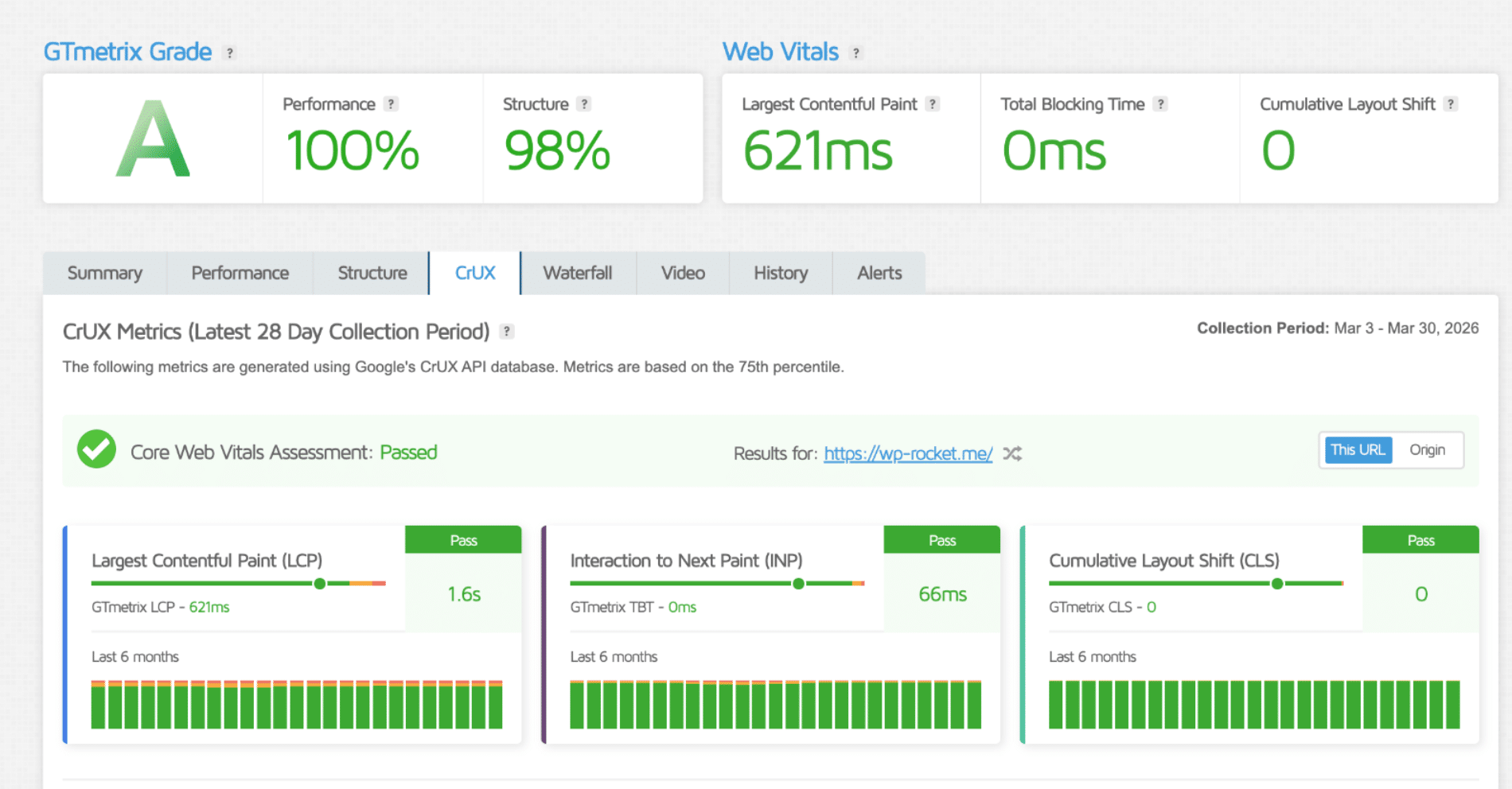
- Core Web Vitals (LCP, CLS, INP)
- Page weight and asset distribution
- SEO rankings and keyword positions
- Conversion rate and user actions
Ask yourself:
- Is my site slow on mobile or desktop?
- Are my rankings improving or dropping?
- Where are users converting or leaving?
👉 At this stage, you are measuring performance, SEO visibility, and user behavior to understand what needs improvement.
Step 2: Identifying Bottlenecks
Once you have data, the next step is to identify what is causing issues.
Use the audit and waterfall analysis in GTmetrix, and complement it with SEO and UX insights.
Look for:
- Heavy images or unoptimized media
- Plugins loading too much JavaScript
- Render blocking resources
- Slow server response in certain regions
- Drops in rankings or traffic
- User friction points in the journey
You can also use:
- SEMrush to track keyword positions and detect SEO issues
- Rank Math to run an SEO audit directly in WordPress
- Hotjar to analyze user behavior
👉 Example: If users drop off at the shipping step, it may indicate friction. Maybe the page is too slow, the cost is high, or the delivery process feels too complex.
Step 3: Implementing Optimizations
Now that you understand the issues, you can take some action using the right tools. For example:
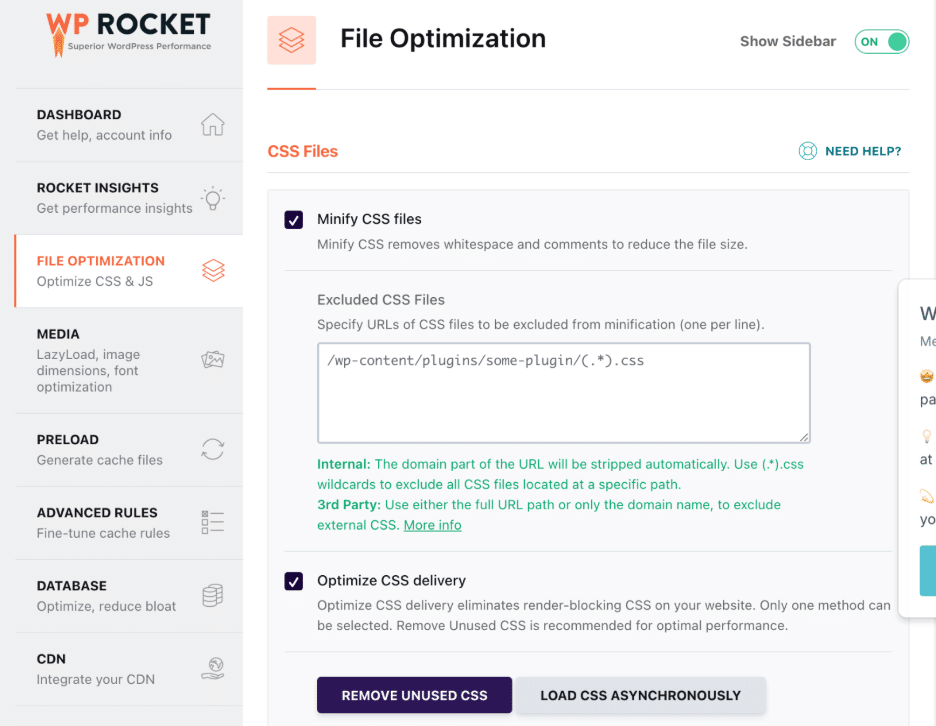
- Use WP Rocket to improve speed with caching, GZIP compression, code optimization and lazy loading.
- Use RocketCDN to fix latency issues and improve global performance
- Use Imagify to compress images and reduce page weight
- Use Rank Math to optimize on-page and technical SEO
👉 Example: If your site is slow in the US but hosted in Europe, a CDN distributes your content closer to users, improving speed and experience.
Step 4: Monitoring Results Over Time
Optimization is an ongoing process. You need to track performance, SEO, and UX continuously.
To track your key pages performance, you can easily set up Rocket Insights, the free performance hub inside WP Rocket powered by GTmetrix. It helps you understand what’s impacting your performance and provides clear, actionable recommendations on which WP Rocket features to enable, so you can optimize your site and track improvements without guesswork or juggling multiple tools. For example, you can:
- Track 4 advanced performance indicators (LCP, CLS, TBT, TTFB) on a global and page level
- Get performance recommendations mapped to WP Rocket features with direct access to enable them
- Unlimited re-tests to measure optimizations
- Set automatic monitoring with daily, weekly, or monthly scheduling to keep your site optimized
For SEO and UX, you can also:
- Monitor SEO rankings with SEMrush
- Track user behavior and conversions with Hotjar
This helps you:
- Measure the impact of your optimizations
- Detect performance drops after updates
- Continuously improve your website
👉 Example: After optimizing images and enabling caching, you can track improvements in load time, rankings, and conversions over time.
That was the general workflow for improving website performance, SEO, and user experience. You measure, identify issues, implement fixes, and monitor results over time.
Now that you understand how tools work together in a general optimization workflow, let’s look at a concrete use case because each type of website has specific challenges. The key is to identify the issue and use the right tools to fix it.
Case Study: How Website Optimization Tools Work Together to Improve Conversion Rate and UX
If your goal is to improve conversion rate and user experience, you can follow a similar optimization cycle using the suggested tools.
1. Measure your current performance
Use Google Analytics to track your current conversion rate.
2. Understand why users drop off
Use Hotjar to analyze heatmaps and session recordings. This helps you see where users hesitate or leave.
👉 Example: Users drop at the shipping step. Is it too expensive, too slow, or unclear?
3. Implement improvements
Update your UX and offer based on insights.
👉 Example:
- Simplify the checkout design
- Add a clearer call to action
- Offer a faster or cheaper shipping option
4. Test variations
Use AB Tasty to run A/B tests. Compare two versions of your checkout or product page.
5. Keep the best performing version
Analyze results and keep the version that delivers the highest conversion rate.
👉 Example: Test two checkout flows with different shipping options and keep the one that generates more purchases at the end.
Common Website Performance Problems (And the Tools That Solve Them)
Every website has different performance challenges depending on its structure, content, and audience. The key is to identify the specific issue and use the right website optimization tools to fix it.
Here are real-world use cases with concrete problems and solutions:
1. Personal Website or Blog
Main performance problems:
- Cookie banner loading too early and blocking rendering
- Oversized videos or images on pages like “About me” (wrong format or too heavy)
- Too many plugins adding unnecessary code
- Large images uploaded without compression
Personal websites often look simple but can become slow due to unoptimized media and third-party scripts.
Best tools to solve this:
- WP Rocket applies caching, delays non-critical JavaScript and optimizes CSS.
- Imagify compresses images and converts them to the next-gen formats: Avif and WebP.
👉 Example: Delaying a cookie banner script and optimizing images on an “About” page can significantly improve load time and user experience.
2. Multilingual Website
Main performance problems:
- Slow loading times for international users
- Server too far from part of the audience
- Increased page weight due to multiple language versions
Multilingual websites need to deliver content fast worldwide.
Best tools to solve this:
- RocketCDN serves content from global servers to reduce latency.
👉 Example: A French website with visitors in the US or Asia loads much faster when content is delivered from nearby locations.
3. Online Store (WooCommerce)
Main performance problems:
- Heavy product images slowing down pages
- Unoptimized product pages with many scripts
- Poor mobile performance
- Slow checkout experience impacting conversions
Ecommerce sites are highly sensitive to speed and UX.
Best tools to solve this:
- Imagify or Optimole, to compress product images without losing quality.
- WP Rocket improves load time and can also boost your Core Web Vitals on the PageSpeed audits.
👉 Example: Compressing and resizing product images combined with caching can significantly improve mobile performance and increase conversions.
4. Designers and Agencies (Portfolio Websites)
Main performance problems:
- Large, high-resolution images
- Heavy CSS from page builders
- Animations and visual effects slowing down rendering
Portfolio sites prioritize design but often at the cost of performance.
Best tools to solve this:
- Imagify reduces image weight while preserving quality
- WP Rocket optimizes CSS delivery and improves loading performance
- Bulk Resize Photos to ensure images are properly sized
👉 Example: A portfolio with full-screen visuals loads much faster when images are optimized and CSS is delivered efficiently.
5. Real Estate Website
Main performance problems:
- Heavy use of custom post types and custom fields
- Advanced search filters loading complex queries
- Google Maps integrations adding extra scripts
- Large image galleries for property listings
Real estate websites combine dynamic content, maps, and media, which can quickly slow down performance.
Best tools to solve this:
- WP Rocket reduces heavy queries and delays non-critical scripts like maps
- Imagify optimizes images to reduce page weight without impacting their quality
👉 Example: Delaying Google Maps scripts and optimizing listing images can significantly improve load time and user experience.
FAQ About Website Optimization Tools
What Are Website Optimization Tools?
Website optimization tools are software solutions designed to improve user experience, website speed, SEO, and conversions. These tools help you attract more visitors, improve engagement, and increase revenue by ensuring your website performs as expected and aligns with your business goals.
Which Tools Are Best for Improving Website Performance?
For WordPress users, WP Rocket is one of the best website optimization tools to improve performance. It can apply 80% of performance best practices upon activation, making it one of the most effective website performance optimization tools.
What techniques work best for conversion rate optimization to improve website performance?
The best conversion rate optimization techniques focus on improving both user experience and website performance. Some of the most effective strategies include speeding up page loading times, optimizing Core Web Vitals, simplifying forms and checkout flows, improving mobile usability, strengthening calls to action, and running A/B tests to validate changes. These optimizations can help increase conversions while also improving visibility across search engines and AI-driven discovery platforms.
Do Website Optimization Tools Improve SEO?
Yes, website optimization software can directly and indirectly improve SEO. Tools like Rank Math SEO help optimize content, metadata, and technical SEO, which can directly impact rankings. Other tools, such as WP Rocket and Imagify, improve page speed and Core Web Vitals, which are key ranking factors. These tools to improve website performance also contribute to better SEO results.
How Many Optimization Tools Should a Website Use?
You do not need dozens of tools to optimize your site. A smart setup usually includes:
- One tool to improve website speed and performance
- One SEO tool
- One UX or conversion optimization tool
- One website performance monitoring tool
This balanced approach ensures you cover all key areas without slowing down your site with unnecessary tools.
Are Free Website Optimization Tools Effective?
Yes, many free website performance tools are very effective, especially for small to medium websites. For example, Imagify offers a free plan that allows you to optimize up to 20 MB of images per month. It can compress images by up to 90% and convert them to next-gen formats like WebP or AVIF. Free tools to improve website speed are a great starting point before moving to more advanced solutions.
How Often Should Website Performance Be Monitored?
Website performance should be monitored regularly using website performance monitoring tools. Ideally, you should check your performance daily, especially during major promotions like Black Friday, product launches, and website updates or redesigns. Continuous monitoring helps you detect issues early and maintain optimal performance over time.
Wrapping Up
Website optimization is not a one-time fix. It is a continuous cycle where you measure performance, identify issues, implement improvements, and monitor results over time.
To build a high-performing website, you need the right combination of website optimization tools across all key areas:
- Performance and page speed
- User experience and conversion optimization
- SEO and search visibility
- Image optimization and media delivery
- Monitoring and analytics
If you are looking for the best website optimization tools to get started, begin with a solid performance foundation. WP Rocket is the best performance plugin for quickly improving website speed and Core Web Vitals, making it one of the easiest ways to see immediate results.
And there is no risk to try: WP Rocket comes with a 14-day money-back guarantee, so you can test its impact on your website’s performance with true confidence!