

Table of Contents
Last update on
A well-optimized theme sets the foundation for a great user experience and better performance, which are two factors that directly influence how long visitors stay on your site and how high you can rank on Google.
To help you make the right choice, we did the heavy lifting: we ran speed tests on the most popular WordPress themes and selected the 10 that consistently delivered the best results, with page load times below 4s.
In this guide, you’ll find both ultra-lightweight options like Hello or Astra, as well as highly customizable multipurpose themes like Divi or Avada — all tested under the same conditions.
Ready to discover which themes truly deliver speed? Let’s dive in.
| TL;DR: The 10 Fastest Themes for WordPress We tested around 30 popular WordPress themes and selected the 10 fastest based on fully loaded time. We also tested other KPIs like the Core Web Vitals and the overall performance score on mobile. Lightweight themes like Astra and Hello deliver the best raw performance, while multipurpose themes like Avada prove that page builders can still be fast when well optimized. All themes scored in the orange or green range on PageSpeed Insights, with none falling into poor performance. Finally, we showed how WP Rocket dramatically improves performance, boosting a BeTheme site from 82/100 to 98/100 on mobile. Choosing a fast theme + proper optimization is the winning combination. |
Key Takeaways
✅ Page speed is a confirmed Google ranking factor and has a direct impact on SEO, user experience, and conversions.
✅ Astra is the fastest lightweight WordPress theme, with a 1.9s fully loaded time and a 91/100 mobile score.
✅ Avada is the fastest multipurpose theme with a page builder, achieving a 2.3s load time and an 87/100 mobile score.
✅ All tested themes provide a solid performance foundation, with no red scores on PageSpeed Insights.
✅ WP Rocket is the easiest and most powerful performance plugin for WordPress that improves page speed and boosts Core Web Vitals (requiring no technical skills).
✅ Core Web Vitals improved significantly with WP Rocket, including an LCP dropping from 3.3s to 1.2s.
✅ We improved a site from 82/100 to 98/100 and cut load time nearly in half using WP Rocket.
The 10 Fastest WordPress Themes (+ Data)
For our analysis, we have selected the most popular themes on the market (free and paid), and we have tested around 25 of them thoroughly. Here’s our shortlist of the 10 fastest themes below:
5 Lightweight Themes
- Hello
- Astra
- OceanWP
- GeneratePress
- Kadence
5 Themes With a Page Builder
- Avada (Fusion builder)
- Divi (Divi Builder)
- BeTheme (BeBuilder)
- The 7 (Elementor page builder)
- Salient (WPBakery page builder)
💡 Hint: You don’t see your theme on that list? It’s OK. Install the theme of your choice on a staging site and run a performance test to assess its impact on your loading time. If activating the theme and creating a single page drops your PageSpeed score to 50/100 or pushes your load time above 10 seconds, that’s your sign to walk away.
Let’s go over the performance results of the fastest WordPress themes.
1. Hello
A plain vanilla free theme developed by Elementor and tailored for their page builder. It takes up just 6 KB of memory resources so as a result, the customization options are limited if you use the theme alone.
Performance results for the Hello theme:
| KPIs | Score |
| Overall mobile score | 90/100 |
| First Contentful Paint | 2.0s |
| Largest Contentful Paint | 1.8s |
| Cumulative Layout Shift | 1.9s |
| Speed Index | 1.3s |
| Time To Interactive | 1.4s |
| Total Blocking Time | 0 ms |
| Fully loaded time | 1.9s |
| Total page size | 890 KB |
| HTTP requests | 13 |
| 💡 Did you know? WP Rocket now includes Rocket Insights, the built-in performance hub powered by GTmetrix. It brings performance monitoring right where you already optimize your website, so you can monitor your key pages, understand your results, get clear recommendations tied to WP Rocket features, and re-test anytime, all without juggling multiple tools. 🚀 Update WP Rocket to the latest version to start using Rocket Insights right from your dashboard: it’s included for free in your plan! |
2. Astra
Astra is one of the most popular free WordPress themes, known for its lightweight code, user-friendly features, and thousands of ready-to-use templates.
Performance results for the Astra theme:
| KPIs | Score |
| Overall mobile score | 91/100 |
| First Contentful Paint | 2.1s |
| Largest Contentful Paint | 1.8s |
| Cumulative Layout Shift | 1.2s |
| Speed Index | 1.1s |
| Time To Interactive | 1.3s |
| Total Blocking Time | 0 ms |
| Fully loaded time | 1.9s |
| Total page size | 870 KB |
| HTTP requests | 11 |
3. OceanWP
Lightweight and highly extendable, it will enable you to create almost any type of website. It’s a fully responsive theme that looks great on mobile and it has its own translation tools. It comes with many templates built with Gutenberg (the WordPress editor), but also popular builders like Elementor or Beaver Builder.
Performance results for the OceanWP theme:
| KPIs | Score |
| Overall mobile score | 88/100 |
| First Contentful Paint | 1.5s |
| Largest Contentful Paint | 2.9s |
| Cumulative Layout Shift | 1.8s |
| Speed Index | 2.3s |
| Time To Interactive | 1.3s |
| Total Blocking Time | 0.2 ms |
| Fully loaded time | 2.9s |
| Total page size | 986 KB |
| HTTP requests | 14 |
4. GeneratePress
GeneratePress is a lightweight theme built with a focus on usability and speed (a fresh GeneratePress install adds less than 10kb to your page size). The theme takes full advantage of the block editor, which gives you more control over creating your content.
Performance results for the GeneratePress theme:
| KPIs | Score |
| Overall mobile score | 87/100 |
| First Contentful Paint | 3.2s |
| Largest Contentful Paint | 1.9s |
| Cumulative Layout Shift | 2.8s |
| Speed Index | 1.3s |
| Time To Interactive | 2.5s |
| Total Blocking Time | 0 ms |
| Fully loaded time | 2.5s |
| Total page size | 890 KB |
| HTTP requests | 12 |
5. Kadence
Kadence Theme is a lightweight yet full-featured WordPress theme for beautiful fast loading sites. The developer made the demos accessible and built a drag-and-drop header and footer builder to build any type of header in minutes. The multi-purpose template library is full of different designs that can fit hundreds of different projects.
Performance results for the Kadence theme:
| KPIs | Score |
| Overall mobile score | 89/100 |
| First Contentful Paint | 3.1s |
| Largest Contentful Paint | 1.9s |
| Cumulative Layout Shift | 2.9s |
| Speed Index | 1.3s |
| Time To Interactive | 1.7s |
| Total Blocking Time | 0.3 ms |
| Fully loaded time | 2.8s |
| Total page size | 898 KB |
| HTTP requests | 10 |
⚠️ Important performance note: The following themes come with their own built-in page builder or are bundled with tools like Elementor or WPBakery. That’s why they’re listed in a separate section. The performance results you’ll see are based on a fresh test site where we recreated similar layouts across each page builder to keep the comparison fair.
6. Avada (+ Fusion Builder)
The #1 selling themes on Envato for years. There are thousands of easy-to-customize templates in the library. It’s a website builder that lets you build your site from header to footer with the powerful Fusion Builder. Avada is 100% maintained in-house by the same team and is not reliant on third-party tools.
Performance results for the Avada theme:
| KPIs | Score |
| Overall mobile score | 87/100 |
| First Contentful Paint | 3.0s |
| Largest Contentful Paint | 1.4s |
| Cumulative Layout Shift | 1.8s |
| Speed Index | 1.6s |
| Time To Interactive | 2.4s |
| Total Blocking Time | 0 ms |
| Fully loaded time | 2.3s |
| Total page size | 998 KB |
| HTTP requests | 19 |
7. Divi (+ Divi Builder)
Divi is a powerful theme thanks to its visual page builder. Elegant Themes was one of the first companies to bring the WYSIWYG to WordPress. You can build everything visually using the Divi framework without ever touching a single line of code (and without installing and configuring any plugins to bring additional features).
Performance results for the Divi theme:
| KPIs | Score |
| Overall mobile score | 84/100 |
| First Contentful Paint | 4.1s |
| Largest Contentful Paint | 1.6s |
| Cumulative Layout Shift | 1.8s |
| Speed Index | 1.4s |
| Time To Interactive | 1.2s |
| Total Blocking Time | 0.1 ms |
| Fully loaded time | 3.2s |
| Total page size | 1.2 MB |
| HTTP requests | 18 |
8. BeTheme (+ BeBuilder)
BeTheme is a multipurpose website builder and best-selling WordPress theme that comes with 650+ pre-built websites (with very modern and trending design). Their BeBuilder is also fully compatible with WooCommerce, and they recently launched a query builder to build dynamic websites.
Performance results for the BeTheme theme:
| KPIs | Score |
| Overall mobile score | 82/100 |
| First Contentful Paint | 4.1s |
| Largest Contentful Paint | 3.3s |
| Cumulative Layout Shift | 0s |
| Speed Index | 4.1s |
| Time To Interactive | 1.4s |
| Total Blocking Time | 0ms |
| Fully loaded time | 4.0s |
| Total page size | 1.4 MB |
| HTTP requests | 22 |
9. The7 (+ Elementor)
It’s the #1 selling Elementor themes that offer a lot of customization from the WordPress dashboard. The7 comes with 60+ prebuilt dummy websites complete with exclusive templates for Elementor, WPBakery Page Builder & Slider Revolution.
Performance results for The7 theme:
| KPIs | Score |
| Overall mobile score | 81/100 |
| First Contentful Paint | 2.4s |
| Largest Contentful Paint | 1.7s |
| Cumulative Layout Shift | 2.9s |
| Speed Index | 1.1s |
| Time To Interactive | 1.2s |
| Total Blocking Time | 0 ms |
| Fully loaded time | 3.9s |
| Total page size | 1.3 MB |
| HTTP requests | 19 |
10. Salient (+ tailored version of the WPBakery Page Builder)
Salient offers access to a library of professional templates, with currently over 400 to choose from. They have taken the WP Bakery Bakery page builder as a base and added some extra features to it. Finally, Salient has an average rating of 4.8 out of 5 based on 5700 ratings on Themeforest.
Performance results for the Salient theme:
| KPIs | Score |
| Overall mobile score | 82/100 |
| First Contentful Paint | 2.5s |
| Largest Contentful Paint | 1.7s |
| Cumulative Layout Shift | 1.8s |
| Speed Index | 1.9s |
| Time To Interactive | 1.2s |
| Total Blocking Time | 0,35 ms |
| Fully loaded time | 3.8s |
| Total page size | 1.1 MB |
| HTTP requests | 25 |
The Fastest WordPress Themes in 2026
Below, you’ll find a summary of the performance results for the top WordPress themes.
| Theme | Fully Loaded Time | Mobile Score | Key Features | Best For | Page Size |
| Astra (Winner) | 1.9s | 91/100 | ✓ Lightweight code ✓ Ready-to-use templates ✓ User-friendly features ✓ LCP: 1.8s | Users wanting speed without sacrificing customization; WooCommerce sites | 870 KB |
| Hello | 1.9s | 90/100 | ✓ 6 KB memory footprint ✓ Tailored for Elementor ✓ Minimalist approach ✓ LCP: 1.8s | Performance-first builds with Elementor page builder | 890 KB |
| GeneratePress | 2.5s | 87/100 | ✓ Less than 10kb added ✓ Block editor optimized ✓ Usability focused ✓ LCP: 1.9s | Users prioritizing block editor and lightweight performance | 890 KB |
| Kadence | 2.8s | 89/100 | ✓ Drag-and-drop header/footer builder ✓ Multi-purpose template library ✓ Fast loading ✓ LCP: 1.9s | Projects needing custom headers and diverse design templates | 898 KB |
| OceanWP | 2.9s | 88/100 | ✓ Highly extendable ✓ Fully responsive ✓ Translation tools ✓ Gutenberg/Elementor/Beaver templates ✓ LCP: 2.9s | Users needing flexibility with multiple page builders and translation support | 986 K |
Key Performance Takeaways at a Glance
- Astra is the fastest overall lightweight theme, scoring 91/100 on mobile with a 1.9s fully loaded time, making it the top pick for users who want speed without sacrificing customization.
- Avada leads the page builder category, achieving 87/100 on mobile and a 2.3s fully loaded time, which is impressive for a theme bundled with its own visual builder.
- All 10 themes fall within acceptable-to-excellent performance ranges, with no red scores on PageSpeed Insights, indicating each theme provides a solid technical foundation.
- Hello and Astra remain the most consistent performers, delivering load times under 2 seconds even with basic content, ideal for performance-first builds.
- Heavier, builder-based themes naturally load more resources, but top performers like Avada, Divi, and Salient remain competitive thanks to well-optimized codebases and efficient asset handling.
How We Tested the Fastest Themes
Our selection is based on popularity, high download or sales volumes (for example, on Envato), and consistently positive user reviews. We tested approximately 30 themes and retained only those that achieved a page load time under 4 seconds in our setup.
First, we shortlisted 10 themes and divided them into two categories:
#1 Free lightweight themes
These themes follow a minimalist approach and act as a clean, optimized canvas to build your website on:
- Hello
- Astra
- OceanWP
- GeneratePress
- Kadence
#2 Heavier, builder-based themes
The second category includes “heavier” multipurpose themes that ship with their own page builder or come bundled with one. It wouldn’t be fair to compare a theme like Avada (with its Fusion Builder) directly with a lightweight theme like Astra, so they’re grouped separately:
- Avada (Fusion Builder)
- Divi (Divi Builder)
- BeTheme (BeBuilder)
- The7 (Elementor / WPBakery)
- Salient (WPBakery)
The Performance Tools We Used
For our tests, we relied on Lighthouse, PageSpeed Insights, and GTmetrix. These tools analyze both raw performance and real-world user experience signals. The key KPIs we focused on are Core Web Vitals and detailed diagnostics that show how each page is built and rendered, and where there is room for optimization.
To ensure consistency and comparability, we measured the following 10 performance metrics on mobile for each theme and test page.
Powered by Lighthouse, PageSpeed Insights, and GTmetrix, both analyze the performance and the user experience of your Website. The most important KPIs are the Core Web Vitals and the detailed report that shows how your pages perform and where there is room for improvement. That’s why we have included the following 10 metrics in our tests – measured on mobile:
From PageSpeed Insights:
- Overall mobile score
From GTmetrix:
- Fully loaded time
- Total page size
The Testing Sites
For the first category, we built a realistic test site using the WordPress Editor and we used the blocks to create a hero banner with a button, 5 testimonials with pictures, 1 call to action (full section with an image), 4 icons and text, 2 titles and 2 subtitles, and 8 services with pictures.

For the second category, we made sure every time to build a page with similar elements present in each builder: a hero banner with an image and a button, 3 services with icon and texts, 2 images (we re-used the same), 2 text elements, 3 icon lists, and a call to action section with a header, sub-header and button (full section).

By using the same testing scenarios and content across themes, we can conduct a fair performance comparison. We performed a new installation for each theme and used the same server for speed testing across all themes.
Important: Those tests were performed on a server in France, and we built each page ourselves. The results we present are based on our experience and may vary depending on the image size you upload, the amount of content you use, or your location.
Performance testing is essential, but real-life usage is even more telling. We asked an agency if they would perform this kind of test for a future client, and that’s what Jérôme, Developer at Calenzy, said:
Defintely! One of our clients wanted a beautiful website, but without excessive animations or visual effects. The theme had to feel fast, intuitive, and easy to navigate for their users. That’s why testing a theme’s performance before going live is absolutely critical, and we always do it! Whether you rely on a curated list like this one or test your own theme on a staging site, speed should always be validated before delivering a project to a client. Even if we are not always using WordPress, we also test the speed of our own design and code before delivering the site.
Give an Extra Performance Boost with WP Rocket
Even with a fast, lightweight theme, performance can quickly drop as you add real content like images, videos, or embeds. That’s where optimization tools come in.
WP Rocket is the easiest and most powerful performance plugin for WordPress. Upon activation, it automatically applies 80% of web performance best practices, including caching, compression, lazy rendering, CSS and JS minification, and critical image optimization.
With one click, you can also enable advanced optimizations like removing unused CSS or delaying JavaScript execution.
| 💡 You can discover all the WP Rocket features we used to boost Core Web Vitals and improve performance right after our before/after analysis. |
Let’s see how WP Rocket improves the performance of a site built with BeTheme! 🚀
For the record, the overall mobile performance grade was 82/100 with BeTheme (without WP Rocket), and the LCP was 3.3s (in the red).
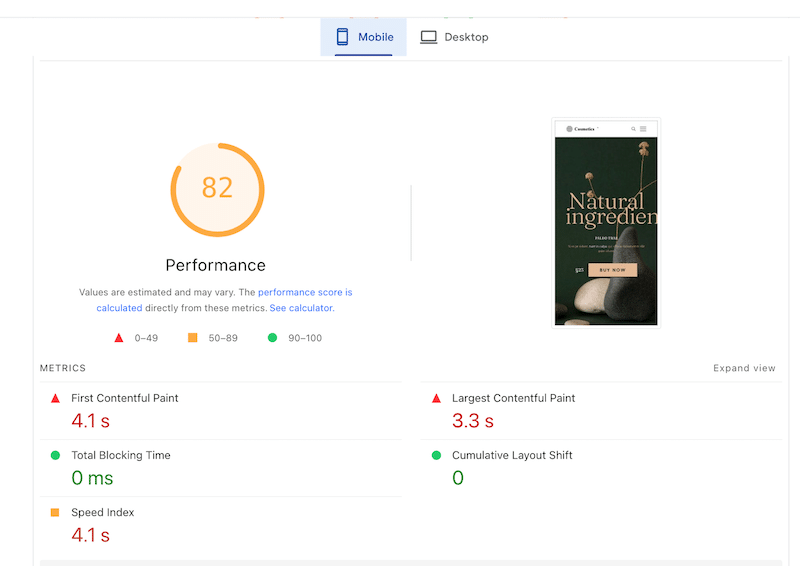
Additionally, there were a few issues flagged by Lighthouse, listed under the “insights” and “diagnostics” tab:
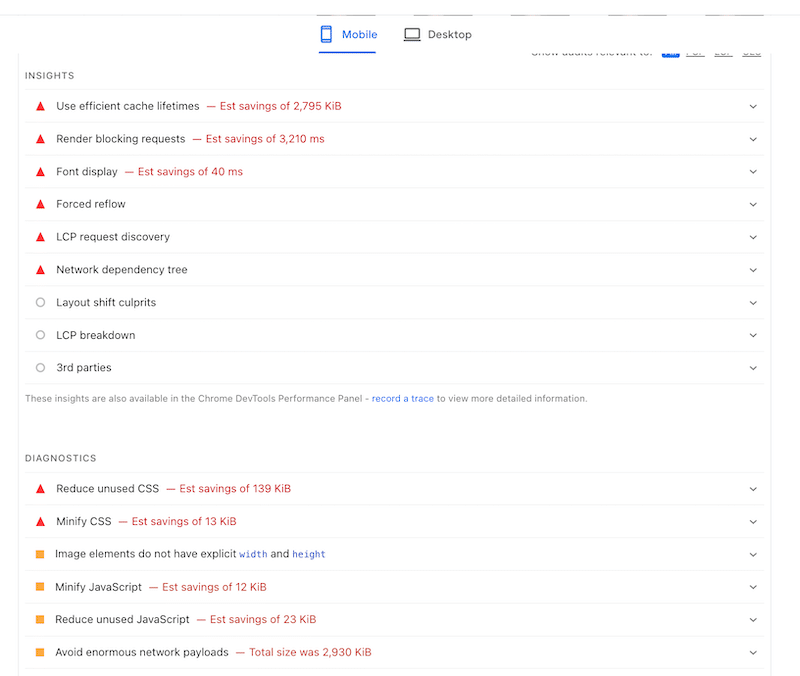
As you can see, PageSpeed Insights pointed out several easy wins to improve performance. These include using caching, optimizing fonts, reducing unused CSS and JavaScript, and minifying CSS and JS files so the browser has less code to download and process. In simple terms, all those optimizations help your pages load faster by removing unnecessary content.
The report also highlighted a critical issue with Largest Contentful Paint (LCP). In our case, the main image (or key element) displayed above the fold wasn’t preloaded. This means the browser didn’t know it should prioritize loading this element first. Instead, it loaded other resources before it, which can delay the moment when users see the most important part of the page:

🚀 We activated WP Rocket on that test site, and we noticed significant performance improvements:
- PageSpeed Insights score improved from 80/100 to 98/100, moving the site from the “needs improvement” range into the green zone.
- Fully loaded time was reduced by nearly 50%, dropping from 4.0s to 2.1s, resulting in a much faster perceived loading speed.
- Largest Contentful Paint (Core Web Vitals) improved significantly with WP Rocket, going from 3.3s to 1.2s, thanks to better prioritization of critical resources.
- Overall page weight and network requests were reduced, with total page size decreasing from 1.4 MB to 980 KB and HTTP requests dropping from 22 to 11.
Here’s a visual summary before and after WP Rocket:
| Performance KPIs | BeTheme Score (no WP Rocket) | BeTheme Score (+ WP Rocket 🚀) |
| Overall mobile score | 80/100 | 98/100 |
| First Contentful Paint | 4.1s | 2.2s |
| Largest Contentful Paint* | 3.3s | 1.2s |
| Fully loaded time | 4.0s | 2.1s |
| Total page size | 1.4 MB | 980 KB |
| HTTP requests | 22 | 11 |
*Core Web Vitals
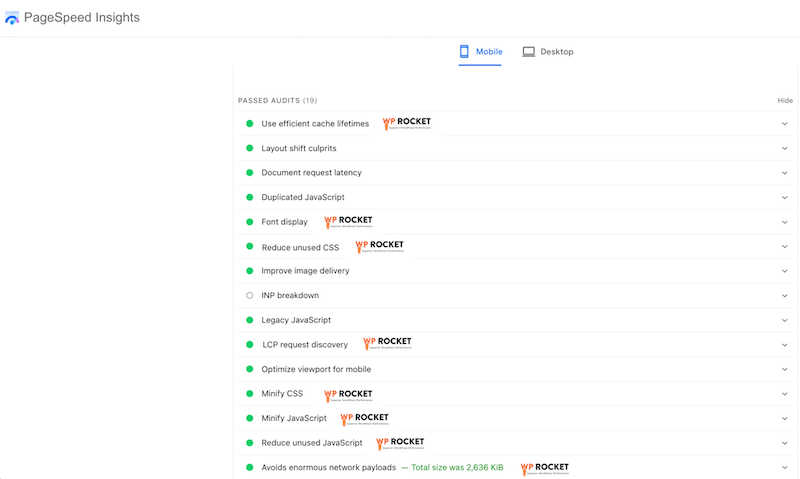
Finally, you can see that all our issues are now in the past audit section thanks to WP Rocket:
How WP Rocket Helps Boost Performance and Core Web Vitals
If you are curious about how we managed to fix all the PageSpeed Insights warnings and achieve such strong Core Web Vitals results, here’s exactly how WP Rocket helped us get there.
Many of the most impactful optimizations are automatically applied as soon as WP Rocket is activated. These include:
- Caching and text compression, to serve pages faster and reduce server load.
- CSS and JavaScript minification, to remove unnecessary characters and reduce file size.
- Google Fonts optimization, to improve font loading performance.
- Critical image optimization, which prioritizes above-the-fold images so they render faster and improve perceived loading speed.
- Automatic lazy rendering to improve user interaction by making the browser rendering only the elements visible to users at that moment.
Beyond these automatic improvements, WP Rocket also offers powerful one-click optimizations you can enable directly from the interface, including:
- Removing unused CSS, to reduce render-blocking code.
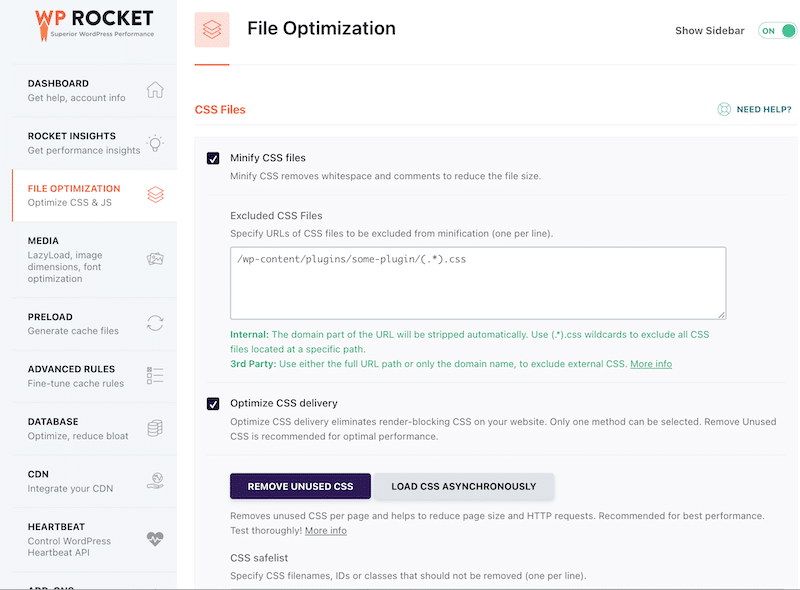
- Deferring JavaScript and delaying JavaScript execution, so scripts don’t block page rendering.
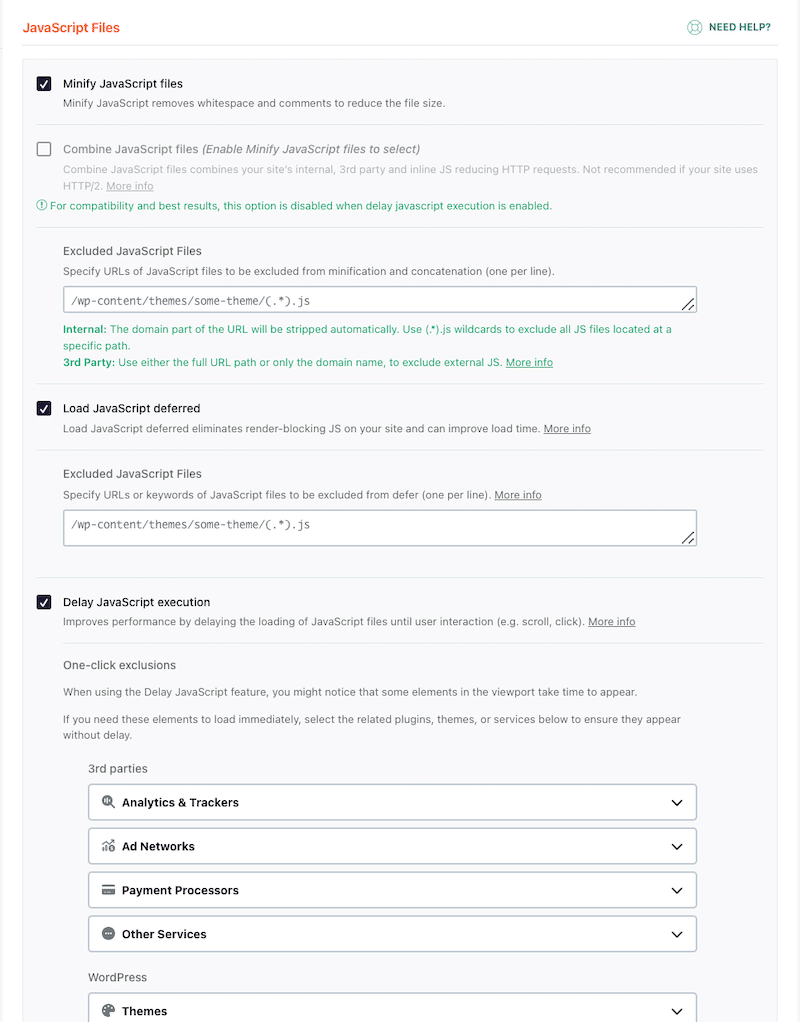
- Preloading fonts and self-hosting Google Fonts, for faster and more reliable font delivery.
What’s the Fastest Theme For Your Needs?
It’s almost impossible to suggest one single theme as it depends on your specific needs and on your client brief, but here are a few takeaways:
- If you have a client willing to take over their website, update the content, and access the WordPress dashboard, then choosing a theme with a page builder may be easier (like BeTheme or the 7).
- If you are a freelancer looking for a theme with beautifully designed demos for different industries, then Avada, Divi and BeTheme may be your best choices.
- If you plan to build an advanced WooCommerce site with thousands of products, a lightweight theme like Astra may be a better fit. Additionally, it includes advanced WooCommerce features.
- If you need to create your own forms, product layouts and add some dynamic data to your website, then a theme bundled with Elementor Pro is a great option. Elementor was among the first companies to launch the WooCommerce builder, enabling you to quickly create your own product templates and shop pages.
- If you are hesitating between a few themes, install one of their demos and review them on mobile. Responsiveness should be a top priority when building a website.
- If you are a web and design agency, Divi offers the Divi Cloud where you can store your own project and share it with the team easily. Collaboration and potential modifications can be completed more quickly from anywhere.
Finally, choose a theme with fast support, up-to-date features, and accurate documentation. For example, OceanWP offers an academy with webinars and tutorials to help users get the most out of the theme.
FAQ on the Fastest WordPress Themes
What is the fastest WordPress theme in 2026?
Astra is the fastest lightweight WordPress theme in 2026, achieving a 1.9s fully loaded time and 91/100 mobile score. For multipurpose themes with page builders, Avada leads with a 2.3s load time and 87/100 mobile score, proving that builder-based themes can still deliver excellent performance.
How do lightweight themes compare to page builder themes?
Lightweight themes like Astra and Hello load faster (under 2 seconds) with minimal resources, while page builder themes like Avada and Divi load in 2-4 seconds due to additional features. Both categories can achieve good performance scores (80-91/100 on mobile) when properly optimized with tools like WP Rocket.
Can WP Rocket improve theme performance?
Yes, WP Rocket significantly improves theme performance by automatically applying 80% of web performance best practices. In our BeTheme test, WP Rocket improved the mobile score from 82/100 to 98/100, reduced fully loaded time from 4.0s to 2.1s, and improved LCP from 3.3s to 1.2s.
What load time should I target for my WordPress site?
Target a fully loaded time under 4 seconds for good performance. In our 2026 testing, the fastest themes achieved 1.9-2.3s load times for lightweight and builder-based options respectively. All themes in our top 10 list stayed under the 4-second threshold with proper optimization.
How were these WordPress themes tested?
We tested approximately 30 popular WordPress themes using PageSpeed Insights, Lighthouse, and GTmetrix on mobile devices. Each theme was installed fresh on the same French server with similar content layouts to ensure fair comparison. We measured 10 performance metrics including Core Web Vitals, fully loaded time, and mobile scores.
Should I choose Astra or Avada for my website?
Choose Astra if you prioritize raw speed and plan to build with WordPress blocks or lightweight page builders. Choose Avada if you need extensive customization options, pre-built templates, and the Fusion Builder visual editor. Avada remains fast (2.3s load time) despite offering more features than lightweight alternatives.
Wrapping up
Choosing a fast WordPress theme is one of the most important decisions you’ll make when starting a new project. It sets the technical foundation for everything that follows: user experience, SEO, conversions, and long-term scalability. With this study, you now have all the data you need to confidently pick a theme that delivers strong performance right out of the box.
But that’s only step one.
As soon as you start adding real content — images, videos, embeds, custom layouts, and scripts — performance can quickly degrade, even on the fastest themes. That’s why step two is just as critical: optimizing your content, code, assets, and loading behavior across the entire site.
As shown in our real-world test with BeTheme, WP Rocket is the easiest and most powerful way to do exactly that. Without technical skills, we improved Core Web Vitals, reduced load times by nearly 50%, and pushed PageSpeed Insights from 80/100 to 98/100.
And best of all, there’s no risk: WP Rocket comes with a 14-day money-back guarantee, so you can test it on your own site and see the results for yourself.