Table of Contents
By Marine Larmier - Last update on
Do you want to learn the best conversion rate optimization techniques (CRO) for your WordPress site? Start with speed.
Faster websites support SEO ranking, and they also help improve conversion rates by reducing friction from the moment visitors land on your page.
Conversion rate optimization is about making it easier for users to take action. On WordPress, performance issues often create friction before visitors even read your copy, click a button, or compare your offer. Slow loading times, layout shifts and heavy scripts can all affect trust, focus, and decision-making.
Modern CRO combines UX, performance, trust, behavioral psychology, and testing, but speed is what allows all those elements to work together. After all, the best CTA, design, or copy won’t convert if your WordPress site feels slow, unstable, or frustrating before your visitors even get to the offer.
Let’s explore the conversion rate optimization techniques that can make your WordPress site faster, smoother, and easier to convert on!
| Key Takeaways ✅ Speed is one of the most important conversion rate optimization techniques because it reduces friction before users even interact with your page. ✅ WordPress performance optimization can help improve loading speed, Core Web Vitals, trust, and the overall user experience. ✅ To improve conversion rates, focus on clarity, stable layouts, simple navigation, fast forms, and smooth mobile interactions. ✅ To improve WooCommerce conversions, optimize product pages, simplify checkout, offer guest checkout, and make payment and delivery options clear. ✅ A performance plugin makes it easy to connect website speed and conversions by helping your WordPress site load faster and support a more enjoyable buying journey. |
12 Top CRO Techniques to Improve Performance
Now that you know what frustrates users, let’s look at 12 CRO techniques you can use to improve conversion rates, boost WordPress performance optimization, and make your site faster and easier to trust.
1. Improve Above-the-Fold Clarity and Loading Speed
Users decide within seconds whether your page feels relevant, trustworthy, and worth their time. That’s why above-the-fold clarity and loading speed are two essential conversion rate optimization techniques for faster WordPress sites.
The top of the page should answer three questions immediately: what the page offers, why it matters, and what the user should do next. But clarity only works if users can actually see and interact with that content quickly.
Key CRO Insights
Above-the-fold content is your first conversion moment. If the hero section loads slowly, shifts around, or feels visually confusing, users may leave before reading your offer. For example, if you are a travel agent specialized in tailor-made trips to Greece, make sure users instantly understand:
- That the homepage is loading quickly: The hero image, headline, and CTA appear fast, without delays.
- What the page is about: Tailor-made trips to Greece.
- What problem you solve: Planning a beautiful Greece itinerary without the stress of organizing hotels, ferries, and activities yourself.
- Why they should trust you: Local experts, verified hotels, and hundreds of happy travelers.
- What action to take next: Request a free quote.
📊 CRO Stat: According to Think with Google’s Milliseconds Make Millions report, with a 0.1-second improvement in site speed, retail consumers spent almost 10% more.
Best Practices
Keep your above-the-fold section clear, fast, and action-oriented:
- Make sure your page loads in under 3 seconds.
- Use one clear headline that explains the value of the page.
- Place the main CTA where users can see it quickly and avoid cluttering the hero section with too many buttons, sliders, popups, or animations.
- Optimize your Largest Contentful Paint element, often the hero image, heading, or banner.
- Prioritize the loading of above-the-fold images and lazy load the others.
- Use caching to serve pages faster to returning and new visitors.
- Reduce render-blocking CSS and JavaScript.
- Delay non-essential scripts that are not needed for the first interaction.
WordPress Optimization Tips & Tools
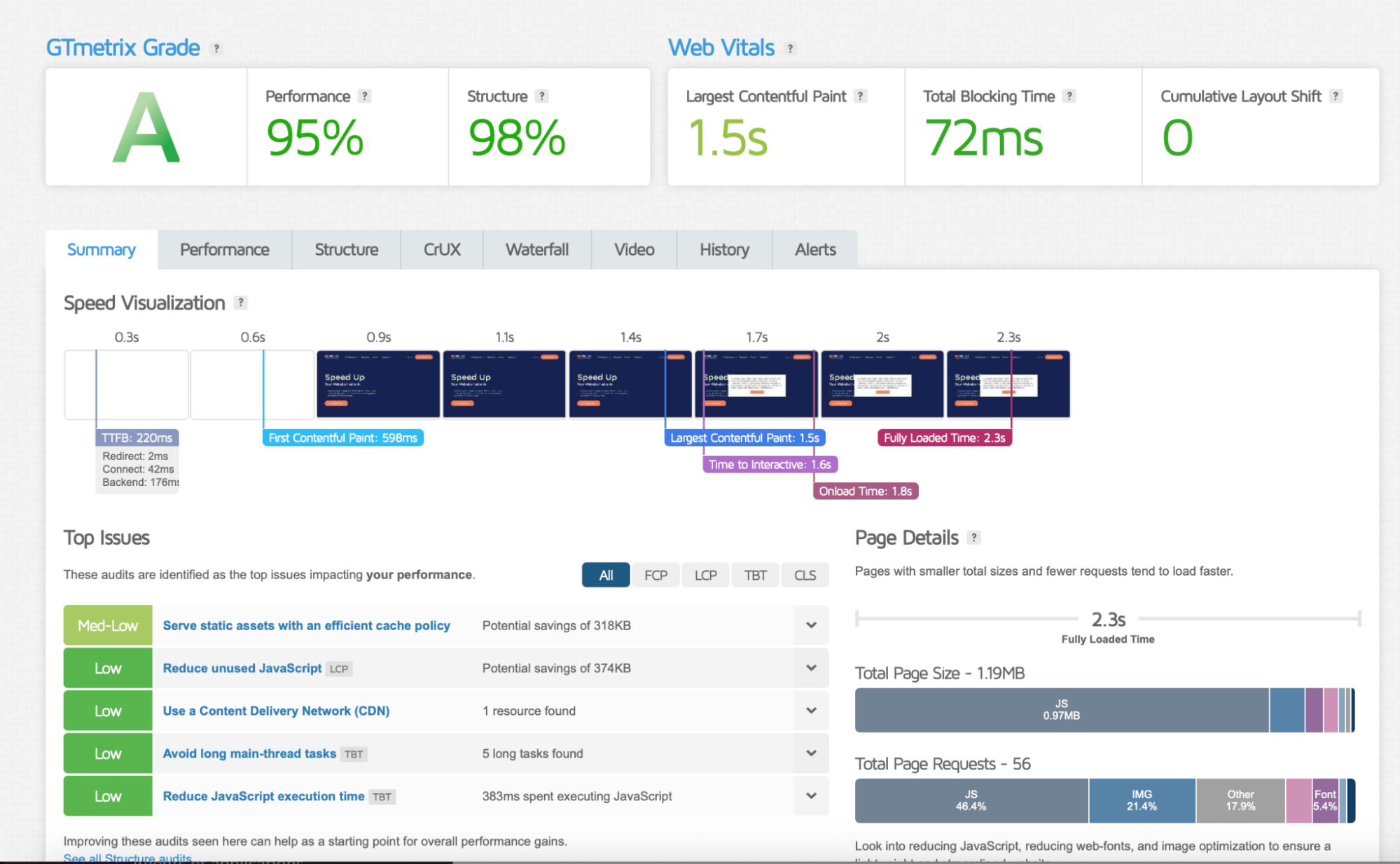
🛠️ You can also test your page speed on GTmetrix to see where you stand. GTmetrix helps you monitor key performance indicators and makes it easier to identify what slows down your site and which WordPress performance optimization actions to prioritize.
🛠️ WP Rocket is a WordPress performance plugin that applies 80% of web performance best practices upon activation. It automatically enables caching, GZIP compression, lazy rendering, critical image optimization, and Google Font optimization. Additional performance features can be enabled in a few clicks, including Remove Unused CSS, Delay JavaScript Execution, and LazyLoad.
2. Reduce Layout Shifts to Build Trust
Visual instability creates uncertainty and weakens user confidence. When buttons, images, banners, or text move while a page is loading, users can feel like the site is broken, unreliable, or not fully ready to use.
This is why layout stability is an important part of Core Web Vitals and conversions. A stable WordPress site feels more professional, easier to navigate, and safer to interact with.
Key CRO Insights
Cumulative Layout Shift, or CLS, affects perceived quality. Even if your content is good, sudden movement can interrupt decision-making and make users hesitate before clicking, filling out a form, or completing a purchase.
For example, imagine a user is about to click “Request a free quote” on a travel landing page, but the CTA suddenly moves because a font, image, cookie banner, or review widget loads late. That tiny moment of frustration can break trust and reduce conversion intent.
📊 CRO Stat: Google recommends keeping CLS under 0.1 to provide a good user experience.
Best Practices
Keep your pages stable from the first load:
- Set fixed dimensions for images, videos, ads, and embeds.
- Avoid inserting banners or popups above existing content after the page starts loading.
- Make sure fonts load smoothly without moving text around.
- Reserve space for dynamic elements such as reviews, trust badges, notices, or promo bars.
- Test your most important pages on mobile, where layout shifts feel even more disruptive.
WordPress Optimization Tips & Tools
🛠️ You can also use GTmetrix or PageSpeed Insights to identify CLS issues and see which elements are moving during load.
🛠️ If the problem comes from images, use Imagify, the easiest image optimization plugin for WordPress. It automatically compresses images and converts them to next-gen formats without impacting quality.
3. Simplify Navigation to Reduce Cognitive Load
Too many choices slow down decision-making. If users have to think too hard about where to click next, they are more likely to hesitate, wander, or leave.
Simple navigation is one of the most overlooked conversion rate optimization techniques because it helps users move faster from interest to action.
Key CRO Insights
Navigation should guide users, not overwhelm them. A clear menu helps visitors understand what you offer, where to find information, and how to take the next step.
For example, a WooCommerce store selling skincare products should not force users to choose between dozens of vague categories. Clear navigation like “Cleansers,” “Moisturizers,” “Best Sellers,” and “Skin Concerns” is easier to understand than a cluttered menu full of internal brand terms.
Best Practices
Make navigation simple, clear, and conversion-focused:
- Limit your main menu to the most important pages.
- Use simple labels users instantly understand.
- Keep key conversion pages easy to access.
- Add internal links from blog posts to relevant product, service, or landing pages.
- Avoid overcrowded mega menus unless they are genuinely useful.
- Make mobile navigation easy to open, scan, and tap.
WordPress Optimization Tips & Tools
Navigation can also affect WordPress performance optimization. Heavy menus, mega menus, icons, animations, and JavaScript-powered navigation can slow down the user experience, especially on mobile.
🛠️ For internal linking, tools like Link Whisper, Rank Math, or Yoast SEO can help you identify relevant pages to connect. This improves both SEO and user flow.
4. Prioritize Mobile Speed and Responsiveness
Most users experience your website on mobile first. If your WordPress site feels slow, cramped, or difficult to use on a phone, your best CRO strategy may fail before users even reach your CTA. Mobile speed optimization is essential because mobile users are often less patient, more distracted, and more sensitive to delays.
Key CRO Insights
Mobile friction often comes from slow loading, tap delays, bloated scroll, oversized images, intrusive popups, and buttons that are too small.
For example, a WooCommerce customer browsing from their phone should be able to view products, open filters, add an item to cart, and start checkout without fighting slow scripts or unstable layouts.
📊 CRO Stat: According to Portent, a site that loads in 1 second has a conversion rate 3x higher than a site that loads in 5 seconds on mobile.
Best Practices
Improve the mobile experience and focus on responsive design:
- Use responsive layouts that adapt naturally to smaller screens.
- Make buttons large enough to tap easily.
- Keep forms short and mobile-friendly.
- Avoid full-screen popups that block the experience.
- Optimize images for mobile screens.
- Test your pages on real mobile devices, not only desktop previews.
WordPress Optimization Tips & Tools
🛠️ Use GTmetrix or PageSpeed Insights to check mobile performance metrics such as LCP, CLS, and Total Blocking Time. These metrics help you understand whether users can load, read, and interact with your WordPress site quickly.
🛠️ Use a performance plugin to improve mobile performance by optimizing caching, CSS, JavaScript, and image loading. It will help make your pages load faster and deliver a better experience on smartphones and tablets.
🛠️ Use an image optimization plugin to compress and resize mobile images, especially product images, hero banners, and blog visuals.
A faster mobile experience helps reduce bounce rate on WordPress and makes every conversion step feel easier.
5. Build Faster Landing Pages Around One Conversion Goal
Focused landing pages reduce distractions and improve decision-making. When a page has one clear goal, users understand what to do next faster.
This is why landing page speed and clarity work together. A focused page keeps attention on the conversion goal, while a fast page helps maintain user momentum.
Key CRO Insights
Simpler landing pages often convert better because they reduce competing choices. Too many CTAs, sections, popups, offers, or animations can create friction and weaken the main action.
For example, if you are promoting a free consultation for a WordPress maintenance service, the landing page should focus on one goal: booking the consultation. Adding too many links to blog posts, case studies, pricing pages, newsletter forms, and unrelated services can distract users from that action.
Best Practices
Build landing pages around one clear conversion goal:
- Use one main CTA throughout the page.
- Keep the headline focused on the user’s problem and desired outcome.
- Remove unnecessary navigation links if they distract from the goal.
- Use short sections that support the decision to convert.
- Add social proof close to the CTA.
- Keep forms short and easy to complete.
- Avoid heavy design effects that slow down the page.
WordPress Optimization Tips & Tools
Landing pages built with page builders can become heavy if they use too many widgets, animations, background videos, sliders, or third-party scripts.
🛠️ Use a performance plugin to improve landing page performance with caching, CSS optimization, JavaScript optimization, LazyLoad, and critical image optimization.
🛠️ If you use Elementor, Divi, or another page builder, keep the design lean. Reuse global styles, avoid unnecessary widgets, and test each landing page after publishing.
A fast landing page with one clear goal makes the next step obvious and easier to take.
6. Optimize Forms for Faster Completion
Every extra field, delay, or confusing instruction increases friction. Forms are often the final step before a lead, signup, quote request, or purchase, so they need to feel fast and easy.
Form optimization is a direct way to improve conversion rates because it removes unnecessary effort at the exact moment users are ready to act.
Key CRO Insights
Simpler forms usually increase completion rates because users have fewer decisions to make. Faster form interaction also improves usability, especially on mobile.
For example, a travel quote form should not ask for every possible detail before the first contact. Asking for destination, travel dates, number of travelers, budget range, and email may be enough to start the conversation. You can collect the rest later.
📊 CRO Stat: Baymard found that the average checkout flow in 2024 contains 11.3 form fields, while most sites need only 8 fields in total for checkout.
Best Practices
Make forms easier to complete:
- Remove fields that are not essential.
- Use clear labels instead of placeholder-only instructions.
- Group related fields logically.
- Use dropdowns, checkboxes, or radio buttons only when they reduce effort.
- Show clear error messages.
- Enable autofill where possible.
- Make forms easy to use on mobile.
- Keep the CTA specific, such as “Request a Free Quote” instead of “Submit.”
WordPress Optimization Tips & Tools
Form plugins can add scripts and styles to your pages, so choose and configure them carefully.
🛠️ Plugins like Gravity Forms, WPForms, Fluent Forms, or Formidable Forms can help you build user-friendly forms. Choose the one that fits your needs, but avoid loading complex forms on pages where they are not needed.
🛠️ Test form performance and usability on GTmetrix and on a real mobile device. A form that looks fine on desktop can still feel slow or frustrating on mobile.
A faster, simpler form reduces effort and helps more users complete the action they already intended to take.
7. Improve Checkout Performance to Reduce Cart Abandonment
Checkout is the most sensitive conversion page. At this point, users have already shown purchase intent, so every delay, confusing field, missing payment method, or trust issue can cost you revenue.
Key CRO Insights
Performance affects trust during payment. If the checkout page loads slowly, freezes, or feels unstable, users may hesitate before entering personal and payment details.
For example, a WooCommerce customer may abandon checkout if the payment section takes too long to load, the order summary updates slowly, the preferred payment method is missing, or the guest checkout path is hidden.
📊 CRO Stat: Baymard found that 19% of shoppers abandon checkout because of forced account creation or a hidden guest path, 18% quit because the process is too long or complex.
Best Practices
Make checkout fast, clear, and reassuring by following the best practices below:
- Offer guest checkout.
- Keep the number of checkout fields as low as possible.
- Show the full cost early, including shipping and taxes.
- Offer the payment methods your audience expects.
- Keep the order summary visible and easy to understand.
- Avoid surprise popups or distractions during checkout.
- Make delivery options clear.
- Show trust signals near payment fields.
WordPress/WooCommerce Optimization Tips & Tools
WooCommerce checkout needs careful performance optimization because cart, account, and checkout pages are dynamic.
🛠️ If you use a WordPress performance plugin like WP Rocket or Autoptimize, you can make your WooCommerce store loading quicker. Faster product pages, cart pages, and checkout flows help reduce friction, improve WooCommerce conversions, and make customers more likely to complete their purchase.
🛠️ Useful WooCommerce tools include CartFlows for optimized checkout funnels, WooCommerce Stripe Payment Gateway for flexible payment options, WooCommerce One Page Checkout for shorter checkout flows, and Cart Abandonment Recovery for WooCommerce to follow up with users who leave before purchasing.
8. Reinforce Trust Signals at Key Conversion Points
Users convert more easily when they feel confident and reassured. Trust signals help reduce doubt, especially near CTAs, forms, pricing sections, and checkout.
But trust signals only work if they load quickly and appear at the right moment. A slow-loading review widget or broken badge can create the opposite effect.
Key CRO Insights
Trust signals are strongest when they appear close to friction points. For example, testimonials near a quote form, security badges near payment fields, and delivery guarantees near the checkout button can reassure users right before they make a decision.
For a WooCommerce store, useful trust signals include verified reviews, secure payment icons, refund policy links, delivery details, customer support information, and recognizable payment logos.
Best Practices
Place trust signals where users need reassurance:
- Add reviews or testimonials near CTAs.
- Show security badges near payment forms.
- Display refund, return, or guarantee information clearly.
- Add delivery information before checkout.
- Use real customer quotes instead of generic praise.
- Show client logos or case studies when relevant.
- Make sure trust elements do not clutter the page.
WordPress Optimization Tips & Tools
Trust elements often come from third-party widgets, review plugins, badge scripts, or embedded tools. These can slow down your WordPress site if they are not optimized.
🛠️ For WooCommerce reviews, use lightweight review plugins and avoid loading review carousels or external widgets above the fold if they hurt LCP or interactivity.
🛠️ Test your trust elements on GTmetrix to see if they increase page size, requests, or Total Blocking Time.
The goal is to make users feel reassured, not slowed down.
9. Reduce Third-Party Scripts That Hurt UX and Conversions
Many CRO and marketing tools slow down the experience they are trying to improve. Heatmaps, chat widgets, popups, analytics tags, ad pixels, review widgets, and A/B testing tools can all add extra scripts.
Used carefully, these tools are valuable. Used excessively, they can hurt website speed and conversions.
Key CRO Insights
More scripts can create slower loading, delayed interactivity, and a cluttered user experience. They can also distort analytics and testing if they slow down the page enough to change user behavior.
For example, a WooCommerce product page may load scripts for analytics, ads, reviews, live chat, popups, personalization, and tracking. If all of them load immediately, the page may feel slow before users even interact with the product.
Best Practices
Keep third-party scripts under control:
- Audit all tracking, marketing, and CRO tools regularly.
- Remove tools you no longer use.
- Avoid loading scripts sitewide when they are only needed on specific pages.
- Delay non-essential scripts until after the first interaction.
- Avoid stacking multiple tools that do the same job.
- Test performance before and after adding a new script.
WordPress Optimization Tips & Tools
WordPress sites often accumulate scripts over time through plugins, themes, pixels, and embedded tools.
🛠️ Regularly audit your third-party scripts and remove the ones you no longer need. Performance plugins can help reduce the impact of heavy scripts, but the best CRO approach is still to keep only the tools that support your goals and test their impact on website speed and conversions.
🛠️ Use GTmetrix to identify heavy third-party requests, large JavaScript files, and scripts that increase Total Blocking Time.
🛠️ Use Google Tag Manager carefully. It can help organize scripts, but it can also become a hidden performance problem if too many tags fire on every page.
A leaner script setup makes your WordPress site faster, easier to use, and more reliable for CRO testing.
10. Use Behavioral Data to Identify Conversion Friction
CRO decisions should be based on real user behavior, not assumptions. Analytics can show where users drop off, but behavioral data helps you understand why.
Heatmaps, session recordings, scroll maps, form analytics, and funnel reports can reveal small UX frustrations that create major conversion losses.
Key CRO Insights
Users may abandon a page because the CTA is too low, the form feels too long, the mobile menu is confusing, or the checkout button is hard to find. These issues are not always obvious in standard analytics.
For example, if users repeatedly tap a non-clickable image on a WooCommerce product page, that is a friction signal. If many users stop scrolling before seeing your CTA, your page structure may need to change.
Best Practices
Use behavioral data to find friction points:
- Review heatmaps on high-intent pages.
- Watch session recordings for users who abandon forms or checkout.
- Track form field drop-off.
- Compare mobile and desktop behavior.
- Look for rage clicks, dead clicks, and repeated taps.
- Use funnel reports to identify where users leave.
- Turn observations into testable CRO hypotheses.
WordPress Optimization Tips & Tools
Behavioral tools are useful, but they can also add extra scripts to your WordPress site.
🛠️ Tools like Hotjar, Microsoft Clarity, Crazy Egg, and Matomo can help identify friction through heatmaps, recordings, and behavior reports.
🛠️ Behavioral tools can add extra scripts to your WordPress site, so use them carefully. Performance plugins can help reduce their impact, but you should always test your site after optimization to make sure tracking, heatmaps, and recordings still work properly.
🛠️ Use GTmetrix before and after installing behavioral tools to see how they affect loading time, requests, and responsiveness.
Behavioral data helps you fix the friction users actually experience, not the problems you guess they might have.
11. Align Performance Optimization with Conversion Intent
Not every page has the same conversion value. A homepage, blog post, product page, pricing page, checkout page, and contact page do not all contribute to revenue in the same way.
To improve conversion rates efficiently, prioritize performance optimization on the pages closest to conversion.
Key CRO Insights
High-intent pages should receive the highest optimization priority. Faster money pages create the biggest business impact because users are already closer to taking action.
For example, a blog post may attract traffic, but a pricing page, product page, booking page, or WooCommerce checkout page usually has stronger conversion intent. These pages should be fast, stable, and easy to act on.
Best Practices
Prioritize the pages that matter most:
- Identify your highest-converting pages.
- Find pages with high traffic but low conversion rates.
- Optimize product, pricing, checkout, quote, demo, and contact pages first.
- Monitor Core Web Vitals on high-intent URLs.
- Remove unnecessary scripts from money pages.
- Make sure CTAs, forms, and checkout elements load quickly.
WordPress Optimization Tips & Tools
Start by testing your most important URLs instead of only testing the homepage.
🛠️ A WordPress performance plugin can improve speed across your site, but high-intent pages deserve extra attention. Check how JavaScript delay, image loading, CSS optimization, and caching settings affect your product pages, landing pages, forms, and checkout flow.
🛠️ Tools like Rocket Insights, PageSpeed Insights, and GTmetrix can help you monitor performance and Core Web Vitals over time, so you can quickly spot regressions on important pages.
🛠️ Use GA4, Matomo, or WooCommerce analytics to identify which pages generate leads, sales, add-to-cart actions, and checkout completions.
Performance optimization becomes more profitable when it focuses on the pages that directly influence revenue.
12. Measure CRO Improvements After Speed Optimization
Performance improvements should connect to business outcomes. Faster pages are valuable, but CRO is about what happens next: more clicks, more leads, more purchases, and fewer abandoned carts.
That’s why you should measure both speed metrics and conversion metrics after optimizing your WordPress site.
Key CRO Insights
CRO without measurement becomes guesswork. Speed metrics alone are not enough because a faster page should also support better user behavior.
For example, after improving a WooCommerce product page, you should not only check LCP or CLS. You should also monitor add-to-cart rate, checkout starts, completed purchases, bounce rate, and revenue per visitor.
Best Practices
Measure performance and conversions together:
- Track Core Web Vitals before and after optimization.
- Monitor conversion rate, bounce rate, add-to-cart rate, form completions, and checkout completion.
- Compare mobile and desktop results separately.
- Annotate major performance changes in your analytics tool.
- Run A/B tests when changing layout, copy, CTAs, or checkout flow.
- Watch for regressions after adding new plugins, scripts, or design elements.
WordPress Optimization Tips & Tools
Use a simple measurement stack that connects speed and business performance.
🛠️ Use GTmetrix, or Rocket Insights to track performance metrics such as LCP, CLS, TBT, page size, requests, and fully loaded time.
🛠️ Use GA4, Matomo, WooCommerce analytics, or your CRM to track conversions, revenue, leads, and funnel drop-off.
Why Reducing Friction Improves Conversions
Nobody wants to buy, sign up, or send an inquiry on a website that feels slow, confusing, or annoying. If the experience feels frustrating, users are less likely to trust your site and more likely to leave before converting.
Friction is anything that slows down or frustrates users on their way to conversion. It can be technical, visual, or psychological, but the result is often the same: users hesitate, lose trust, or worse, completely abandon your page
On WordPress, friction often starts before users even interact with your page. A slow-loading landing page can interrupt momentum. Heavy scripts, popups, cluttered navigation, and complicated forms can all make the experience feel harder than it needs to be.
📊 CRO stat: According to Portent, an ecommerce site that loads in 1 second has a conversion rate 2.5x higher than a site that loads in 5 seconds.
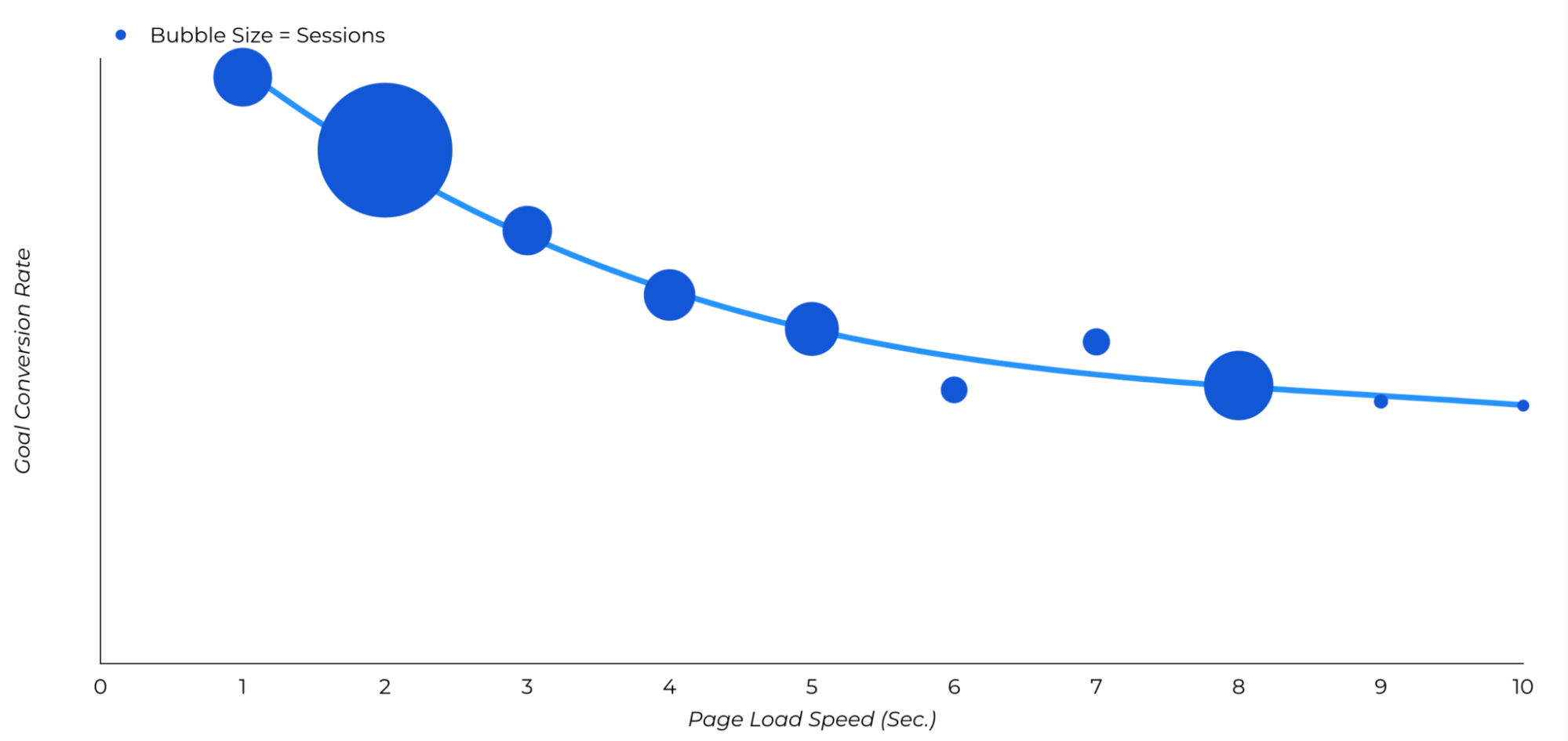
For WooCommerce stores, friction can also appear at checkout. For example, users may abandon their cart if they cannot find their preferred payment method, if delivery options are unclear, if shipping costs appear too late, or if the checkout form asks for too much information.
📊 CRO stat: Baymard found that 10% of US online shoppers have abandoned checkout because the site didn’t offer their desired payment option.
Website Friction Points That Affect Conversion Rate Optimization on WordPress
| Website Friction Point | User Impact | Conversion Impact |
| Slow loading pages | Users wait before they can read, browse, or buy. | Higher bounce rate, fewer product views, and lower conversions. |
| Delayed interactivity and not stable layouts | Buttons, menus, filters, or forms feel unresponsive and disruptive ads move while the page loads. | Users may click repeatedly, lose patience, or abandon the page. Lower trust, missed clicks, and weaker Core Web Vitals and conversions. |
| Complicated forms | Users face too many fields or unclear instructions. | More form abandonment and fewer leads or checkout completions. |
| Cluttered navigation | Users struggle to find the next step or compare options. | Lower engagement and reduced conversion rates. |
| Missing payment or delivery options | Users cannot choose the method they trust or prefer. | Lower checkout completion and harder to improve WooCommerce conversions. |
| Hidden extra costs | Users discover shipping, taxes, or fees too late. | Higher cart abandonment and lost sales. |
| 💡 Hint: Making your WordPress site faster is one of the most important conversion rate optimization techniques because it helps visitors stay, trust your site, and take action. |
Choose the Best CRO Techniques Based on Your WordPress Website Goals
Whether you are a blogger, freelancer, WooCommerce owner, agency, or marketer, the best conversion rate optimization techniques depend on what you want users to do next. A WooCommerce site, a lead generation website, a SaaS landing page, and a blog can all benefit from better WordPress performance optimization, but they won’t always prioritize the same actions.
Here’s a table below to match your website goal with the CRO techniques that can help improve conversion rates, connect website speed and conversions, and support a smoother user experience.
| WordPress Website Goal | CRO Techniques to Prioritize |
| Improve WooCommerce checkout completion | Offer guest checkout, reduce form fields, show total costs early, and provide preferred payment and delivery options. |
| Generate more leads | Simplify forms, improve above-the-fold clarity, use a clear CTA, and add trust signals near the form. |
| Increase landing page conversions | Focus on one conversion goal, improve LCP, remove distractions, and keep the CTA visible. |
| Improve mobile conversions | Prioritize mobile speed optimization, responsive design, tap-friendly buttons, shorter forms, and stable layouts. |
| Reduce bounce rate | Improve loading speed, clarify the first screen, simplify navigation, and reduce intrusive popups or heavy scripts. |
| Improve free trial signups | Make the value proposition clear, reduce signup friction, add social proof, and keep the trial CTA fast and visible. |
| Increase newsletter signups | Use a simple form, explain the benefit clearly, avoid aggressive popups, and make the signup section load quickly. |
The goal is not to apply every CRO tactic everywhere. Start with the pages closest to your conversion goals, improve their speed and usability, and measure how those changes affect real business outcomes.
FAQs
What Is Conversion Rate Optimization And How Does It Actually Work?
Conversion rate optimization, or CRO, is the process of improving your website so more visitors take action, such as buying a product, filling out a form, or signing up. It works by reducing friction, improving trust, testing changes, and making the user journey faster and easier.
What Conversion Rate Optimization Techniques Improve Website Performance The Most?
The best conversion rate optimization techniques for performance are improving page speed, optimizing Core Web Vitals, reducing layout shifts, simplifying navigation, and removing heavy scripts. On WordPress, WP Rocket can help by making pages load faster, improving LCP, delaying unnecessary JavaScript, and supporting a smoother user experience.
Which Conversion Optimization Techniques Work Best For Ecommerce Businesses Selling Online Products?
For ecommerce businesses selling online products, focus on fast product pages, clear product images, simple navigation, trust signals, guest checkout, fewer form fields, and clear payment and delivery options. To improve WooCommerce conversions, WP Rocket can help speed up product pages and the buying journey while keeping sensitive pages like Cart, Checkout, and My Account safe from caching.
Which Website Speed Issues Hurt Conversions The Most?
The speed issues that hurt conversions the most are slow loading pages, poor LCP, layout shifts, delayed interactivity, heavy images, and too many scripts. These problems make your site feel slow, unstable, or hard to trust, which can increase bounce rate and reduce conversions.
Why Do Slow Checkout Pages Increase Cart Abandonment?
Slow checkout pages create doubt at the worst possible moment: when users are ready to pay. If the checkout freezes, loads slowly, or feels unstable, shoppers may lose trust, get frustrated, or leave before completing the order.
Can Too Many Plugins and Third-Party Scripts Reduce Conversions?
Yes. Too many plugins, popups, tracking tools, chat widgets, and third-party scripts can slow down your WordPress site and create a frustrating experience. WP Rocket can help reduce the impact of heavy scripts with features like Delay JavaScript Execution, but you should still remove tools you don’t really need.
Wrapping Up: Start Your CRO Strategy with Speed
The best conversion rate optimization techniques all have one thing in common: they reduce friction. And on WordPress, one of the biggest sources of friction is slow performance.
Before testing new CTAs, redesigning your landing pages, or changing your checkout flow, make sure your site is fast, stable, and easy to use. A faster website creates a smoother experience that helps visitors stay engaged, build trust, and take action.
Now it’s your turn. Start with the pages that matter most, remove friction step by step, and measure how each improvement helps more visitors convert!