
Table of Contents
By Marine Larmier - Last update on
Congratulations, a visitor is about to make a purchase on your online store! But is your checkout process really ready for everyone? Are you using the best WooCommerce checkout plugins to reduce cart abandonment and improve conversion?
What if a customer does not want to create an account? What if they only want to pay with PayPal? What if they expect a fast checkout with no extra steps? If your process does not match their expectations, you risk losing the sale.
WooCommerce gives you a solid foundation, but it is not enough to cover every scenario. To truly improve WooCommerce checkout conversion, you need the right checkout customization plugins to reduce friction and meet user expectations.
In this guide, you will discover the best 12 WooCommerce checkout plugins, explore common WooCommerce checkout problems and the plugins that fix them, and learn how to choose the right solution for your store.
| TL;DR Improving WooCommerce checkout conversion means simplifying the flow, reducing friction, and optimizing performance first. Slow pages, complex steps, and missing payment options are the main reasons users drop off. The best WooCommerce checkout plugins help fix these issues based on your needs, whether it is WooCommerce checkout optimization for speed with WP Rocket, better UX with one-page checkout, or trust with payment and review tools. |
Key Takeaways
✅ Checkout friction is one of the biggest conversion killers in WooCommerce checkout optimization.
✅ Not all WooCommerce checkout plugins solve the same problem, define your strategy first.
✅ Simplifying the checkout flow helps improve WooCommerce checkout conversion.
✅ Mobile checkout UX is critical, keep it fast, responsive, and frictionless.
✅ Faster checkout means more completed purchases, and WP Rocket is the easiest way to improve performance.
✅ The best WooCommerce checkout plugins combine performance, UX, and trust to reduce cart abandonment WooCommerce stores often face.
Top WooCommerce Checkout Plugins
WooCommerce checkout plugins enhance the default checkout by improving speed, user experience, trust, and conversion. They are essential for effective WooCommerce checkout optimization, helping reduce cart abandonment, simplify the buying journey, and adapt checkout to real customer expectations.
📝 Here’s a toolbox you can save for later:
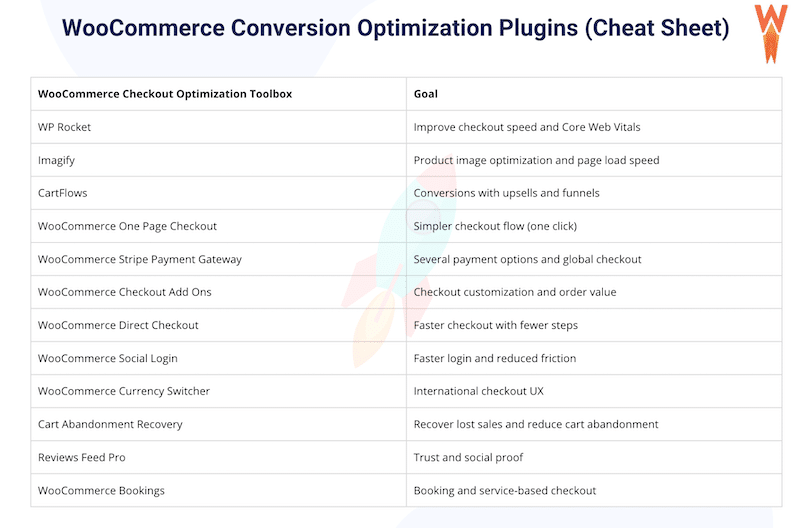
From performance optimization to trust building and recovery strategies, the best WooCommerce checkout plugins help improve WooCommerce checkout conversion at every step of the buying journey and create a smoother, more efficient experience for your customers.
1. WP Rocket – Boost WooCommerce Checkout Speed and Core Web Vitals
Overview
WP Rocket is the most powerful WooCommerce checkout plugins for performance. It improves WooCommerce checkout by reducing load times, improving Core Web Vitals, and creating a faster buying experience that helps improve conversions.
Key Features
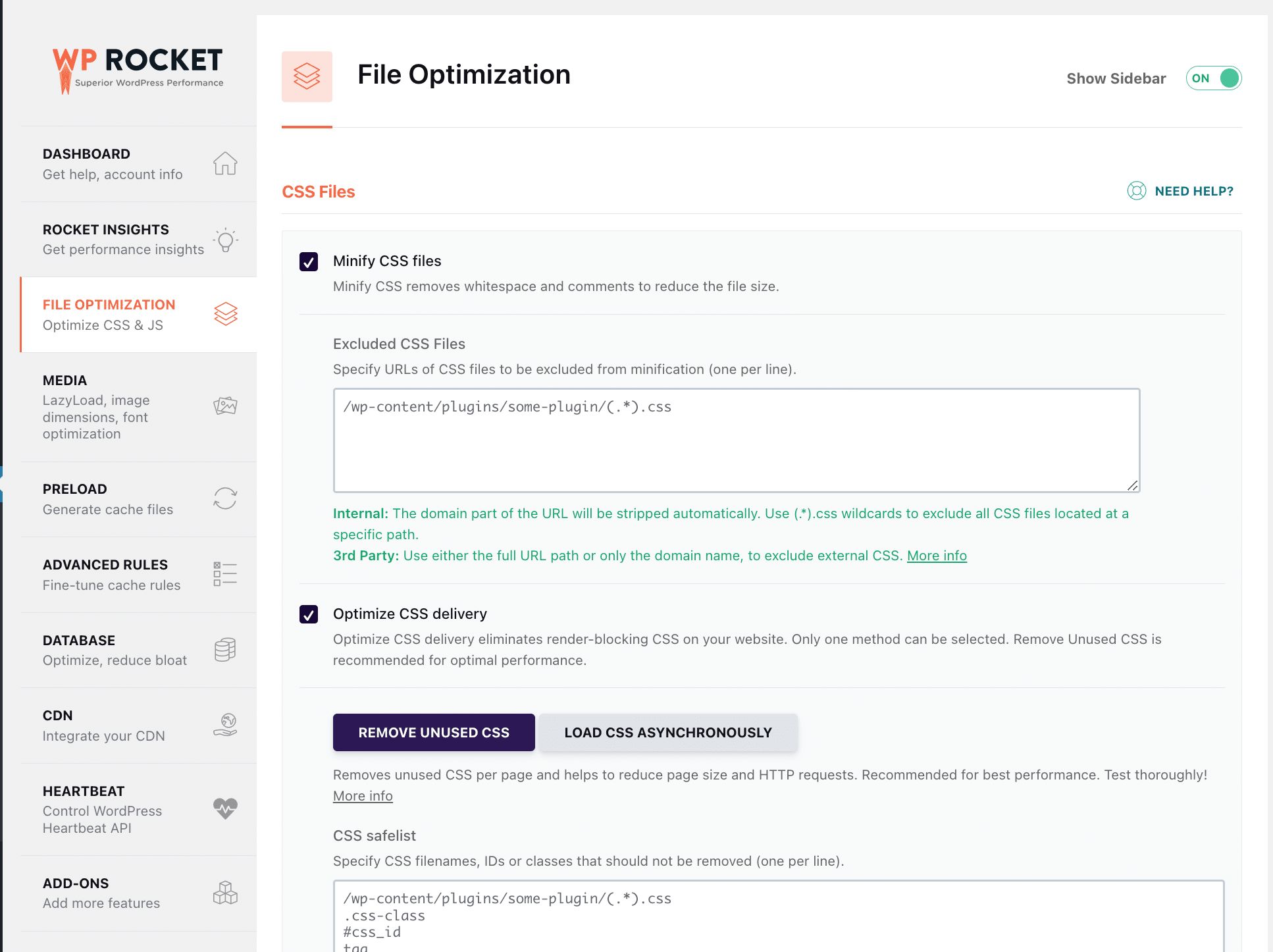
It applies 80% of performance best practices upon activation, including caching, GZIP compression, CSS and JavaScript minification, lazy rendering, and critical image optimization. Among many optimizations, it lets you remove unused CSS, defer JavaScript, and delay JavaScript execution in one click.
Ease of Setup
Very easy. Most performance optimizations are applied automatically upon activation.
Main Strength
It comes with Rocket Insights, the free performance hub built into WP Rocket that helps you monitor performance and identify improvements for your WooCommerce store. It measures your overall website performance score plus four advanced KPIs (LCP, CLS, TBT, and TTFB) at both site-wide and page level. Based on your test results, it also provides tailored recommendations linked to WP Rocket features, with direct access to enable them.
Pros
- It delivers immediate speed improvements.
- It improves Core Web Vitals and PageSpeed performance score.
- It includes built-in performance monitoring with Rocket Insights.
Cons
- Paid only.
Best For
Business owners, freelancers, developers, bloggers, marketers, and agencies that need to improve WooCommerce checkout conversion and monitor performance easily.
Pricing
Starts at $59 per year (final price may vary depending on your country and applicable taxes).
2. Imagify – Optimize Product Images For Faster Checkout Pages
Overview
Imagify is the easiest image optimization plugin for WordPress. It supports WooCommerce checkout optimization by reducing the size of product images and improving loading speed across the buying journey.
Key Features
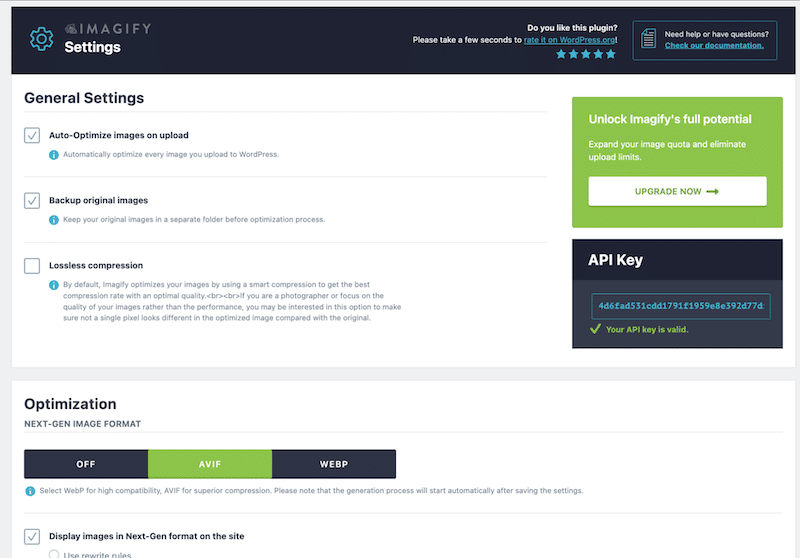
It compresses and resizes images automatically.It converts images to WebP and AVIF.
Ease of Setup
Easy. One click optimization.
Main Strength
It uses Smart compression to reduce image weight while keeping quality intact.
Pros
- It compresses images without losing quality.
- It converts images to WebP and AVIF.
- It reduces image weight across the store.
- It improves loading speed.
Cons
- No lazy-loading feature.
Best For
Stores with image heavy product pages.
Pricing
Free plan available, paid starts at $4.99 per month.
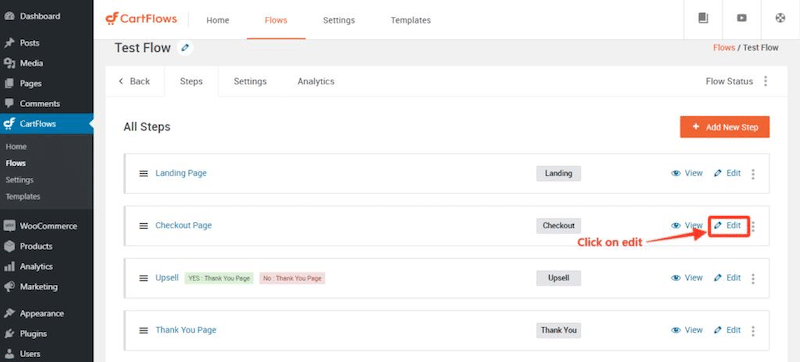
3. CartFlows – Create High Converting Checkouts with Upsells
Overview
CartFlows is one of the best WooCommerce conversion optimization plugins. It improves WooCommerce checkout conversion by optimizing checkout flows and increasing average order value.
Key Features
It includes a funnel builder, order bumps, upsells, templates, analytics, and A/B testing.
Ease of Setup
Moderate.
Main Strength
It focuses on revenue growth through optimized checkout funnels.
Pros
- It improves checkout conversion.
- It adds order bumps and upsells.
- It provides ready to use templates.
- It includes A/B testing.
Cons
- Advanced features require a paid plan.
- Can feel complex for beginners.
- Limited outside WooCommerce.
Best For
Marketers and store owners focused on revenue growth.
Pricing
Free version available, paid starts at $199 per year.
4. WooCommerce One Page Checkout – Turn Your Checkout into A Single Page Experience
Overview
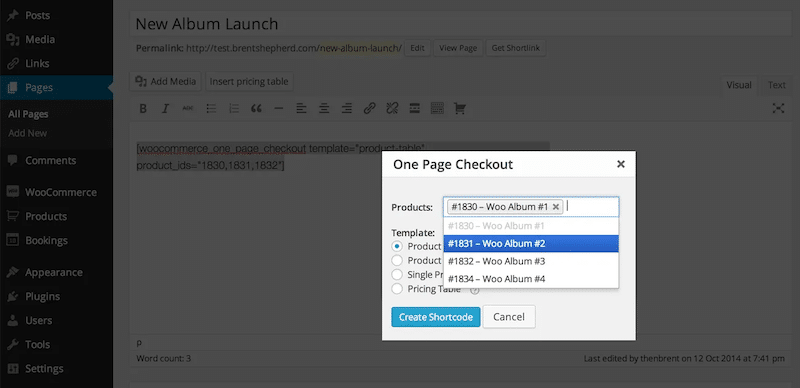
This official WooCommerce plugin simplifies the buying journey by combining product selection and checkout on one page.
Key Features
It enables one-page checkout layouts and custom checkout landing pages.
Ease of Setup
Easy.
Main Strength
It reduces checkout steps and friction.
Pros
- It simplifies checkout.
- It reduces friction.
- It improves user experience.
- It integrates with WooCommerce.
Cons
- Paid only.
- Limited design flexibility.
- Not ideal for advanced funnels.
Best For
Stores that want a faster checkout flow.
Pricing
$79 per year.
5. WooCommerce Stripe Payment Gateway – Accept Multiple Payment Methods Worldwide
Overview
WooCommerce Stripe Payment Gateway is one of the best WooCommerce checkout plugins for payments. It improves WooCommerce checkout optimization by offering multiple payment methods in a single integration, helping reduce friction and improve WooCommerce checkout conversion, especially for international customers.

Key Features
It supports credit cards, Apple Pay, Google Pay, and a wide range of local and global payment methods such as Alipay, Klarna, SEPA, iDEAL, and more.
It also includes secure payments with 3D Secure and allows customers to save payment details for faster checkout.
Ease of Setup
Moderate. It requires connecting a Stripe account and configuring payment settings.
Main Strength
Its main strength is flexibility. It lets you offer multiple payment methods in one integration, which improves checkout UX and supports global WooCommerce stores.
Pros
- It supports multiple global and local payment methods.
- It improves checkout experience with fast and secure payments.
- It supports mobile payments like Apple Pay and Google Pay.
- It works well for international WooCommerce stores.
Cons
- PayPal is not supported natively.
- It requires a Stripe account setup.
Best For
WooCommerce stores that need to improve checkout conversion by offering multiple payment options and optimizing international checkout experience.
Pricing
Free plugin. Transaction fees apply depending on Stripe pricing.
6. WooCommerce Checkout Add Ons – Customize Checkout with Extra Fields and Options
Overview
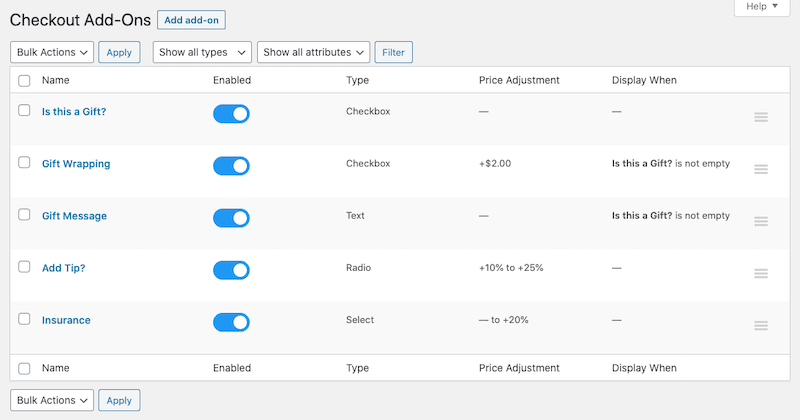
This WooCommerce checkout customization plugin allows you to tailor checkout with additional fields and services.
Key Features
It supports custom fields, file uploads, conditional logic, and paid add-ons.
Ease of Setup
Easy.
Main Strength
It adds flexibility and personalization.
Pros
- It allows you to customize checkout and adds extra services easily.
- It increases order value and boosts your revenue.
Cons
- It can clutter the checkout and make users abandon the final step.
Best For
Stores needing custom checkout fields.
Pricing
$79 per year.
7. WooCommerce Direct Checkout – Skip the Cart and Send Users Straight to Checkout
Overview
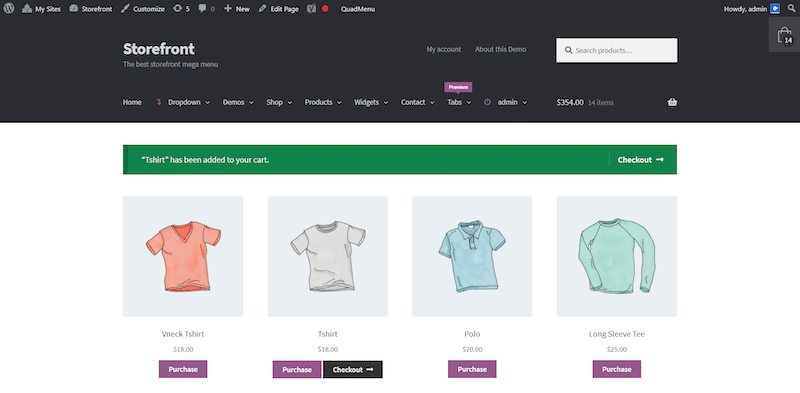
This plugin removes the cart step to simplify the purchase process.
Key Features
It redirects users directly to checkout and supports AJAX add to cart.
Ease of Setup
Easy.
Main Strength
It shortens the buying journey.
Pros
- It reduces the amount of purchasing steps allowing quick purchases.
Cons
- Limited features.
- No advanced customization.
- It reduces cross-sell opportunities.
Best For
Stores needing a faster purchase path.
Pricing
Free.
8. WooCommerce Social Login – Enable Fast Login and Checkout with Social Accounts
Overview
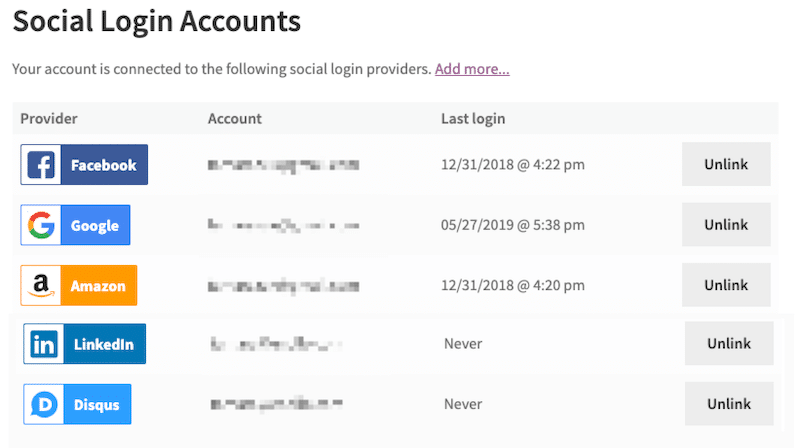
This plugin simplifies login and speeds up checkout thanks to a link to your customers social account. You can easily connect your store’s customer accounts with Facebook, Twitter, Google, Amazon, LinkedIn, PayPal, and Disqus.
Key Features
It supports login via major social platforms.
Ease of Setup
Moderate.
Main Strength
It makes it easier for your customers to login in one click.
Pros
- It simplifies login and speeds up checkout.
Cons
- Paid only.
- It requires API setup and depends on third-party services.
Best For
Stores with returning customers.
Pricing
$99 per year
9. WooCommerce Currency Switcher – Let Customers Pay in Their Local Currency
Overview
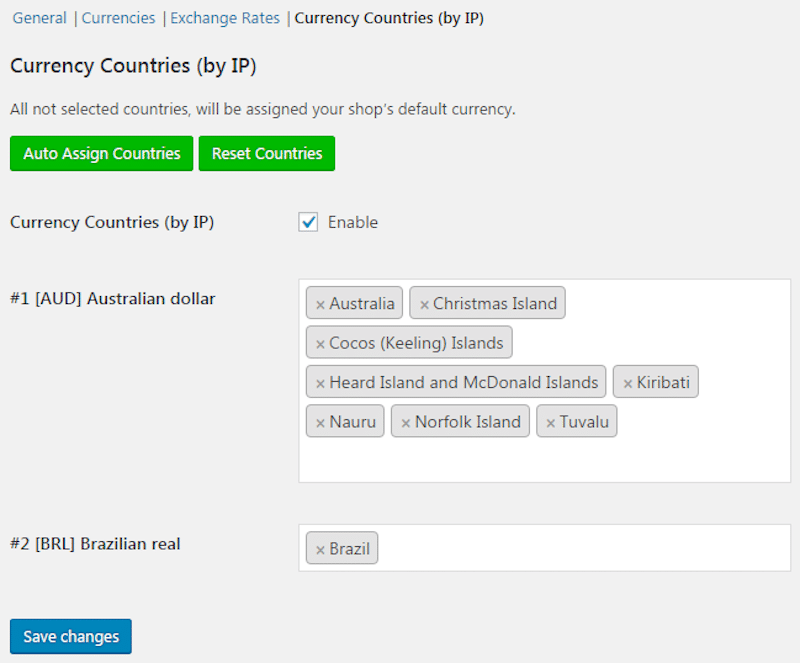
This plugin improves WooCommerce checkout UX for international stores by displaying the right currency according to the user’s location.
Key Features
It supports multiple currencies and automatic conversion. Automatic currency exchange rates updates with prices on a per product basis. You can set up currency by country (i.e. by IP), by language (i.e. locale) with the option to revert to original currency on checkout.
Ease of Setup
Moderate.
Main Strength
It improves trust for global customers and comes with the option to add currency switchers as widget or as shortcodes.
Pros
- It supports global customers and displays local currencies.
- It improves trust and adapts pricing.
Cons
- It requires some setup.
- It’s not useful for local stores.
- It can create confusion with fluctuating rates.
Best For
International WooCommerce stores.
Pricing
Free.
10. Cart Abandonment Recovery For WooCommerce – Recover Lost Sales with Automated Follow Ups
Overview
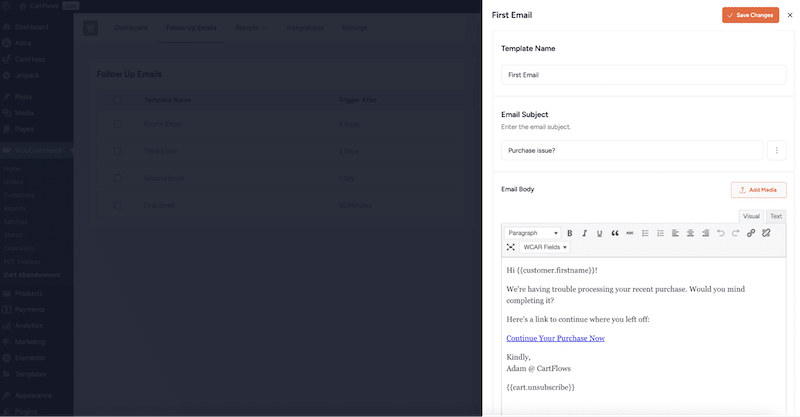
This plugin helps recover abandoned carts and improve WooCommerce checkout conversion.
Key Features
It captures emails and sends automated follow ups.
Ease of Setup
Very easy.
Main Strength
It recovers lost revenue automatically.
Pros
- It recovers abandoned carts and sends automated emails.
- It improves conversions.
Cons
- It requires the user’s email to maximize results.
Best For
Stores with high cart abandonment.
Pricing
Free.
11. Reviews Feed Pro – Display Social Proof to Build Trust at Checkout
Overview
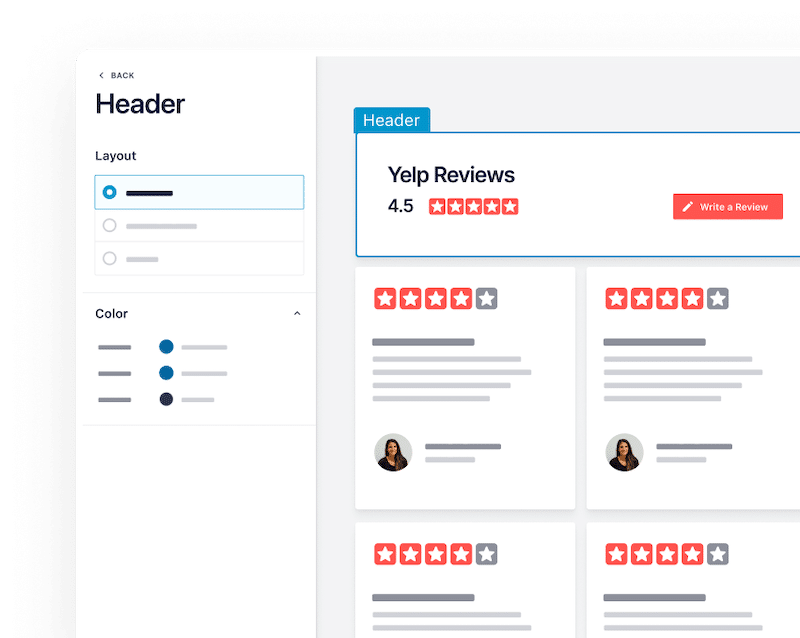
This plugin improves WooCommerce checkout optimization by adding trust signals through official reviews.
Key Features
It displays reviews from multiple platforms including Google and Yelp.
Ease of Setup
Easy.
Main Strength
It builds credibility.
Pros
- It builds trust by displaying real reviews.
- It reduces hesitation.
Cons
- It requires external review sources.
Best For
Stores need strong social proof.
Pricing
It starts at $49 per year.
12. WooCommerce Bookings – Handle Bookings and Appointments at Checkout
Overview
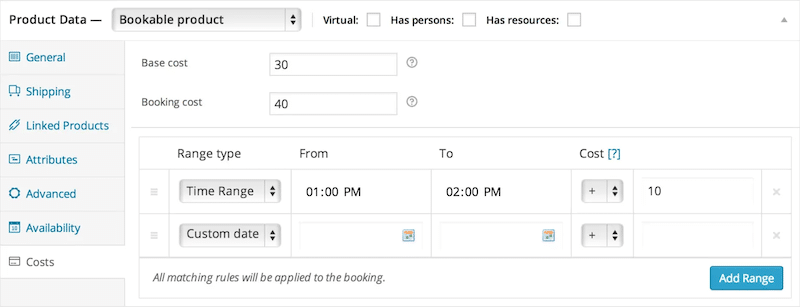
WooCommerce Bookings is a powerful extension designed for businesses that need to sell time-based services or reservations directly from their website. Instead of a standard product purchase, customers can select a date, time, and duration.
Key Features
It supports scheduling, availability, and pricing rules. You can set availability rules based on:
- Specific dates or recurring schedules.
- Staff or resource availability.
- Time buffers between bookings.
Ease of Setup
Moderate.
Main Strength
It enables complex booking flows.
Pros
- It supports bookings.
- It manages schedules.
- It enables services checkout.
Cons
- Paid only.
- Complex setup.
Best For
Service-based businesses.
Pricing
$249 per year.
WooCommerce Checkout Plugins Comparison
To help you choose the best WooCommerce checkout plugins for your store, here’s a quick comparison based on their main checkout optimization goal, ease of setup, and pricing.
| WooCommerce Checkout Plugins | Checkout Optimization Goal | Easy Setup | Pricing |
| WP Rocket | Improve WooCommerce checkout speed, PageSpeed performance score, and Core Web Vitals | ✔ | From $59 per year |
| Imagify | Reduce image weight to speed up product and checkout pages | ✔ | Free + from $4.99 per month |
| CartFlows | Improve WooCommerce checkout conversion with funnels and upsells | ✔ | Free + from $199 per year |
| WooCommerce One Page Checkout | Reduce cart abandonment WooCommerce with a one page checkout flow | ✔ | $79 per year |
| WooCommerce Checkout Add Ons | Customize checkout fields and increase order value | ✔ | $79 per year |
| WooCommerce Stripe Payment Gateway | Offer multiple payment methods and improve WooCommerce checkout conversion globally | ✖ | Free (transaction fees apply) |
| WooCommerce Direct Checkout | Simplify checkout flow by skipping the cart page | ✔ | Free |
| WooCommerce Social Login | Reduce friction with fast login and repeat purchases | ✖ | $99 per year |
| WooCommerce Currency Switcher | Improve checkout experience for international customers | ✖ | Free |
| Cart Abandonment Recovery | Recover abandoned carts and improve conversions | ✔ | Free |
| Reviews Feed Pro | Build trust and reduce hesitation before checkout | ✔ | From $49 per year |
| WooCommerce Bookings | Enable booking and appointment checkout flows | ✖ | $249 per year |
But before choosing a plugin, it is important to understand what is actually hurting your conversions. Let’s look at the most common WooCommerce checkout problems and how to fix them.
Common WooCommerce Checkout Problems (And the Plugins That Fix Them)
If you want to reduce cart abandonment WooCommerce stores often struggle with, you first need to identify what’s slowing users down at checkout. These common issues impact WooCommerce checkout optimization and create friction that hurts conversions. The right WooCommerce checkout plugins help fix them quickly and improve WooCommerce checkout conversion.
1. Slow Checkout Performance
A slow checkout frustrates users and can lead to drop offs, especially on mobile where speed is critical.
🛠 Recommended WooCommerce Checkout Plugins: WP Rocket, Imagify
2. High Cart Abandonment
Customers add products to their cart but leave before completing the purchase, often due to distractions or lack of follow up.
🛠️ Recommended WooCommerce Checkout Plugins: Cart Abandonment Recovery for WooCommerce
3. Long Or Too Many Steps In Checkout Process
Too many pages or fields increase friction and give users more chances to abandon their purchase.
🛠 Recommended WooCommerce Checkout Plugins: WooCommerce One Page Checkout
4. Not Enough Payment Gateways
Customers may leave if their preferred payment method is not available at checkout.
🛠️ Recommended WooCommerce Checkout Plugins: WooCommerce Stripe Payment Gateway
5. Site Is Not Trustworthy
Lack of reviews, trust signals, or secure payment options can make users hesitate before completing their purchase.
🛠️ Recommended WooCommerce Checkout Plugins: Reviews Feed Pro
6. Checkout Forms Are Too Long Or Require Account Creation
Forcing users to create an account or fill long forms slows down the process and increases friction.
🛠️ Recommended WooCommerce Checkout Plugins: WooCommerce Social Login
How WooCommerce Checkout Plugins Improve Conversions
WooCommerce conversion optimization plugins use smart mechanisms to remove friction, improve speed and simplify the buying journey, helping you turn more visitors into customers. Performance has a direct impact on WooCommerce conversions, especially during the checkout process where every second counts.
Here are a few concrete scenarios where the best WooCommerce checkout plugins make a real difference:
Goal: Faster Checkout with Fewer Steps
By default, WooCommerce can feel long and multi-step. With the right WooCommerce checkout plugin, you can enable one page or even one click checkout. This technique reduces the number of actions required and helps customers complete their purchase faster, with fewer chances to drop off.
Goal: Better Checkout Page Performance
A large part of your traffic comes from mobile. If your checkout is slow or hard to use, users will leave. WooCommerce checkout UX plugins rely on performance and design optimization mechanisms to speed up loading times, simplify forms, and ensure a great experience even on smaller screens.
Goal: Flexible Payment Options
Not every customer wants to pay the same way. WooCommerce checkout plugins allow you to add or highlight preferred methods like PayPal or express checkout. This technique removes hesitation at the final step and reassures users with familiar payment options.
How To Choose the Right WooCommerce Checkout Plugin
Choosing the right WooCommerce checkout plugins starts with one simple rule: fix your biggest issue first. If you want to improve WooCommerce checkout conversion, you need to identify what is blocking users and select the plugin that directly solves that problem. Here’s our 4-steps strategy you can use follow to choose the plugin that will best match with your strategy;
1. Test Your Store Performance First
Do not guess, instead start by analyzing how your checkout actually behaves. Use RUM tools like Hotjar to see where users hesitate, drop off, or struggle. This helps you identify real friction points in the buying journey. Then test your pages with GTmetrix, a performance analysis tool that shows loading time, page size, and technical issues.
For example, if your product page or checkout takes too long to load, users may leave before completing their purchase. This is a clear performance issue.
🛠️ Recommended WooCommerce Checkout Plugins: WP Rocket, Imagify
2. Define Your Store Complexity
Your store type determines your needs. A simple store should focus on speed and a smooth checkout flow. A more advanced store with upsells or funnels will need conversion-focused tools.
If your checkout is too basic and you want to increase revenue, use tools like CartFlows. If your goal is to simplify the process, a one page checkout solution is often enough.
🛠️ Recommended WooCommerce Checkout Plugins: CartFlows, WooCommerce One Page Checkout
3. Align With Your Conversion Goals
Every plugin solves a different problem. You should always choose based on what you want to improve.
If users abandon carts, you need a recovery tool. If they hesitate before paying, you need better trust signals or payment options. If the process feels too long, you need to simplify it.
🛠️ Recommended WooCommerce Checkout Plugins: Cart Abandonment Recovery, Reviews Feed Pro, WooCommerce Stripe Payment Gateway
4. Check Compatibility with Your Setup
Before installing anything, make sure your plugins work well together. Avoid stacking multiple plugins with the same purpose, as this can create conflicts or slow down your checkout.
For example, if you already use WooCommerce Bookings, do not install another booking plugin. Instead, choose complementary tools like performance or payment plugins. Try to focus on complementary tools, not overlapping features.
| 💡 Hint: Start with your main issue, fix it with one plugin, then improve step by step. The best results come from combining performance, UX, and trust, not installing too many plugins at once. |
Why Checkout Speed Matters for Conversions
A slow checkout creates friction at the worst possible moment. Your visitor is ready to buy, but delays or unstable elements can break trust and push them away. WooCommerce checkout optimization is not just about design. It is about removing technical barriers before they turn into lost revenue.
Here are 4 good reasons why checkout speed matters for conversions, backed by real WooCommerce stats and data:
1. Faster Pages Lead to Higher Conversion Rates
Improving loading time directly increases your chances of turning visitors into customers.
📊 A site that loads in 1 second has a conversion rate 2.5x higher than a site that loads in 5 seconds, and 1.5x higher than a site loading in 10 seconds. Conversion rates drop by about 0.3% for every extra second.
Source: Portent study on site speed and conversions
2. Slow Checkout Increases Cart Abandonment
When pages take too long to load, users leave before completing their purchase.
📊 Around 50% of users abandon their cart after a 2 second delay, and 76% have left a purchase due to slow performance at least once.
Source: 2024 ecommerce speed and abandonment report
3. Users Expect a Fast Website and Leave When It Is Slow
Speed directly affects user expectations and trust.
📊 47% of users expect a site to load in under 2 seconds, and 40% leave if it takes more than 3 seconds.
Source: WP Rocket website speed statistics
4. Core Web Vitals impact both UX and SEO
Performance issues like layout shifts or slow loading can frustrate users and affect visibility in search results.
📊 Google recommends LCP under 2.5 seconds for a good user experience, and confirms that Core Web Vitals are part of its ranking signals.
Source: WP Rocket Core Web Vitals and speed guide
| 💡Hint: Improving WooCommerce checkout performance is one of the most effective ways to reduce friction, reduce cart abandonment, and increase conversions at checkout. |
How WP Rocket Helps Improve Checkout Conversions
If you want to improve WooCommerce checkout conversion, performance is one of the fastest wins. WP Rocket is the easiest and most powerful performance plugin to reduce load times, improve user experience, and as a result, boost mobile conversions. It helps you get a faster checkout process and boost your core web vitals without technical complexity.
Here is a simple strategy to follow using WP Rocket to support your WooCommerce checkout optimization:
1. Activate WP Rocket
Getting started is effortless because once you activate WP Rocket, many performance optimizations are applied automatically such as:
- Page caching and browser caching
- GZIP compression
- CSS and JavaScript minification
- Google Fonts optimization
- Critical image optimization
- Lazy rendering
These built-in mechanisms instantly improve loading speed, which is key to reducing cart abandonment WooCommerce stores often experience at checkout.
2. Track Your Performance with Rocket Insights
Before going further, you need to check your current performance and see if you need to continue the optimization by activating more features. For this, you have Rocket Insights, the free performance hub included in WP Rocket that helps you monitor and improve your site without guesswork.
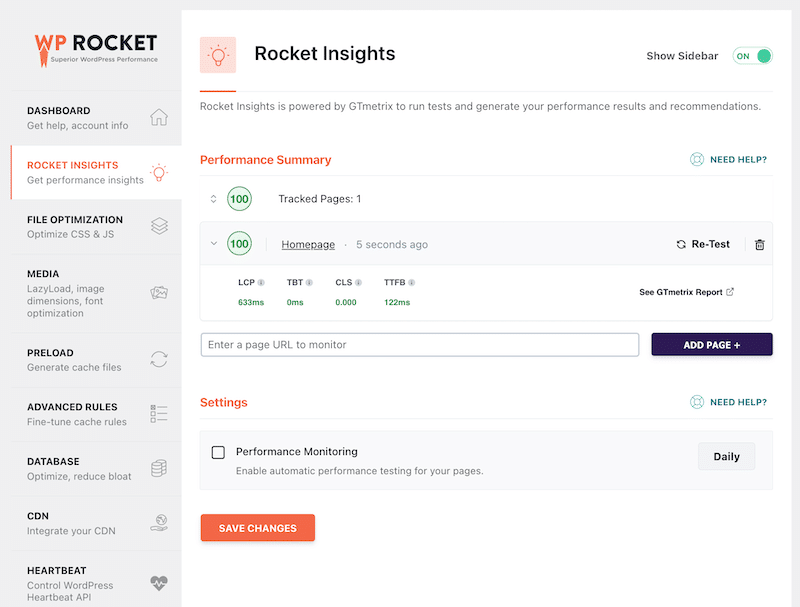
Rocket Insights gives you a clear overview of your performance, what to improve, and which WP Rocket features you can enable accordingly. Here are the main features and KPIs you can track:
- Global website performance score out of 100
- 4 key performance metrics LCP, CLS, TBT, and TTFB at both global and page level
- Actionable recommendations mapped to WP Rocket features
- Automatic monitoring with daily, weekly, or monthly reports
This helps you identify exactly what is slowing down your checkout and which optimization actions to apply.
3. Enable Advanced Performance Features in One Click
Based on your Rocket Insights report, you can go further and activate additional optimizations if needed. WP Rocket makes this step simple with its intuitive interface:
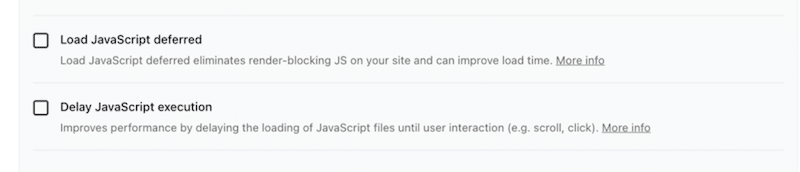
You can easily apply more advanced performance techniques directly from the interface, without any technical skills such as:
- Remove unused CSS
- Defer JavaScript loading
- Delay JavaScript execution
- Enable LazyLoad for images and media
- Preload links and improve resource loading
| 💡Hint: WP Rocket features are especially powerful for WooCommerce checkout optimization, as they reduce delays, improve responsiveness, and ensure a faster buying experience. |
4. Re-Test Your Performance with Rocket Insights
Once optimizations are enabled, go back to Rocket Insights and run a new test. You can clearly see how your performance score and Core Web Vitals improve. This allows you to measure the real impact of your changes on checkout speed and user experience.
| 💡Hint: Continuous monitoring within Rocket Insights and effective performance optimizations with WP Rocket help you maintain a fast, reliable checkout and improve WooCommerce checkout conversion over time. |
FAQ About WooCommerce Checkout Plugins
Which are the top 5 WooCommerce checkout optimization plugins to reduce cart abandonment rate?
The best WooCommerce checkout optimization plugins for reducing cart abandonment include WP Rocket for improving checkout speed and Core Web Vitals, CartFlows for optimized checkout funnels and upsells, WooCommerce Stripe Payment Gateway for flexible payment methods, WooCommerce Direct Checkout for shortening the purchase process, and Cart Abandonment Recovery for WooCommerce for recovering lost sales with automated emails. Together, these plugins help reduce friction, improve checkout performance, and create a faster buying experience that can increase conversions.
How Do I Choose the Right WooCommerce Checkout Plugin?
Start by identifying your main issue. If your checkout is slow, focus on performance plugins. If users drop off during the process, improve UX or simplify the process. The best WooCommerce checkout plugins are the ones that directly solve your biggest conversion problem.
How Can I Improve My WooCommerce Checkout Conversion Rate?
Start by improving performance to ensure a fast checkout experience. Then offer multiple payment gateways, display prices in local currency, simplify the checkout process, and allow guest checkout or social login. These are key WooCommerce checkout optimization techniques to reduce friction and increase conversions.
Which Checkout Plugin Is Best for One Page Checkout?
WooCommerce One Page Checkout is one of the best WooCommerce checkout plugins for creating a single page checkout and simplifying the buying journey.
Can I Use Multiple WooCommerce Checkout Plugins Together?
Yes, but use them strategically. Combine complementary plugins, for example one for performance, one for payments, and one for checkout UX. Avoid using multiple plugins with the same features to prevent conflicts and performance issues.
Do WooCommerce Checkout Plugins Slow Down My Site?
Well-built WooCommerce checkout plugins should not slow down your site significantly. However, adding too many plugins can impact performance. If your checkout feels slow, using a performance plugin like WP Rocket helps maintain speed and improve WooCommerce checkout optimization.
Does Checkout Speed Affect Conversion Rates?
Yes, significantly. A site that loads in 1 second can have up to 2.5 times higher conversion rates than one loading in 5 seconds. Also, around 40% of users leave a website if it takes more than 3 seconds to load. Speed is a key factor to improve WooCommerce checkout conversion.
What Causes Cart Abandonment in WooCommerce?
Common causes include slow checkout performance, high shipping costs or long delivery times, limited payment options, lack of trust signals, no customer reviews, a checkout process that is too long, and forcing users to create an account. Fixing these issues helps reduce cart abandonment WooCommerce stores often face.
Wrapping Up
When you improve your checkout, you are going on the fastest road to increase revenue on your WooCommerce store. If you want to reduce cart abandonment and improve WooCommerce checkout conversion, the right plugins make all the difference.
It’s true that WooCommerce gives you a solid base, but it is not enough on its own. To stay competitive, you need to optimize, customize, and boost performance with the right tools: fix performance first, then improve UX, and build trust step by step.
If your checkout feels slow, WP Rocket is your best ally. It helps you speed up your store, improve Core Web Vitals, and deliver a fast buying experience that converts.
Try WP Rocket today and give your store the performance boost it deserves. No risks taken with the 14-day refund guarantee! 🚀