

Table of Contents
Last update on
Looking for the best WordPress page builders to create your website faster? Using a page builder can save you a huge amount of time, but with so many options available, choosing the right one can quickly become overwhelming.
To help you decide, we did the heavy lifting for you: WordPress page builder performance comparison, key KPIs, performance profiles, strengths, limitations, pricing, and optimization tips.
We’ll help you understand which builder best matches your workflow, technical level, and goals, and more importantly, how to speed up WordPress page builders for faster loading times and better Core Web Vitals.
| TL;DR Some page builders generate more code and extra elements behind the scenes, which can lead to slower loading times and impact Core Web Vitals. Others are built with a lighter architecture and generally perform better out of the box. However, speed isn’t the only aspect to take into account: visual builders often provide greater design flexibility and advanced features while still delivering excellent performance when properly optimized. The fastest setup usually comes from choosing the right page builder and combining it with WP Rocket. Among many other optimizations, WP Rocket handles caching and code optimization, helping deliver a faster website and stronger Core Web Vitals performance. |
Key Takeaways
✅ Your page builder choice directly impacts Core Web Vitals and page speed because it’s the backbone of your page.
✅ Choosing the right page builder depends on your technical skills, workflow, design needs, and performance goals.
✅ CSS, JavaScript, dynamic widgets, and unused assets are some of the biggest factors affecting page builder performance and Core Web Vitals.
✅ Even feature-rich page builders can achieve excellent GTmetrix scores and strong Core Web Vitals with WP Rocket. In our performance test, WP Rocket helped WPBakery achieve a 100 PageSpeed performance score.
✅ WP Rocket is the easiest WordPress performance plugin to optimize page builder loading speed thanks to caching, CSS/JS optimization, lazy loading, and many other optimizations.
10 Fastest WordPress Page Builders Compared (2026)
Some builders focus on clean code and speed, others on AI features, large template libraries, visual editing, or advanced WooCommerce capabilities. To help you choose, we tested 10 of the fastest WordPress page builders and compared their performance profiles, key features, use cases, and pricing. Let’s go over them.
1. Gutenberg (WordPress Block Editor)
Gutenberg is WordPress’s native block editor built directly into WordPress core. Instead of relying on a third-party visual builder, it uses a block-based editing system that keeps the experience simple while offering more flexibility than the Classic Editor.
⚡ Performance Profile
Gutenberg follows a lightweight, minimal-code philosophy rather than a feature-heavy visual builder approach. Since it is integrated directly into WordPress core, it generally generates cleaner markup and fewer assets than traditional page builders.
Built-in performance strengths:
- Lightweight code output.
- Reduced external script dependency.
- Native WordPress optimizations.
- Full Site Editing architecture.
- Minimal front-end overhead.
Overall performance score: 89/100.
Page speed: 3.5s.
LCP: 2.2s.
🧩 Key Features
- Block-based editing.
- Full Site Editing (FSE).
- Reusable blocks and patterns.
- Template editing.
- Responsive controls.
- Dynamic content support.
- WooCommerce compatibility.
- Global styling options.
✅ Pros
- Very lightweight.
- Excellent Core Web Vitals potential.
- Native WordPress integration.
- No additional builder dependency.
- Free to use.
❌ Cons
- Fewer advanced design features.
- Additional block plugins may be needed.
- Less visual flexibility than dedicated builders.
👥 Best For
- WordPress users who want to stay native.
- Beginners who don’t want to touch code.
- Performance-focused users.
- Developers.
💰 Pricing
- Free (included directly with WordPress).
2. Elementor
Elementor focuses on visual design flexibility with a drag-and-drop editor, AI capabilities, advanced customization, and professionally designed website kits.
⚡ Performance Profile
Elementor follows a feature-rich visual builder philosophy. Recent updates improved performance through optimized asset loading, Flexbox containers, and DOM reduction.
Built-in performance strengths:
- Optimized asset loading.
- Flexbox containers.
- Reduced DOM output.
- Improved CSS handling.
- Native lazy loading support.
Overall performance score: 81/100.
Page speed: 5s.
LCP: 3.1s.
🧩 Key Features
- Visual drag-and-drop editing.
- Theme Builder.
- WooCommerce Builder.
- Popup Builder.
- AI tools.
- Dynamic content support.
- Responsive controls.
- Professionally designed multipurpose templates and website kits.
✅ Pros
- Beginner-friendly interface.
- Strong design flexibility.
- Extensive widget library.
- Excellent WooCommerce capabilities.
❌ Cons
- Multiple add-ons may increase page weight.
- Advanced features require Pro.
- Heavy animations can affect performance.
👥 Best For
- Beginners.
- Freelancers.
- Web designers.
- WooCommerce users.
- Agencies.
💰 Pricing
- Free version available.
- It starts at $59/year for Elementor Pro.
3. Bricks Builder
Bricks Builder is a modern page builder focused on performance and clean code output. It aims to replace multiple plugins through built-in features while keeping websites fast.
⚡ Performance Profile
Bricks follows a performance-first and developer-focused philosophy.
Built-in performance strengths:
- Lightweight asset loading.
- Dynamic CSS loading.
- Reduced dependencies.
- Clean HTML output.
- No front-end jQuery dependency.
Overall performance score: 88/100.
Page speed: 3.7s.
LCP: 2.3s.
🧩 Key Features
- Dynamic content support.
- Query loop builder.
- Form builder.
- Mega menu builder.
- WooCommerce Builder.
- Global classes and variables.
- Conditional logic.
- Reusable components and templates.
✅ Pros
- Extremely fast output.
- Reduces plugin dependency.
- Strong developer workflow.
❌ Cons
- Learning curve for beginners.
- Fewer beginner resources.
👥 Best For
- Developers and agencies.
- Performance-focused users.
- Advanced WooCommerce projects.
💰 Pricing
- It starts at $79/year.
- Lifetime license available.
4. Breakdance
Breakdance is a visual builder designed to provide a complete website-building toolkit with many built-in capabilities, reducing the need for extra plugins.
⚡ Performance Profile
Breakdance follows a visual productivity approach with built-in performance optimization.
Built-in performance strengths:
- Reduced plugin dependency.
- Dynamic asset loading.
- Optimized CSS delivery.
- Built-in feature ecosystem.
Overall performance score: 84/100.
Page speed: 4.4s.
LCP: 2.7s.
🧩 Key Features
- Form builder.
- Popup builder.
- Mega menu builder.
- WooCommerce Builder.
- Dynamic content support.
- Global styling system.
- Conditional display logic.
- Professionally designed layouts and sections.
✅ Pros
- Rich built-in toolkit.
- Strong WooCommerce support.
- Modern editing experience.
❌ Cons
- Advanced users may want deeper developer tools.
- Smaller extension ecosystem.
👥 Best For
- Freelancers.
- Designers.
- Agencies.
- WooCommerce users.
💰 Pricing
- It starts at $99/year.
5. Oxygen Builder
Oxygen is a builder created primarily for developers and advanced users who want complete control over structure and output. It replaces the WordPress theme layer and gives full control over custom layouts and templates.
⚡ Performance Profile
Oxygen follows a developer-first and minimal-output philosophy.
Built-in performance strengths:
- Lightweight HTML output.
- Reduced front-end assets.
- Minimal script loading.
- Theme replacement architecture.
Overall performance score: 87/100.
Page speed: 3.8s.
LCP: 2.4s.
🧩 Key Features
- Theme Builder and dynamic content support.
- WooCommerce Builder.
- Custom code integration.
- Global styling system.
- Reusable components.
- Conditional logic.
✅ Pros
- Very fast output.
- Complete design control.
- Perfect for creating fully custom templates from Figma designs.
❌ Cons
- Steeper learning curve.
- Less beginner friendly.
👥 Best For
- Developers.
- Agencies.
- Advanced custom websites.
- Figma-to-WordPress workflows.
💰 Pricing
- It starts around $199.
6. Beaver Builder
Beaver Builder is a mature and reliable page builder focused on stability and long-term usability.
⚡ Performance Profile
Beaver Builder follows a stable and lightweight philosophy.
Built-in performance strengths:
- Clean output.
- Stable codebase.
- Reusable layouts.
- Lightweight theme integration.
Overall performance score: 86/100.
Page speed: 4s.
LCP: 2.5s.
🧩 Key Features
- Front-end drag-and-drop editing.
- Responsive design controls.
- Professionally designed page layouts.
- Reusable modules and templates.
- Global color settings.
✅ Pros
- Stable and reliable.
- Great for client websites.
- Clean editing experience.
❌ Cons
- Fewer advanced visual effects.
- Theme building and more advanced features such as dynamic content and loop require Beaver Themer.
👥 Best For
- Agencies.
- Freelancers.
- Business websites.
💰 Pricing
- Free Lite version available.
- It starts at $99/year.
7. Brizy
Brizy focuses on simplicity and visual editing with a clean interface and ready-made layouts.
⚡ Performance Profile
Brizy follows a visual-first design philosophy.
Built-in performance strengths:
- Optimized front-end output.
- Dynamic asset loading.
- Responsive design handling.
Overall performance score: 83/100.
Page speed: 4.7s.
LCP: 2.9s.
🧩 Key Features
- Drag-and-drop editing.
- Dynamic content.
- Popups.
- Responsive controls.
- Professionally designed page layouts and templates.
✅ Pros
- Very easy to use.
- Clean interface.
- Fast setup process.
❌ Cons
- Fewer advanced developer tools.
- Limited deep customization.
👥 Best For
- Beginners.
- Designers.
- Small businesses.
💰 Pricing
- Free version available.
- It starts at $59/year.
8. Thrive Architect
Thrive Architect focuses heavily on marketing and conversion optimization.
⚡ Performance Profile
Thrive Architect follows a conversion-focused philosophy.
Built-in performance strengths:
- Integrated marketing tools.
- Reduced plugin dependency.
- Optimized landing pages.
Overall performance score: 78/100.
Page speed: 5.4s.
LCP: 3.4s.
🧩 Key Features
- Landing page builder.
- Lead generation elements.
- Conversion-focused templates.
- Dynamic content.
- A/B testing ecosystem.
✅ Pros
- Excellent marketing tools.
- Strong conversion features.
❌ Cons
- Less flexible for custom development.
- Interface can feel busy.
👥 Best For
- Marketers.
- Bloggers.
- Landing pages.
💰 Pricing
- It starts around $99/year.
9. WPBakery Page Builder
WPBakery remains widely used and bundled with premium themes.
⚡ Performance Profile
WPBakery follows a legacy visual builder philosophy.
Built-in performance strengths:
- Responsive controls.
- Front-end editing.
Overall performance score: 80/100.
Page speed: 5s.
LCP: 2.7s.
🧩 Key Features
- Front-end editing.
- Back-end editing.
- Content elements.
- Professionally designed templates.
✅ Pros
- Large compatibility with themes.
- Familiar workflow.
❌ Cons
- Heavier code output.
- Shortcode dependency.
👥 Best For
- Existing WPBakery websites.
- Legacy projects.
💰 Pricing
- It starts around $69 one time.
10. SeedProd
SeedProd started as a landing page plugin and evolved into a visual website builder.
⚡ Performance Profile
SeedProd follows a marketing-focused and lightweight philosophy.
Built-in performance strengths:
- Optimized landing pages.
- Lightweight front-end output.
Overall performance score: 85/100.
Page speed: 4.2s.
LCP: 2.6s.
🧩 Key Features
- Landing page builder.
- Theme builder.
- Email integrations.
- Professionally designed templates and sales pages.
✅ Pros
- Easy setup.
- Fast workflow.
❌ Cons
- Less advanced customization.
👥 Best For
- Marketers.
- Small businesses.
- Landing pages.
💰 Pricing
- Free version available.
- It starts at $39/year.
WordPress Page Builders Performance Comparison Table
To help you compare the best WordPress page builders at a glance, we tested and evaluated each solution based on performance, loading speed, ease of use, strengths, limitations, and pricing. Keep in mind that results may vary depending on your hosting, theme, plugins, and website complexity.
| Page Builder | Performance Score (/100) | Loading Speed | Ease of Use | Pros | Cons | Pricing |
| Gutenberg | 89 | 3.5s | Easy | Native WordPress integration, lightweight, excellent performance | Fewer advanced design options | Free |
| Bricks Builder | 88 | 3.7s | Medium | Very fast, clean code output, developer-friendly | Learning curve for beginners | From $79/year |
| Oxygen Builder | 87 | 3.8s | Medium–Hard | Full design control, lightweight output | Less beginner-friendly | From $199 |
| Beaver Builder | 86 | 4.0s | Easy | Stable, reliable, clean workflow | Fewer visual effects | From $99/year |
| SeedProd | 85 | 4.2s | Very Easy | Fast landing pages, beginner friendly | Limited deep customization | From $39/year |
| Breakdance | 84 | 4.4s | Easy | Built-in features reduce plugin dependency | Smaller ecosystem | From $99/year |
| Brizy | 83 | 4.7s | Very Easy | Clean interface, quick setup | Fewer advanced developer tools | From $59/year |
| Elementor | 81 | 5.0s | Very Easy | Huge ecosystem, strong WooCommerce support | Add-ons can increase page weight | From $59/year |
| WPBakery | 80 | 5.0s | Medium | Large theme compatibility | Shortcode dependency, heavier output | From $69 one-time |
| Thrive Architect | 78 | 5.4s | Medium | Excellent conversion-focused tools | Less flexible for custom development | From $99/year |
What’s The Best Page Builder Setup for Your Needs?
The right choice depends on your workflow, daily tasks, technical level, and priorities. Some users need lightweight WordPress page builders focused on speed, while others need advanced design systems, WooCommerce features, or reusable workflows. Let’s find out what’s best for you and your business.
For Beginners
⚡ Best choice: Elementor, SeedProd, Brizy
If you’re just getting started, your main challenge is usually not performance; you want something visual and intuitive.
Elementor works particularly well because you can visually drag elements onto the page and instantly see the result. SeedProd and Brizy make website creation feel almost like using Canva.
Their templates and widgets can save enormous time because many things are already built for you.
For Performance-Focused Users
⚡ Best choice: Gutenberg, Bricks Builder, Oxygen
If you constantly look at GTmetrix scores and care about every request and every millisecond, these builders make sense.
You probably optimize images, reduce plugin usage, and pay attention to Core Web Vitals. Bricks and Oxygen generate very clean output and reduce unnecessary front-end assets, while Gutenberg remains naturally lightweight because it is built into WordPress.
Gutenberg is also a great option if you want to stay inside the native WordPress experience without adding another plugin ecosystem.
For Web Designers
⚡ Best choice: Oxygen Builder, Bricks Builder, Elementor
Designers often work differently. You’re probably not starting with a blank page; you’re starting with a Figma file.
Oxygen becomes extremely convenient because it replaces the WordPress theme layer entirely. Instead of fighting theme structures, you can recreate designs exactly as you imagined them. Bricks also works beautifully with reusable classes and global components.
For Business Owners
⚡ Best choice: Elementor, Gutenberg, SeedProd, Beaver Builder
As a business owner, your website is a business tool. You probably don’t want to call a developer every time you need to change a promotion banner or edit pricing.
Elementor and Beaver Builder give flexibility without requiring technical knowledge, while SeedProd makes landing pages and campaigns very fast to build. Gutenberg stays attractive if you prefer simplicity and fewer dependencies.
On a typical day, you might update opening hours, create a landing page for a seasonal promotion, publish a new service, or change homepage text before a campaign launch.
For WooCommerce Owners
⚡ Best choice: Elementor, Breakdance, Beaver Builder
WooCommerce websites require product pages, category pages, upsells, checkout experiences, and dynamic product data to become critical quickly.
Elementor has one of the strongest WooCommerce ecosystems available. Breakdance includes many WooCommerce features directly inside the builder. Beaver Builder provides a stable and reliable structure for long-term stores.
For Developers
⚡ Best choice: Oxygen Builder, Bricks Builder
Developers usually care less about flashy visual effects and more about output quality and flexibility.
Bricks and Oxygen feel closer to development tools. They provide reusable components, dynamic data, cleaner HTML structures, and more control over custom code.
For Freelancers
⚡ Best choice: Elementor, Breakdance, Beaver Builder
Freelancers constantly balance speed, flexibility, and client expectations. Elementor is useful because many clients already recognize it. Breakdance reduces plugin dependency and Beaver Builder remains reliable for long-term projects.
For SEOs and Marketers
⚡ Best choice: Thrive Architect, SeedProd, Elementor
For marketers, the website itself becomes part of the conversion strategy.
Thrive Architect focuses heavily on lead generation and conversion optimization. SeedProd works extremely well for landing pages and Elementor gives flexibility with forms, popups, and dynamic campaigns.
For Agencies
⚡ Best choice: Bricks Builder, Elementor, Beaver Builder, Gutenberg, WPBakery
Agencies need scalability more than anything. You’re not creating one website; you’re creating many while coordinating teams and clients.
Bricks is becoming popular because reusable systems save huge amounts of time. Elementor remains common because clients already know how to use it. Beaver Builder is appreciated for reliability. Gutenberg also becomes interesting if your agency wants to avoid relying heavily on third-party builders and keep everything close to WordPress core. WPBakery still exists in many agency environments because a large number of client sites already use it.
How We Tested the Page Builders Performance
To make this WordPress page builder performance comparison as fair as possible, we tested all builders under the same conditions to eliminate external variables.
Here’s our testing setup:
📍 Server location: France
📱 Testing device: Mobile, more precisely iPhone 14 (more representative of real-world users)
🚀 Testing tool: GTmetrix. GTmetrix is the most complete and actionable website performance testing platform available. It helps you understand exactly what is slowing down your website through actionable KPIs and recommendations.
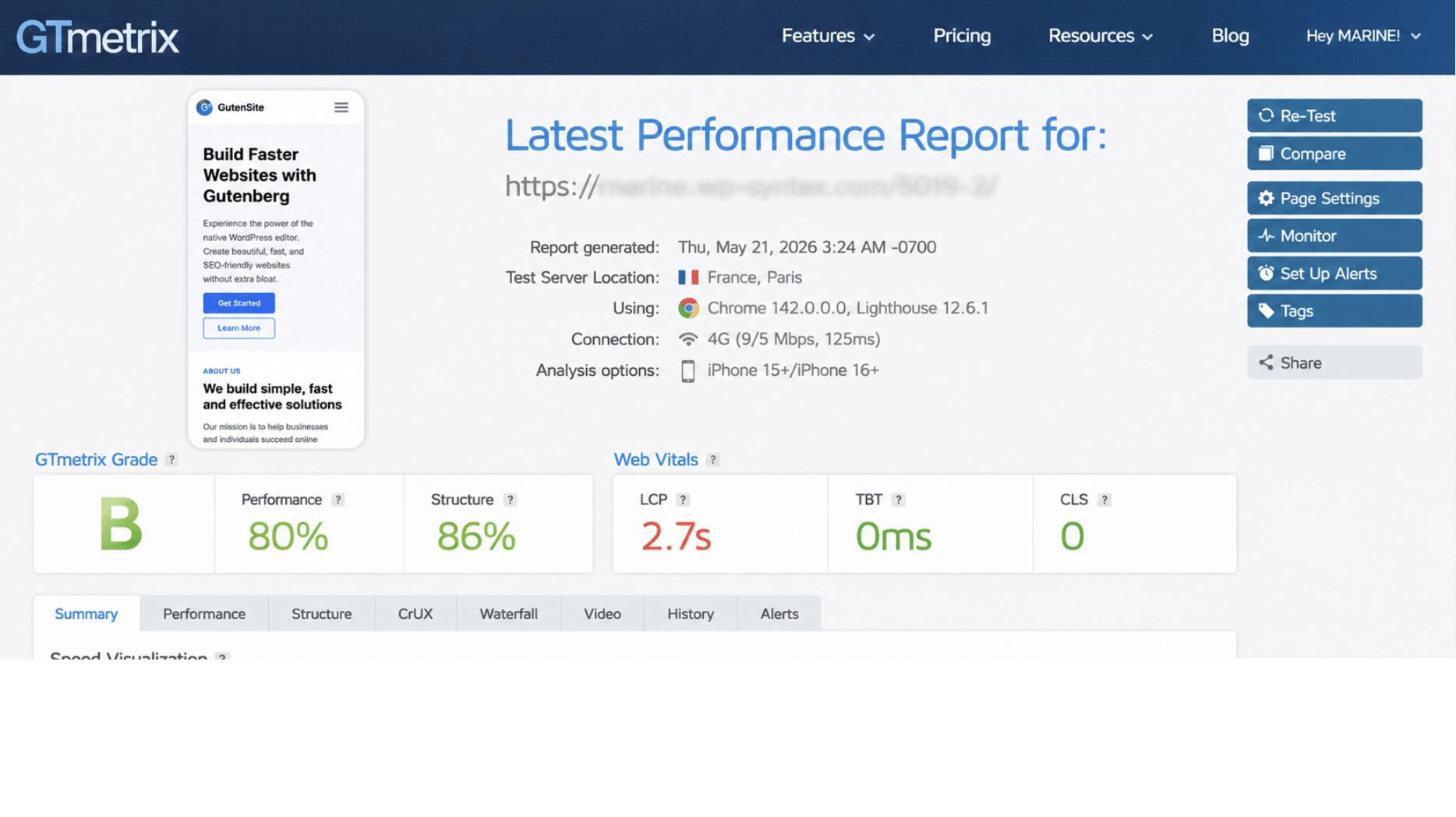
📄 Same page structure: identical content and design across all builders.
⚙️ Same environment: same hosting, theme, images, and plugins.
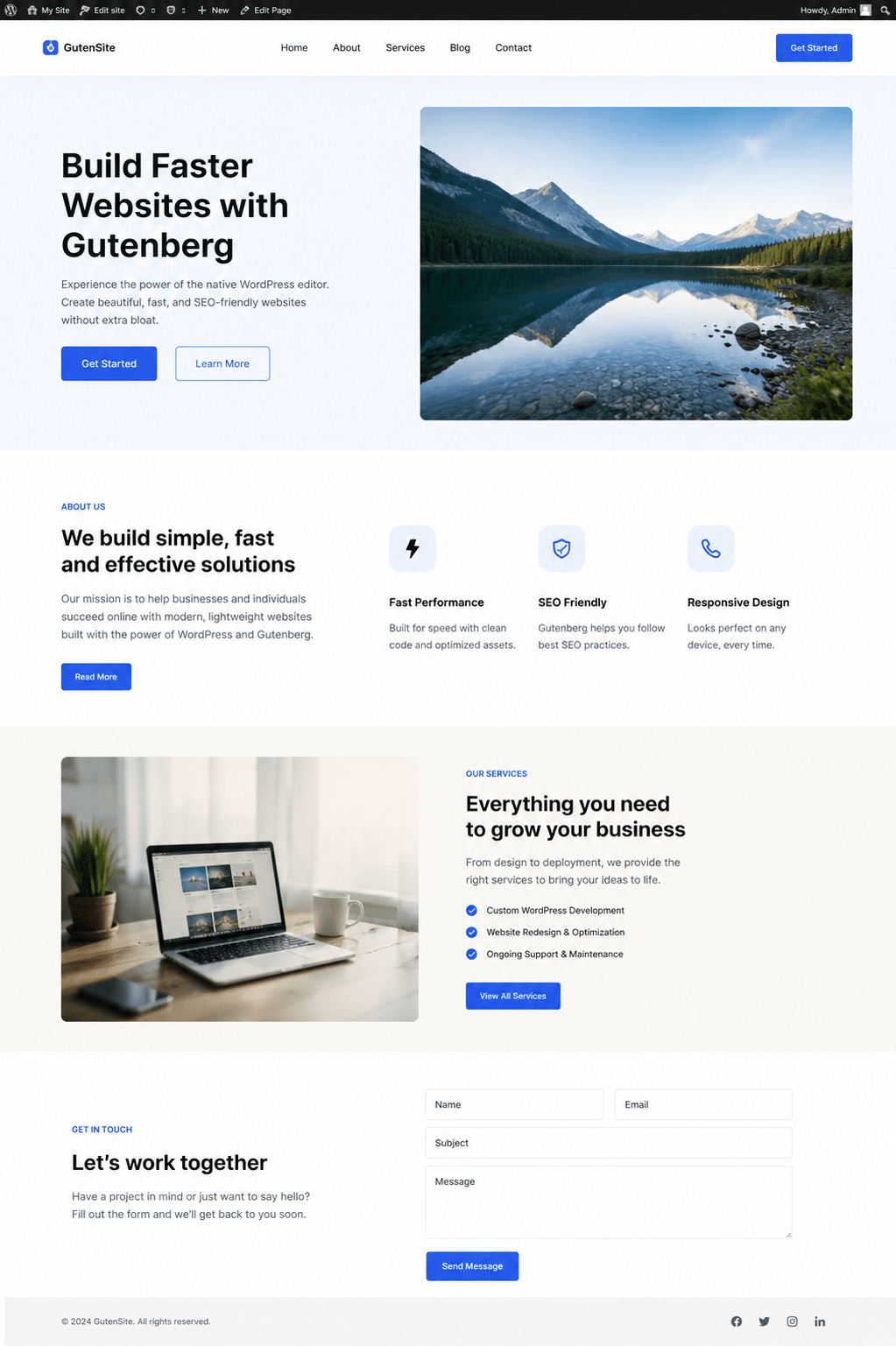
✅ Each test page included: Each test page included a hero section with a heading and call-to-action (CTA), images, text blocks with icons, and buttons to recreate a realistic page layout and ensure consistent performance comparisons across page builders.
We then measured the following metrics:
- Overall performance score /100
- Fully loaded time
- Core Web Vital (Largest Contentful Paint)
For the record, here’s how the demo site looks like when built with Gutenberg:
What Makes a WordPress Page Builder Fast or Slow?
Here are some common reasons why a page builder can be fast or slow, with simple examples to help you understand their effect on loading speed.
📖 DOM Size and Code Output
DOM simply means the structure of your page behind the scenes. The more containers, sections, and nested elements your builder creates, the more work the browser has to do before showing the page.
🔎 Example: You create a simple hero section with a title, image, and button. One builder creates 15 elements, another creates 60 nested elements for the same result. More code usually means slower rendering.
📖 CSS and JavaScript Loading
CSS controls design and JavaScript controls interactions. Some builders load only what is needed, while others load many files even when they are not used.
🔎 Example: You add a contact form on one page, but the builder loads form scripts on every blog article of your website.
📖 Asset Bloat and Unused Code
Asset bloat happens when visitors download code they never actually use.
🔎 Example: Your page only uses a button and image, but the builder still loads popup styles, carousel scripts, animation files, and extra icons.
📖 Dynamic Elements and Third-Party Scripts
Widgets and integrations can create extra requests and increase loading time.
🔎 Example: Your homepage includes a Google Map, Instagram feed, chatbot, and review slider. Each one adds additional files and scripts to load.
🚀 Good news: WP Rocket can help boost page builders performance!
Even if a builder generates extra assets, WP Rocket is the easiest way to speed up WordPress page builders and improve Core Web Vitals. It automatically applies around 80% of performance best practices upon activation, including caching, GZIP compression, lazy rendering, critical image optimization, CSS/JavaScript minification, and Google font optimization.
WP Rocket can also help with additional optimizations through its beginner-friendly interface in just a few clicks such as defer JavaScript, delay non-essential JavaScript, remove unused CSS, implement lazy loading and optimize your database.
| 🚀 WP Rocket optimizations work alongside your page builder to reduce their common performance issues like extra CSS, JavaScript, unused code, and slower loading times. |
How to Make Any Page Builder Faster
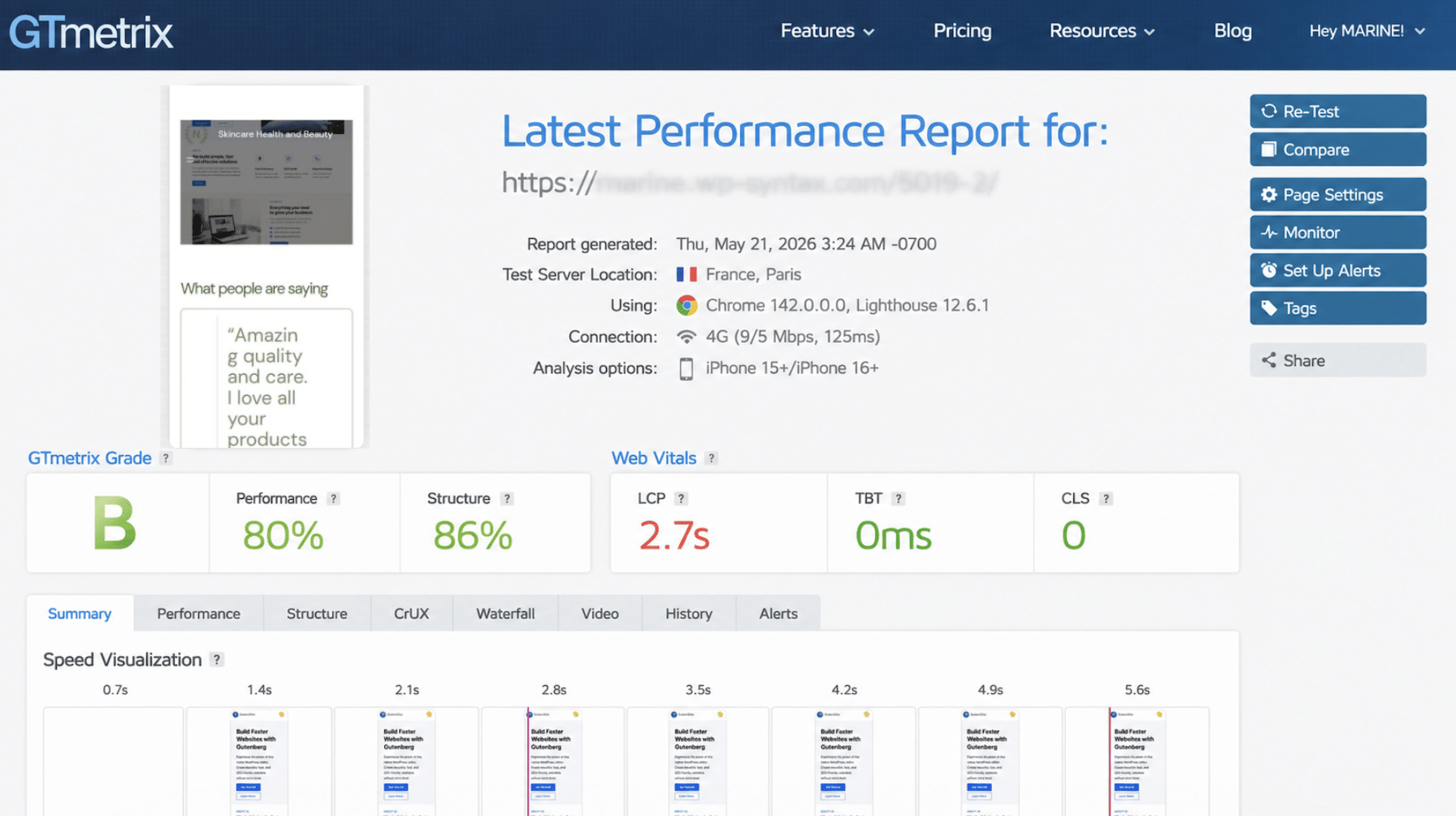
Let’s use the GTmetrix report before and after applying WP Rocket page builder optimization, so you can see the improvements by yourself. We will take the site built with WPBakery.
Performance Result Before WP Rocket
- Overall Performance Score: 80%.
This is a good starting point, but there is still room for improvement.
- Page Speed (Fully Loaded Time): 5.0s.
The page takes more than 5 seconds to fully load. This KPI should be under 3.
- Core Web Vitals KPI (LCP): 2.7s
Largest Contentful Paint measures how quickly users see the main content on the page. Google’s recommendation is below 2.5s.
You can see the full report here:
Top 3 Performance Issues to Fix and How WP Rocket Can Help
1. Avoid enormous network payloads
Your page is too heavy, mostly because of the unused JSS.
✅ Quick fix by WP Rocket: Delay or defer non-critical JS in one click.
2. Serve static assets with an efficient cache policy
Files are downloaded again instead of being reused.
✅ Quick fix by WP Rocket: Caching automatically enabled upon activation.
3. Avoid chaining critical requests
Some files wait for others before loading, slowing down the page.
✅ Quick fix by WP Rocket: Reduce unnecessary CSS and JavaScript dependencies in one click.
How We Boosted WPBakery Performance with WP Rocket
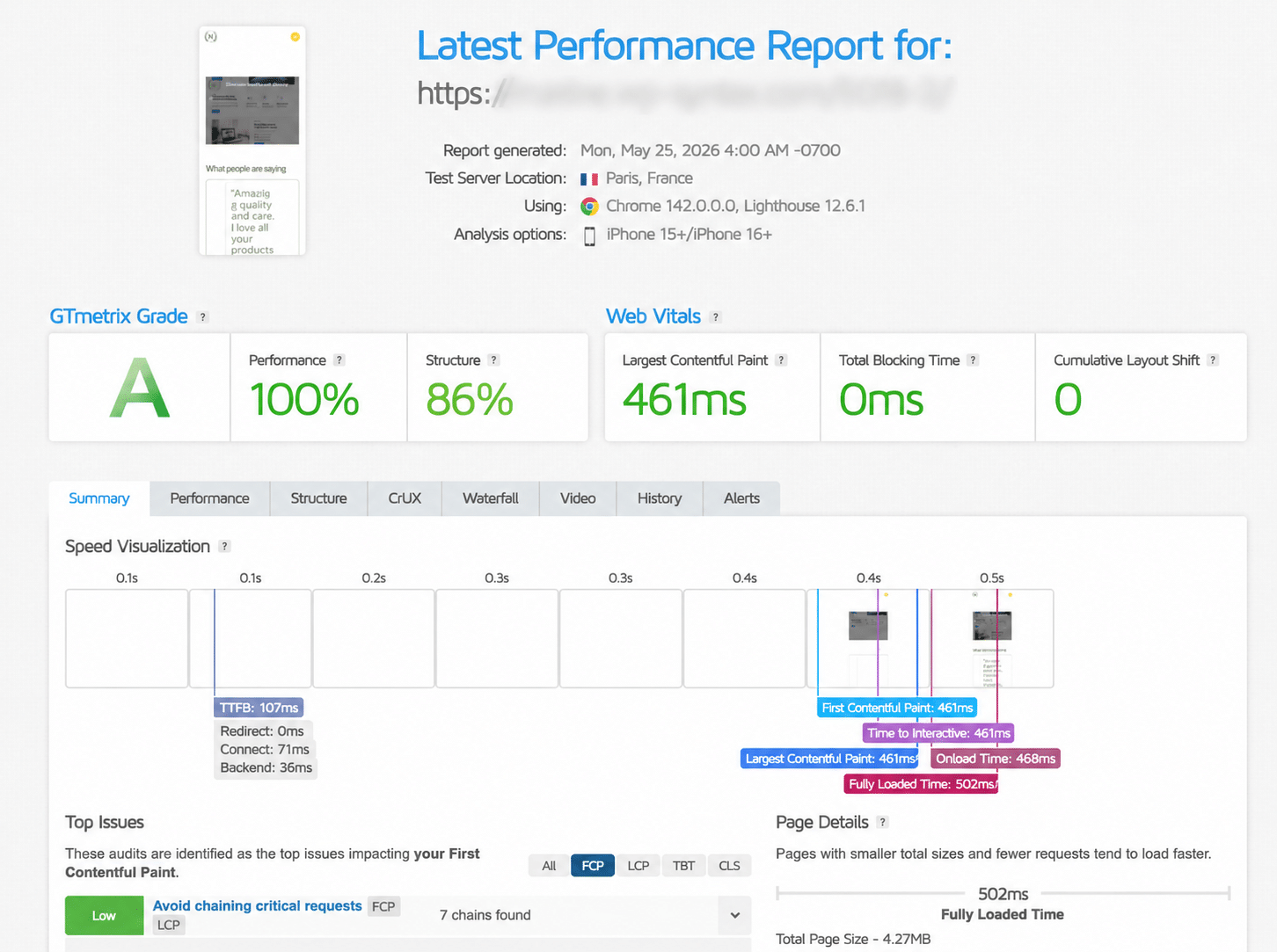
WP Rocket improved the site’s overall performance score from 80/100 to 100/100, enhanced Core Web Vitals by reducing LCP from 2.7s to 461ms, and significantly improved page speed from 5s to 0.5s.
| Metric | Before WP Rocket | 🚀 After WP Rocket |
| Overall Grade | B (80/100) | A (100/100) |
| Page Speed | 5 s | 0.5s |
| LCP | 2.7s | 461ms |
You can see the new performance report is much better with WP Rocket activated on our site:
🚀 Here’s why WP Rocket is considered the best performance plugin for page builders: it directly targets common page builder issues such as extra CSS and JavaScript and helps defer heavy assets, among many other optimizations — and in the simplest way. By reducing performance bottlenecks, it easily helps deliver a faster website and improves Core Web Vitals performance.
| Common Performance Issues with Page Builders | How to Fix It | 🚀 WP Rocket features |
| Large DOM size from nested sections, containers, and widgets | Simplify layouts and reduce unnecessary nested elements | Remove Unused CSS + Cache Preloading + GZIP compression |
| Extra CSS and JavaScript generated by builder widgets and animations | Load only essential assets and delay non-critical files | Delay JavaScript Execution + Remove Unused CSS |
| Heavy dynamic elements (sliders, popups, forms, maps, animations) creating extra requests | Reduce unnecessary widgets and prioritize above-the-fold content | LazyLoad + Delay JavaScript Execution + Critical image optimization |
| 💡Wondering which WP Rocket features are most relevant for your website? Rocket Insights makes the optimization decisions easy! Included for free with your WP Rocket license, Rocket Insights lets you monitor your overall website performance score (out of 100) along with key metrics while providing clear recommendations on which WP Rocket features to enable next. With unlimited re-tests and automatic scheduling, you can track improvements over time without guesswork. |
FAQS
What Is the Fastest WordPress Page Builder?
In our benchmark, Gutenberg was the fastest WordPress page builder thanks to its native WordPress architecture and lightweight output. However, almost any builder can become fast with the right WordPress performance optimization tools. WP Rocket, one of the best performance plugins for page builders, can significantly improve loading times.
Which Page Builder Is Best for Core Web Vitals?
Native solutions like Gutenberg, along with Bricks and Oxygen, generally perform best for Core Web Vitals because they generate cleaner code and fewer assets. WP Rocket can further improve Core Web Vitals with caching, delayed JavaScript, and code optimization.
Can You Make Any Page Builder Fast?
Yes. Most WordPress page builders perform reasonably well by default, but they still benefit from caching, code cleanup, lazy loading, and prioritizing critical content. Combined with strong hosting and WP Rocket, it’s easy to speed up WordPress page builders.
Do I Still Need a Performance Plugin if My Builder Is Lightweight?
Yes. Even lightweight WordPress page builders still load images, CSS, JavaScript, and database resources. A performance plugin adds extra optimizations such as caching, asset optimization, and Core Web Vitals improvements.
Which Is Better for Performance: Gutenberg or Elementor?
For pure speed, Gutenberg wins in our WordPress page builder performance comparison because it generates less front-end overhead. However, Elementor can be easier if you’re a beginner looking for design flexibility and templates. Your workflow and technical level matter too.
How Do I Optimize a Slow Page Builder Website?
The best way to optimize a slow website is to enable caching, remove unnecessary code, implement lazy loading, and prioritize above-the-fold content. All those WordPress performance optimization techniques are available directly in WP Rocket.
Wrapping Up
This guide should have helped you choose the best WordPress page builder according to your technical level, workflow, and goals. Beginners may prefer Elementor or SeedProd, performance-focused users may lean toward Gutenberg or Bricks, while designers and agencies often prioritize flexibility and reusable workflows.
The good news is that modern page builders are not nearly as bad for performance as they used to be at the very beginning. Out of the box, they already provide decent results. The real difference often comes from how you optimize them afterward.
Build the website you want, choose the page builder that fits your workflow, and let WP Rocket handle the performance side!
With a 14-day money-back guarantee, the only thing you’re really risking is seeing your page builder load much faster. 🚀