

Table of Contents
Last update on
Do you want to know the best website load time statistics to keep in mind in 2024? Our stats will give you an idea of where your website stands compared to the competitors. Taking load times seriously is the most effective thing you can do for your online business, as consumers don’t like to wait! Speed is not just a metric—it’s a cornerstone of success that impacts SEO, user experience, and conversion rates.
In this article, you’ll discover the importance of page load speed and its impact on your website. We’ll summarize our key findings about web statistics and practical tips for improving your performance easily.
Key Takeaways:
- Optimal Load Time: Google recommends websites load in under 3 seconds. The average first-page Google result loads in 1.65 seconds, while average load times are 2.5 seconds on desktop and 8.6 seconds on mobile.
- Conversion Impact: B2B sites loading in 1 second have 3x higher conversion rates than 5-second sites and 5x higher than 10-second sites. On mobile, every second delay can reduce conversions by up to 20%.
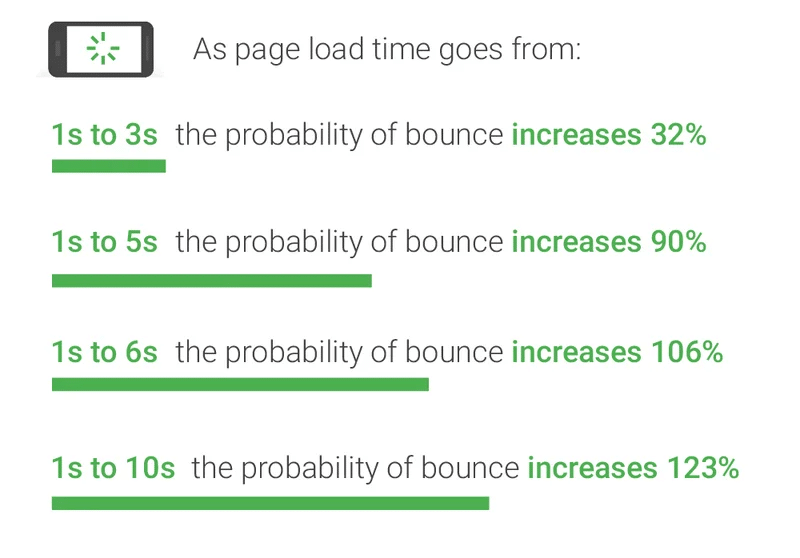
- Bounce Rate Correlation: Bounce probability increases 32% as page load time goes from 1 to 3 seconds. 47% of consumers expect 2-second loads, and 40% abandon sites taking over 3 seconds.
- Core Web Vitals: Largest Contentful Paint (LCP) should stay under 2.5 seconds for a good user experience. In 2023, 74% of websites achieved good LCP on desktop but only 61.4% on mobile.
- Mobile Optimization Priority: Mobile users wait 6-10 seconds before abandoning pages. With mobile-first indexing, optimizing mobile load times is critical for both user retention and SEO rankings.
- Performance Factors: Key factors impacting load time include caching, image optimization, code efficiency, hosting quality, third-party scripts, HTTP requests, and Core Web Vitals optimization.
What Are Website and Page Load Times?
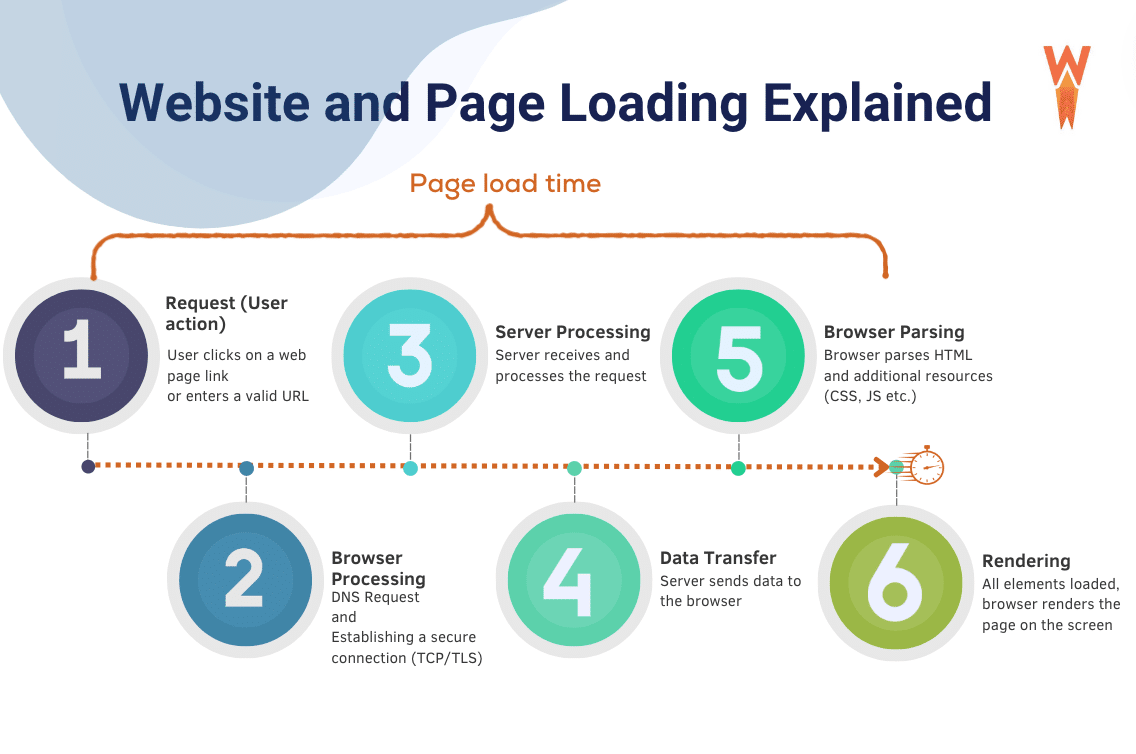
Website and page load times refer to how quickly a website or web page becomes fully accessible to a user after they request it via a web address or a link. As shown below, it measures the duration from initiating the request (user action) to when the content is fully displayed and usable on the screen (rendering).
| ⏱️ Page load time = The duration it takes for a web page to appear on a screen from the moment a user requests it. |
Why Page & Site Speed Statistics Matter
Page and site speed statistics are crucial for many reasons, but here are the 4 main reasons you should always keep the speed KPIs healthy on your site:
- User experience: Faster loading times improve user experience by reducing waiting times and frustration. Users are more likely to engage with and return to your site if it loads quickly and smoothly.
- Conversion rates: Slower page speeds correlate with higher bounce rates and lower conversion rates. Optimizing speed can lead to increased conversions, whether it’s making a purchase, signing up for a newsletter, or completing a form.
- SEO: Search engines like Google are taking page speed as a ranking factor. Websites that load faster are more likely to rank higher in search engine results pages (SERPs), potentially leading to increased organic traffic to your site.
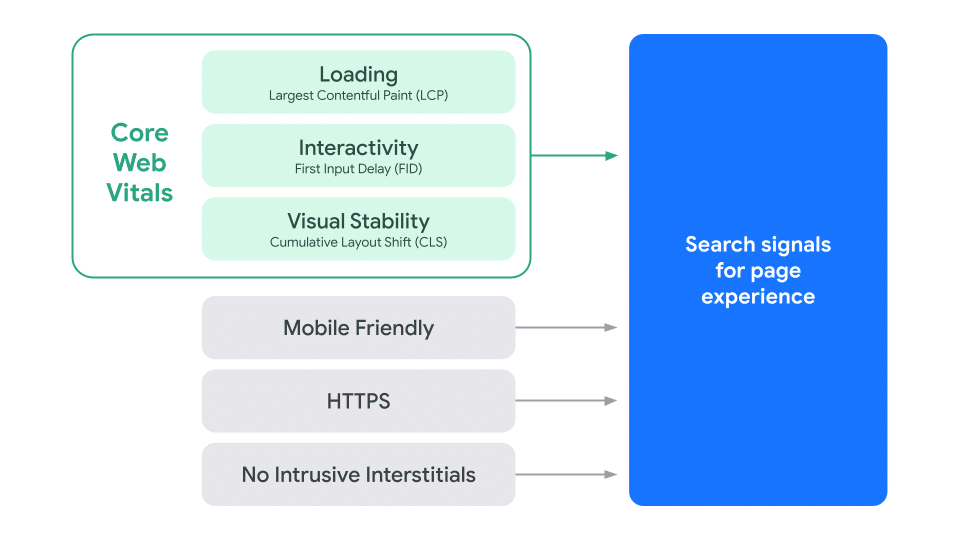
- Core Web Vitals: In 2020, Google released the Core Web Vitals – a set of three metrics that measure the speed, interactivity, and visual stability of a webpage. They are considered to be ranking factors for search engine optimization (SEO), so anything towards speed optimization will help your website rank higher in search results and provide a better user experience.
- Mobile users: With the increasing use of mobile devices, page speed is even more critical. Mobile users expect fast loading times, and search engines prioritize mobile-friendly websites in their rankings.
- Outrun the competition: A faster website can give you an advantage over competitors and improve brand perception. Customers will prefer to buy on your site rather than somewhere else.
- Cost efficiency: Faster loading times may also lead to cost savings. Websites with optimized speed require fewer server resources and bandwidth, which can result in lower hosting costs.
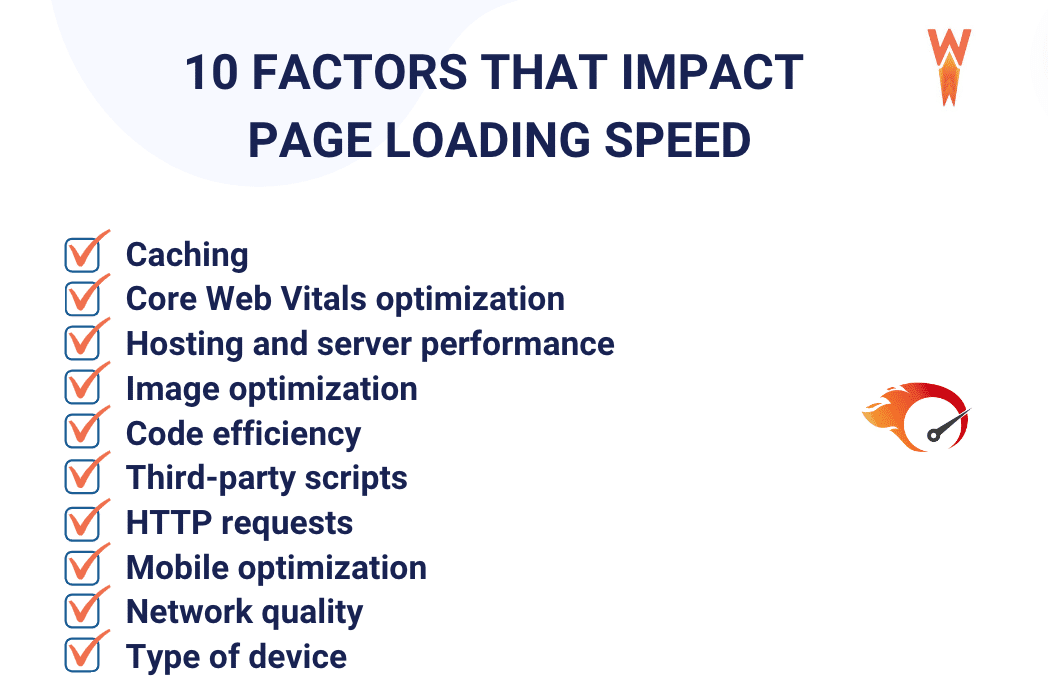
10 Factors Impacting Your Website Load Time
- Caching: Implementing caching mechanisms can improve load times and overall performance by storing frequently accessed data.
- Core Web Vitals optimization: Enhancing aspects like page loading speed, interactivity, and visual stability contributes to a better user experience and improved performance.
- Hosting and server performance: The quality and capabilities of your hosting service and server infrastructure directly influence website page speed, responsiveness, and reliability. We recommend choosing a managed hosting provider, like Kinsta; its server infrastructure is based on Google Cloud’s Premium Tier network and provides additional perks like Cloudflare-powered CDN for enhanced performance and 24/7 support for clients.
- Image optimization: Optimizing images for the web by reducing file sizes without compromising quality and serving them to WebP will get you faster loading times.
- Code efficiency: Well-structured and optimized code leads to faster rendering and smoother functionality of web pages.
- Third-party scripts: Monitoring and managing third-party scripts to minimize their impact on page loading times and overall performance.
- HTTP requests: Reducing the number of HTTP requests required to load a page can accelerate load times and improve performance.
- Mobile optimization: Designing websites to be mobile-friendly ensures seamless user experiences across various devices and screen sizes.
- Network quality: The speed of the internet connection affects how quickly data can be transmitted between the server and the user’s device.
- Type of device: The processing power and capabilities of the user’s device, such as a computer or a smartphone, influence how quickly it can render and display web content.
And here’s a checklist for you so you can go over each factor for your site and assess your overall performance easily:
What Is the Average Page Load Time in 2026?
The average web page load time is 2.5 seconds on desktop and 8.6 seconds on mobile, according to a study conducted by Tooltester.
What Is a Good Load Time for a Website?
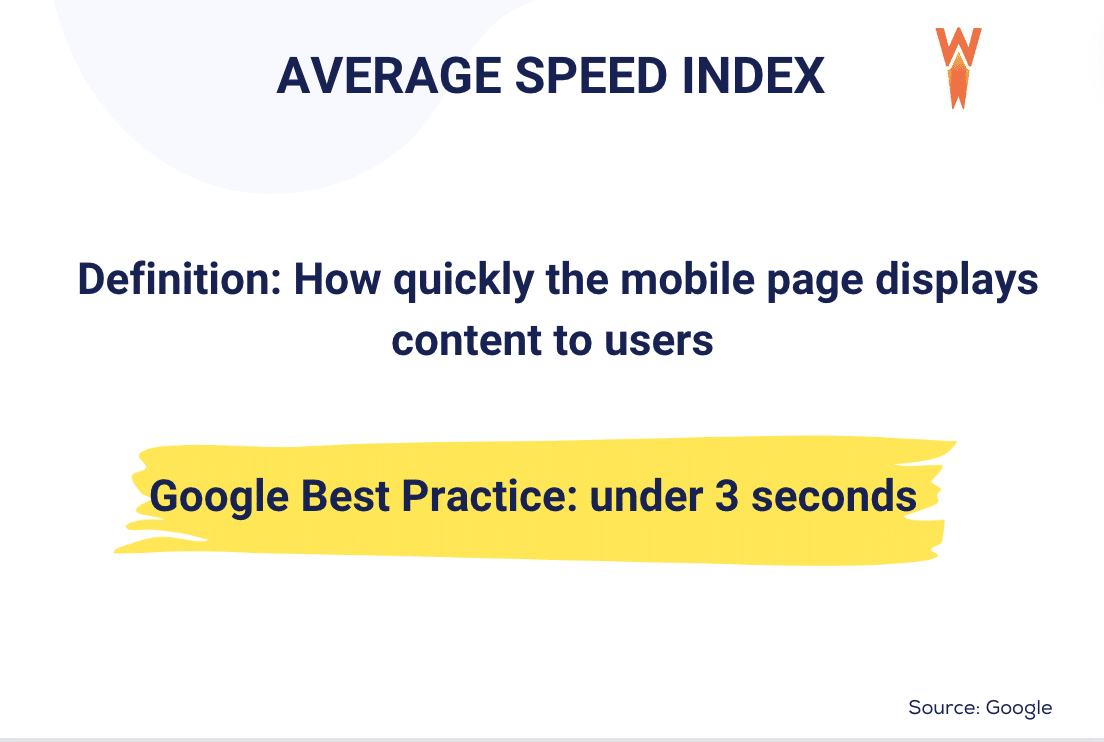
Ideally, you’ll want your website to load within three seconds. Keep in mind that the average page speed of a first-page Google result is 1.65 seconds.
What’s Google’s Recommended Page Load Time?
Google recommends that your site load in under three seconds, but they aim at half a second for their website.
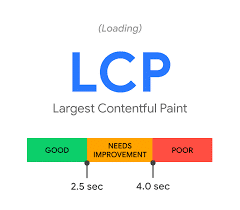
Since 2020, Google has launched three Core Web Vitals, which are metrics measuring the user experience on a page. One of the KPIs is the Largest Contentful Paint (LCP), which measures the perceived load speed. A fast LCP (under 2.5 seconds) reassures the user that the page is loading and that the content will be useful. Any actions to optimize it and keep it under 2.5 seconds will make your website load faster (and make Google happier).
How Fast Do People Expect a Website to Load?
Google reports that most people will leave your site if it takes more than 3 seconds to load. The slowest a site is, the highest the bounce rate will be. According to KissMetrics, 47% of consumers expected a website to load in 2 seconds or less, and 40% would abandon a website that takes more than 3 seconds to load.
| 💡 Did you know? WP Rocket now includes Rocket Insights, the built-in performance hub powered by GTmetrix. It brings performance monitoring right where you already optimize your website, so you can monitor your key pages, understand your results, get clear recommendations tied to WP Rocket features, and re-test anytime, all without juggling multiple tools. 🚀 Update WP Rocket to the latest version to start using Rocket Insights right from your dashboard: it’s included for free in your plan! |
How Long Are Mobile Users Willing To Wait for a Site To Load Before They Abandon the Page?
On average, most mobile user participants in the survey would wait 6-10 seconds before they abandon pages. However, if a webpage exceeds this time frame, it is likely that these users will abandon the page. This shows the critical importance of optimizing mobile website loading times to fall within this preferred range.
10 Page & Site Speed Statistics
Below are 10 site speed statistics that offer insight into how your website’s speed might hurt your ranking and conversion rates (and the sales) of your business.
Page Speed and Conversion Rates
The following stats suggest that the speed at which a website loads significantly influences its conversion rate. Users are more likely to take desired actions, such as making a purchase, signing up for a service, or completing a form on a website that loads quickly compared to one that loads more slowly. This underscores the importance of optimizing website load times to enhance user experience and improve conversion rates.
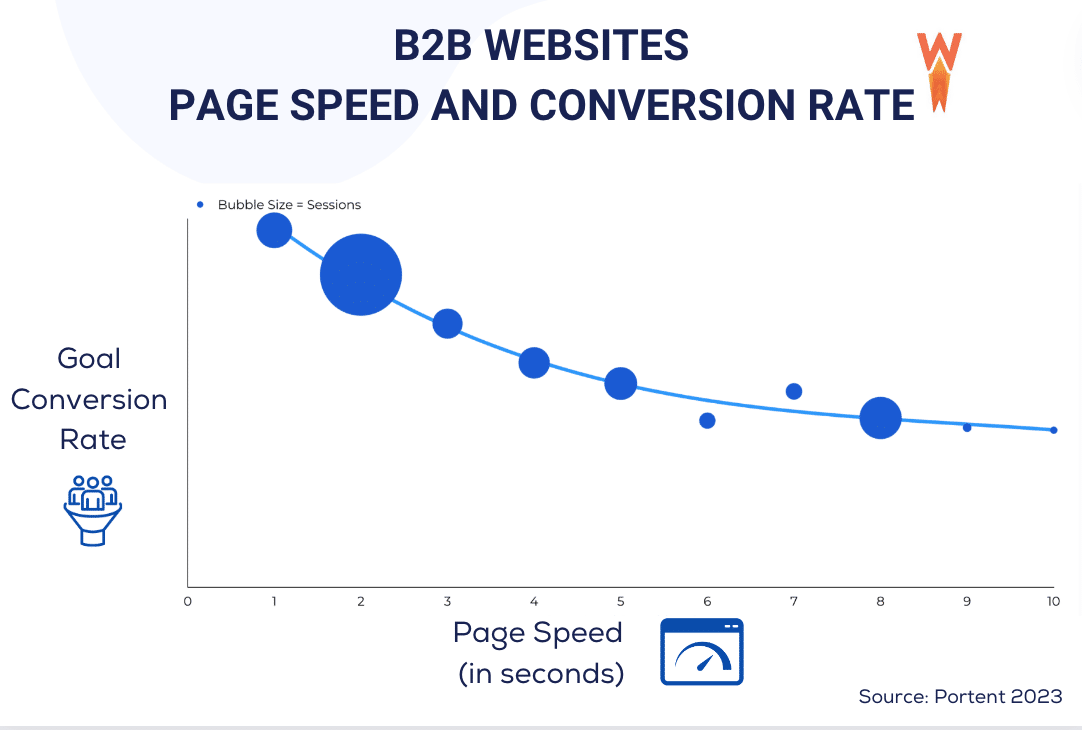
B2B Websites Key Takeaways (Portent’s Study)
- 82% of B2B pages load in 5 seconds or less.
- A B2B site that loads in 1 second has a conversion rate 3 times higher than a site that loads in 5 seconds.
- A B2B site that loads in 1 second has a conversion rate 5x higher than a site that loads in 10 seconds.
B2C Websites and Ecommerce Key Takeaways (Portent’s Study)
4. B2C websites are getting faster and load in 5 seconds or less.
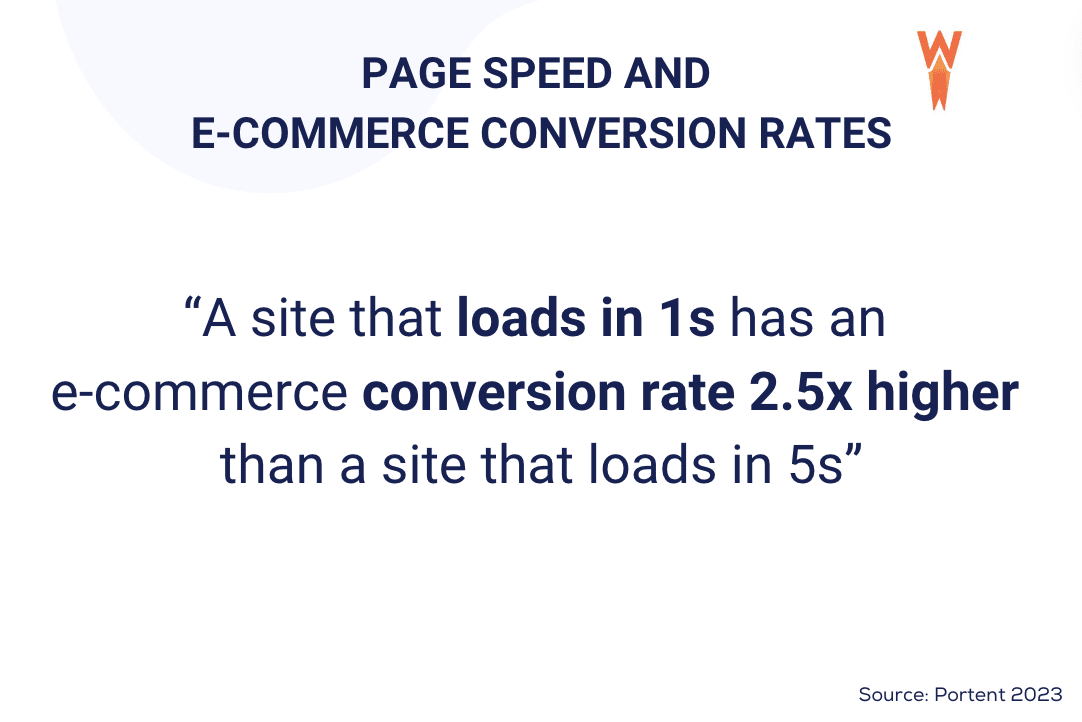
5. A site that loads in 1 second has an e-commerce conversion rate 2.5x higher than a site that loads in 5 seconds.
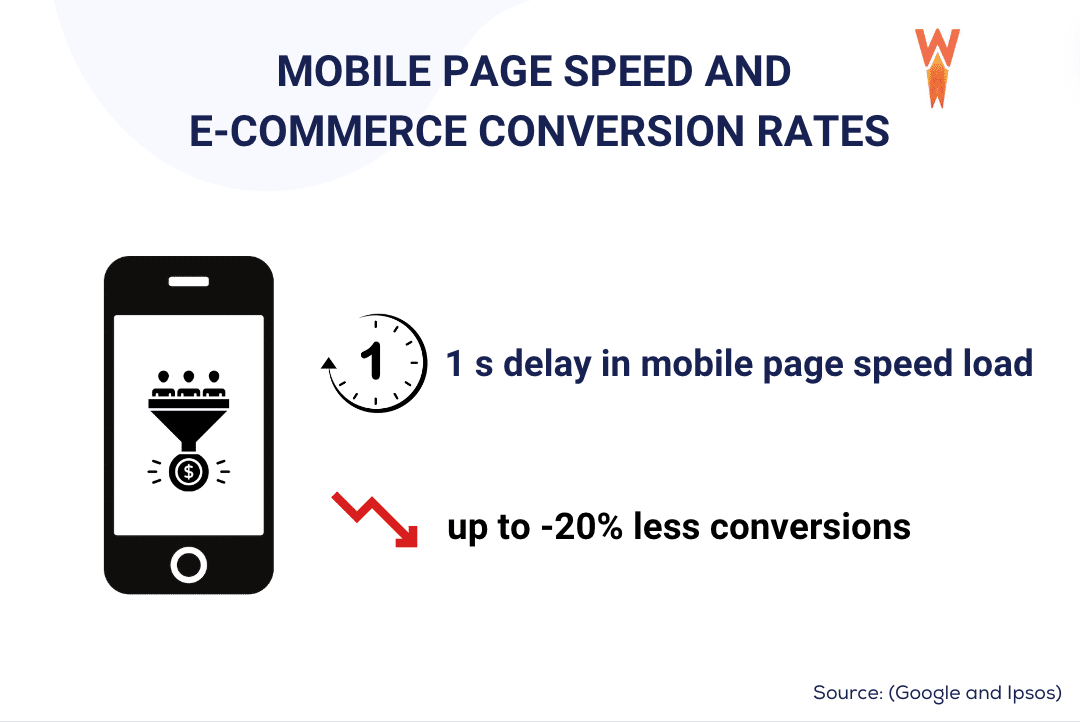
6. On mobile, for every second delay in mobile page load, conversions can fall by up to 20%. (Google and Ipsos)
Page Speed and Bounce Rate
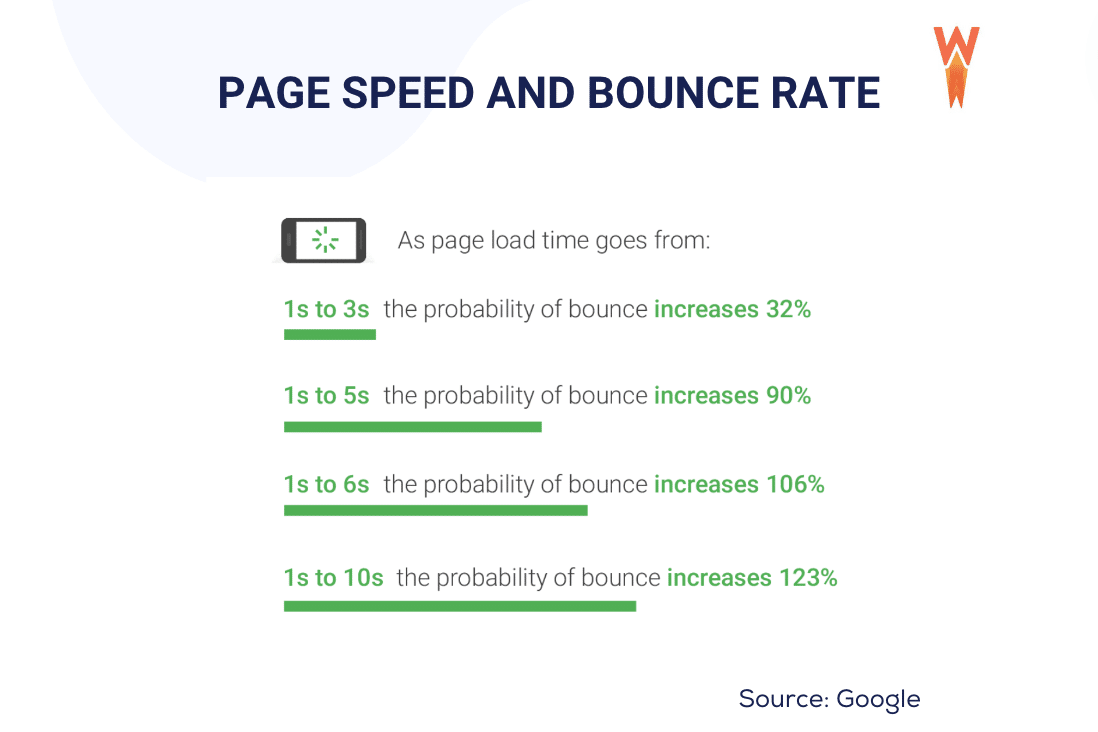
7. The probability of bounce increases 32% as page load time goes from 1 second to 3 seconds. (Google)
The correlation between page speed and bounce rate on mobile devices is clear: the slower a site loads, the higher the bounce rate tends to be. This means that when visitors encounter slow-loading pages, they are more likely to leave the site without exploring further.
Page Speed, Core Web Vitals, and Lost Traffic on WordPress
There’s still work to be done for WordPress sites, but the trend is nonetheless on the rise when it comes to working on loading speed and user experience.
8. 50% of WordPress sites in the research (3M+) have good Core Web Vitals.
Earlier, we mentioned the Largest Contentful Paint (LCP), which is a Core Web Vital used to measure the loading time. By optimizing LCP, you ensure that this critical content loads quickly, leading to a better user experience and SEO.
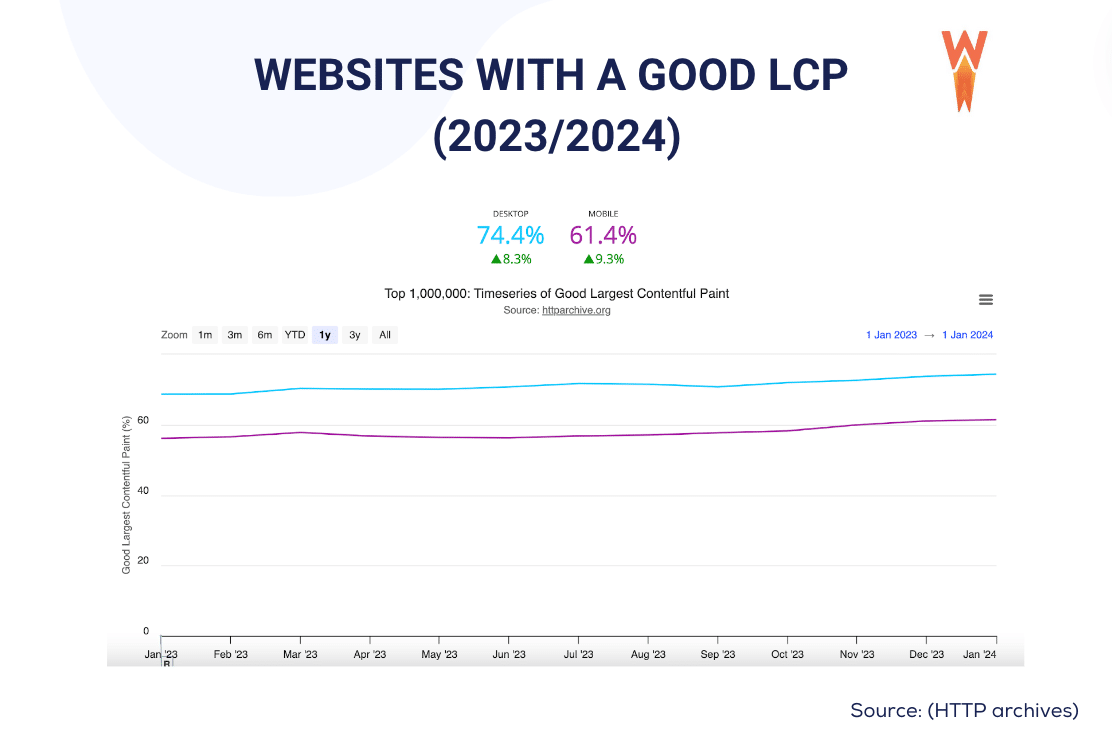
9. In 2023, 74% of the websites had a good LCP on desktop and 61,4% on mobile. (HTTP archive). In light of this, it becomes even more crucial for you to prioritize your website speed, especially on mobile devices, to remain competitive.
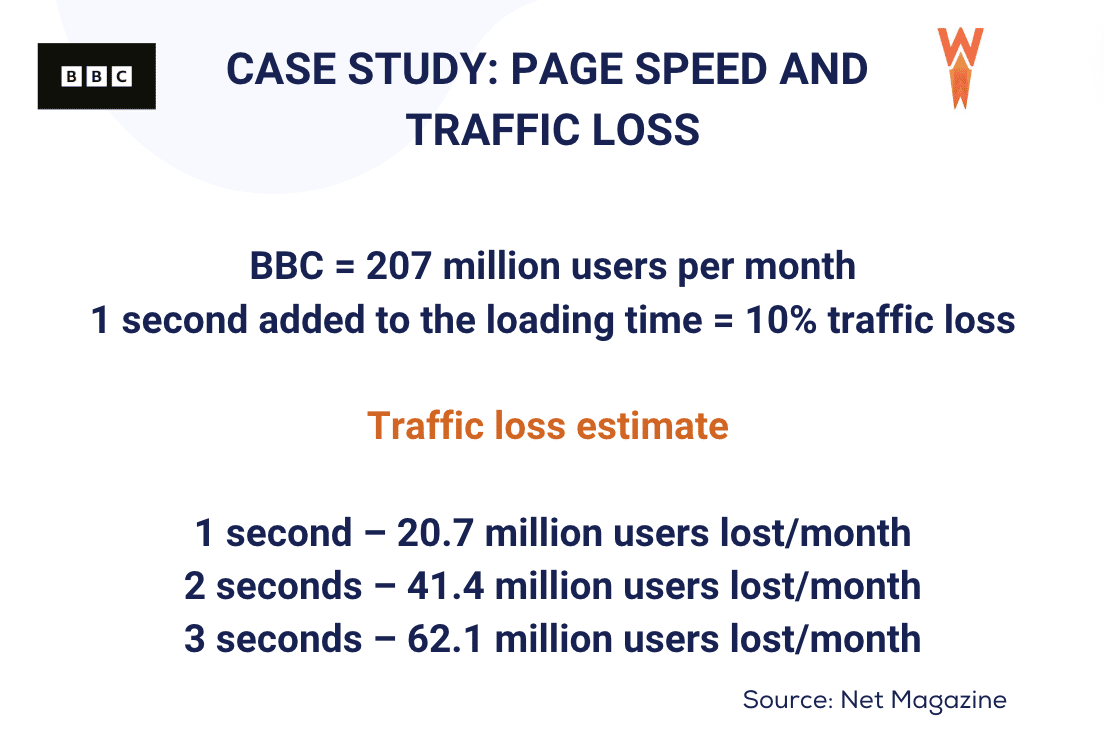
10. From the lead technical architect at the BBC: “Large media like us can lose an additional 10% of users for every second our pages take to load”. For small or medium websites with fewer resources and potentially less optimized infrastructure, the risk of user loss due to slow loading times could be even higher.
To enhance conversion rates and click-through rates, aim to optimize your site until you achieve a loading time close to 1 second. While 4- or 5-second load times may still be deemed acceptable, they could potentially result in missed revenue opportunities. If you require assistance in boosting your website speed, proceed to the next section to learn how WP Rocket can effortlessly help you achieve outstanding performance results.
Improve Your Website Load Time With WP Rocket
The easiest way to improve your website load time is to use WP Rocket, a WordPress performance plugin that helps improve your site performance in a few clicks. WP Rocket enables caching and 80% of web performance good practices automatically!
Here are the main WP Rocket features that will help to improve your website’s loading time:
- Caching and GZIP compression (enabled by default upon activation)
- Minification of CSS and JavaScript files
- Deferred loading of JavaScript
- Removing unused CSS
- Lazy loading of images
By making your website faster, WP Rocket also improves your PageSpeed Insights score and your Core Web Vitals grades and solves most of the warnings from PageSpeed:
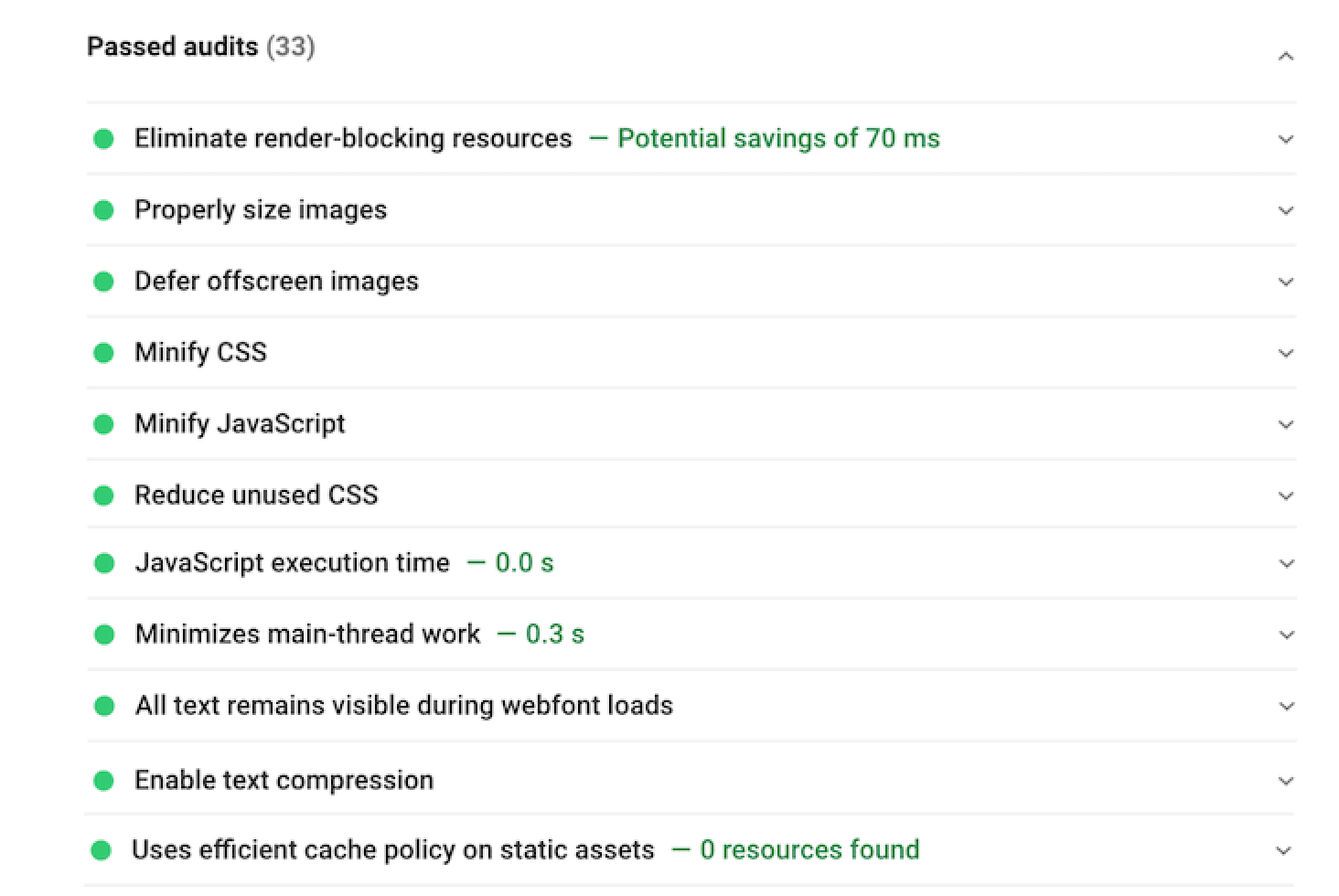
Let’s get to the data to see how WP Rocket improves my page speed. Here are all the steps I followed to run the performance audit:
| 📖 Curious about how your site is performing? Follow our guide to test your site’s performance and measure your speed results. |
- I created a simple WooCommerce site using a pre-made demo from Astra, with servers located in France.

2. I ran a performance test on GTmetrix.com (on mobile, with servers in France).
3. I wrote down the page load speed result without using WP Rocket.
4. Then I installed WP Rocket and ran another test, which was way more successful in terms of speed.
Here are our main findings related to performance:
Results Without WP Rocket:
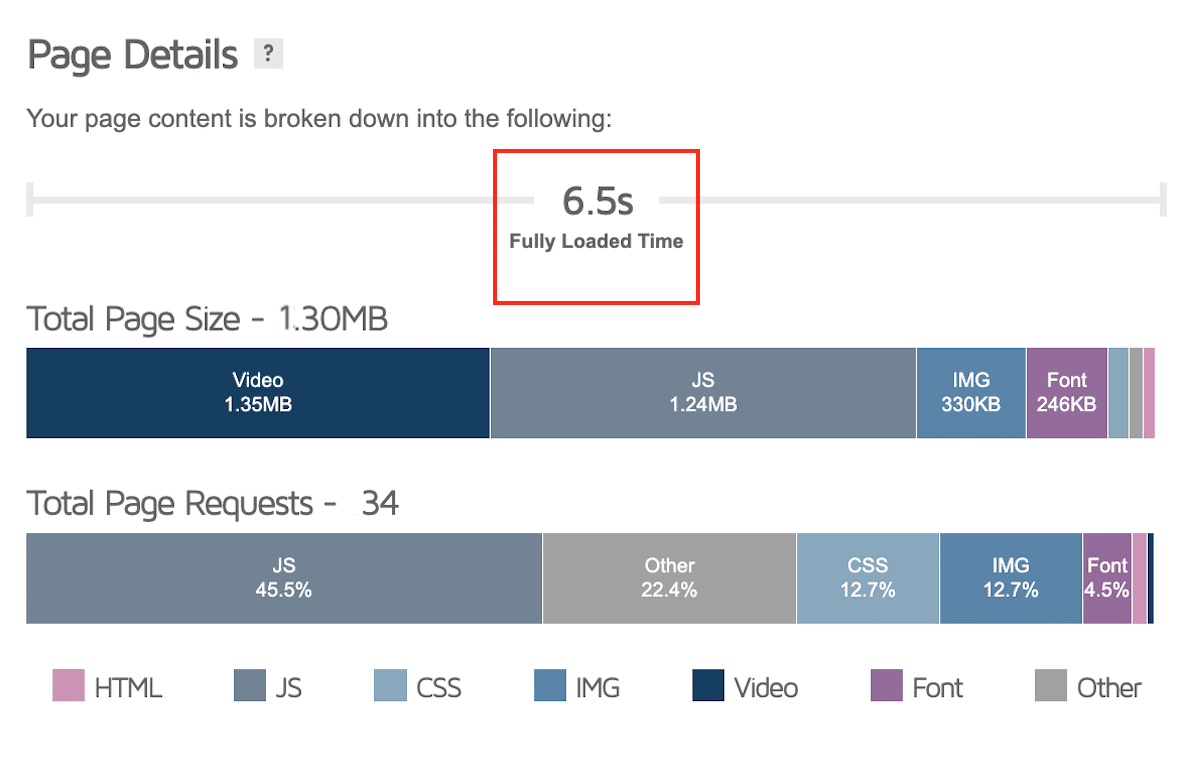
- The page loading time is 6.5 s
- My page size is 1.3 MB
- The number of HTTP requests is 34
- KPIs potentially impacted: conversion rates, traffic, and bounce rate.
According to the stats above, the website has some issues impacting some crucial e-commerce KPIs.
First of all, the page loading time is above 6.5 s, while Google recommends keeping it under 3 seconds. This could impact marketing metrics such as your conversion and bounce rates.
Then, if your site does not load fast, Google will not rank it very well, which could severely decrease the traffic driven to your site.
🚀 With WP Rocket:
WP Rocket improved the already mentioned KPIs as follows:
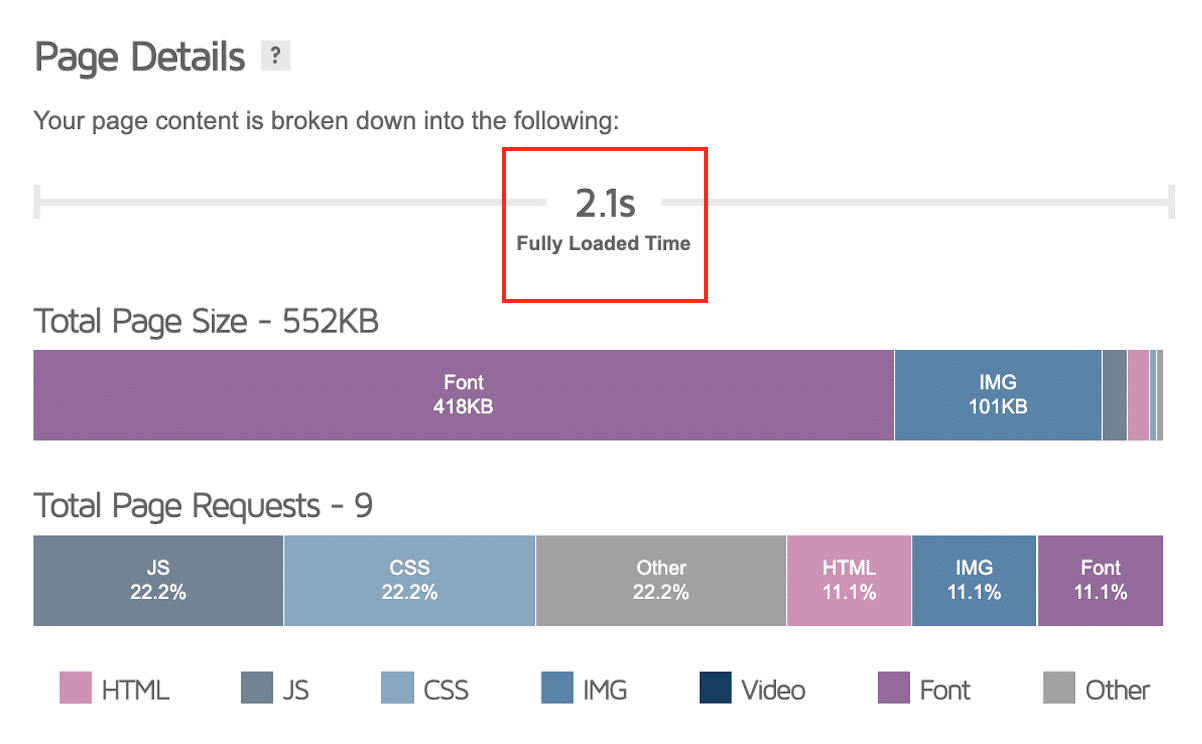
- The page loading time went from 6.5 seconds to 2.1 seconds (meeting Google’s recommendation of 3 seconds)
- My page size is now 552 KB instead of 1.3 MB
- The number of HTTP requests is down to 9.
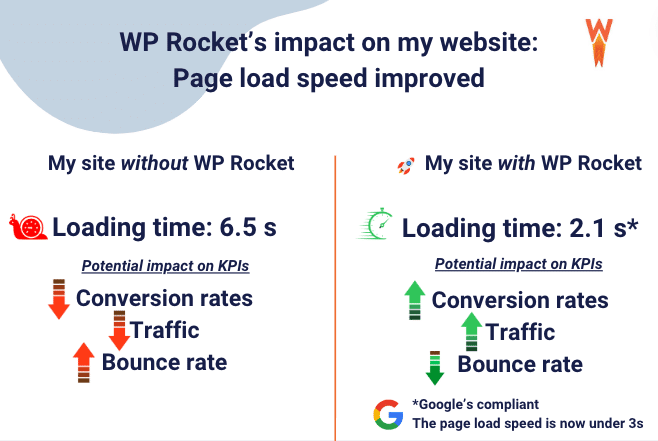
Finally, here’s a summary of how WP Rocket influences the page speed of your site and three of the most important e-commerce KPIs:
Website Speed Statistics Comparison
| Metric | Desktop | Mobile | Impact/Threshold |
| Average Page Load Time | 2.5 seconds | 8.6 seconds | Google recommends under 3 seconds |
| First-Page Google Result Load Time | 1.65 seconds | 1.65 seconds | Benchmark for competitive performance |
| Bounce Rate Increase (1s to 3s) | 32% increase | 32% increase | 47% expect 2s loads, 40% abandon after 3s |
| B2B Conversion Rate Impact | 3x higher at 1s vs 5s | 3x higher at 1s vs 5s | 5x higher at 1s vs 10s load time |
| Mobile Conversion Loss Per Second | N/A | Up to 20% per second | Critical for mobile-first indexing |
| Good LCP Achievement Rate (2023) | 74% of websites | 61.4% of websites | LCP should be under 2.5 seconds |
| WordPress Sites with Good Core Web Vitals | 50% of 3M+ sites | 50% of 3M+ sites | Trend improving but work needed |
| Mobile User Abandonment Time | N/A | 6-10 seconds | Users abandon pages exceeding this range |
| Traffic Loss Per Second (Large Sites) | 10% per second | 10% per second | BBC case study – higher for smaller sites |
| B2C Sites Loading in 5s or Less | Majority | Majority | 2.5x higher conversion at 1s vs 5s |
Frequently Asked Questions
What is a good website load time in 2026?
A good website load time is under 3 seconds as recommended by Google. The average first-page Google result loads in 1.65 seconds. Desktop sites average 2.5 seconds while mobile sites average 8.6 seconds, but faster is always better for conversions and user experience.
How does page speed affect conversion rates?
Page speed significantly impacts conversions. B2B sites loading in 1 second have conversion rates 3x higher than 5-second sites and 5x higher than 10-second sites. On mobile, every second delay can reduce conversions by up to 20%, making speed optimization critical for revenue.
What is Largest Contentful Paint (LCP)?
Largest Contentful Paint (LCP) is a Core Web Vital that measures perceived load speed by tracking when the largest content element becomes visible. Good LCP is under 2.5 seconds. In 2023, 74% of websites achieved good LCP on desktop but only 61.4% on mobile.
Why is mobile page speed more important?
Mobile page speed is critical because mobile users wait only 6-10 seconds before abandoning pages, and Google uses mobile-first indexing for rankings. With mobile sites averaging 8.6 seconds load time versus 2.5 seconds on desktop, mobile optimization directly impacts both user retention and SEO performance.
How can I improve my website load time?
Improve load time by implementing caching, optimizing images to WebP format, minifying CSS and JavaScript files, reducing HTTP requests, using quality hosting like managed WordPress hosting, enabling lazy loading for images, and optimizing Core Web Vitals. Performance plugins like WP Rocket automate many of these optimizations.
What happens if my site loads slowly?
Slow-loading sites experience higher bounce rates, with probability increasing 32% as load time goes from 1 to 3 seconds. 40% of users abandon sites taking over 3 seconds. Slow sites also rank lower in search results, lose up to 10% of users per second of delay, and suffer reduced conversion rates.
Wrapping Up
Now you know where your website should stand in terms of performance.
Improving your page load time is key to optimizing your visibility on Google and increasing conversion rates and sales. Even a few seconds can make a big difference on mobile and desktop. If you’re concerned about your website’s page load speed, WP Rocket is the easiest solution to boost performance immediately. Plus, you don’t take any risks with the 14-day money-back guarantee.