

Table of Contents
Last update on
Want to learn how to optimize user experience on your website?
Well, you are a user yourself, so the concept is actually quite simple. Think about your own behavior online: what do you like on a website, and what makes you leave immediately?
Browsing a shop page where images load painfully slowly? Suddenly, you are not sure you want to enter your credit card details. When a website feels unreliable, trust disappears quickly.
That is exactly what user experience is about. It shapes how visitors interact with your site, how easily they find information, and how smoothly pages load. When you improve website usability and performance, the results are usually measurable: visitors stay longer, engage more with your content, and conversions increase. Search engines also reward good UX with stronger rankings.
The good news is that website user experience optimization follows proven methods.
In this guide, you will learn how to optimize the user experience, discover tools to improve UX performance, explore practical ways to improve website usability, and avoid common mistakes that hurt website engagement.
| TL;DR Optimizing UX includes simplifying navigation, optimizing for mobile, analyzing user behavior, and using performance tools to create a fast, intuitive website experience. Improving performance, usability, and content clarity helps visitors find what they need without frustration. Strong website user experience optimization keeps users engaged longer, increases conversions, and supports better search visibility. |
Key Takeaways to Optimize User Experience
✅ UX performance optimization starts with speed because slow-loading pages increase bounce rates, reduce engagement, and hurt SEO.
✅ Clear structure, simple navigation, and clean layouts help improve website usability and guide visitors naturally through your site.
✅ Data from analytics and behavior tools helps improve user experience and website engagement, revealing where users drop off or struggle.
✅ Tools like Google Analytics, Contentsquare, UserTesting, and Figma support website user experience optimization by analyzing behavior and testing interfaces before and after implementation.
✅ For UX performance optimization, GTmetrix flags performance issues while WP Rocket fixes them.
What Does It Mean to Optimize User Experience?
Optimizing user experience (UX) means making a website faster and more intuitive so visitors can find what they need without friction. The goal is simple: reduce confusion, avoid unpleasant surprises, and guide your users naturally toward the information or action they came for. User experience optimization is not about reinventing the web; it’s about respecting user expectations and removing obstacles that slow people down.
Good UX often relies on familiar patterns that users already expect.
For example:
- Login or account access usually appears in the top right corner.
- The “Contact Us” page is typically found in the footer.
- Pages should load quickly, ideally in under three seconds, so visitors can interact with content without frustration.
User Experience vs User Interface vs Website Usability
User Experience (UX) is the umbrella concept, and User Interface (UI) and Website Usability are components of UX. Let’s break each concept down.
User experience (UX) focuses on the overall experience visitors have when interacting with your website. For example, a WordPress site with clear navigation, fast-loading pages, attractive branding, and simple checkout steps provides a positive UX.
User interface (UI) refers to the visual elements users interact with, such as buttons, colors, typography, or layouts. For instance, a well-designed WordPress theme with clear buttons and readable typography enhances the interface.
Website usability measures how easy it is for visitors to accomplish tasks on your site. For example, a WordPress site with a simple, intuitive menu structure makes it easy for users to quickly find a product or article.
You can also visualize it like this:
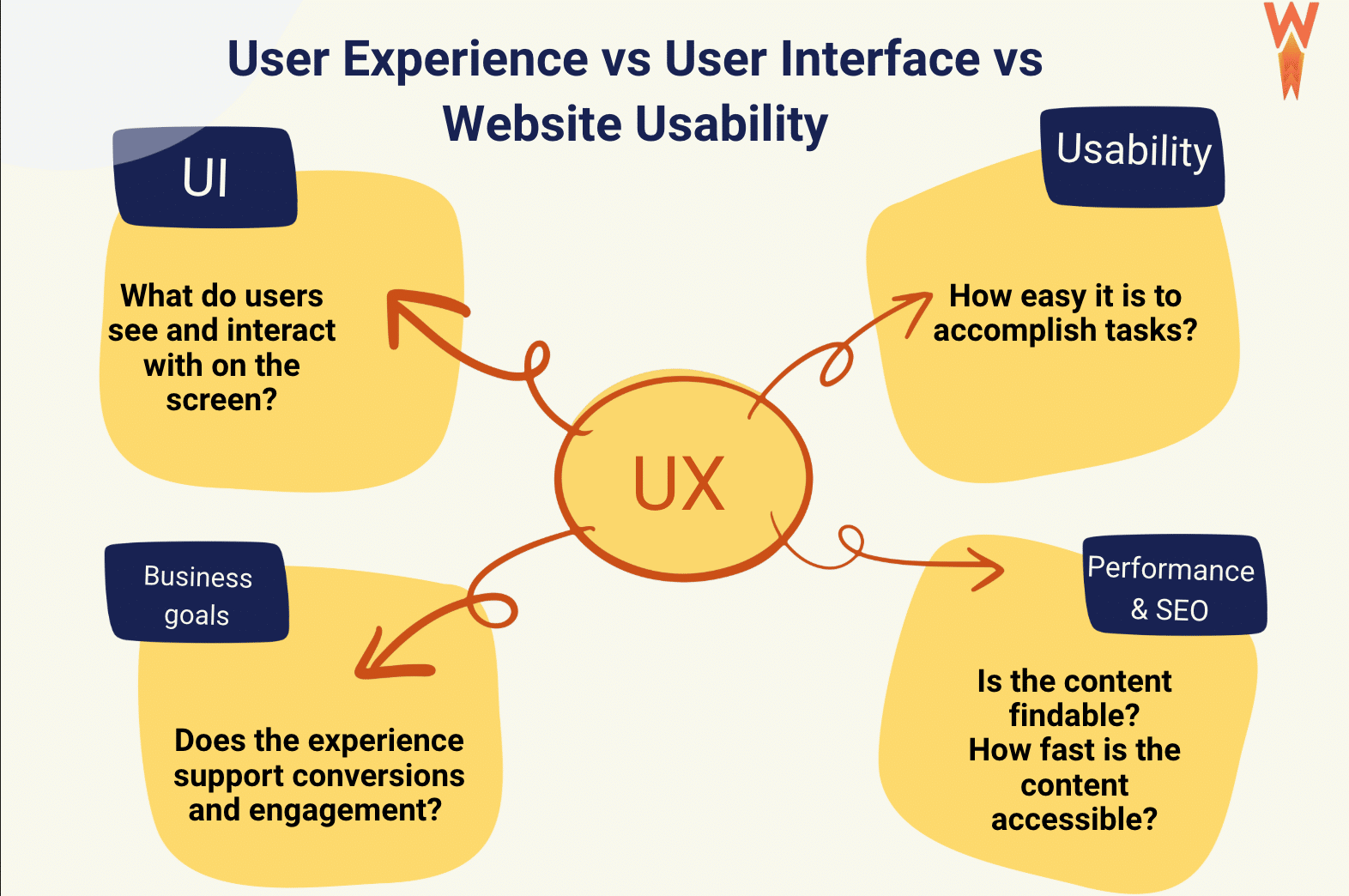
| 💡Hint: User experience is the overall interaction a visitor has with a website, while user interface focuses on visual design and usability measures how easily users can accomplish tasks. |
7 Proven Ways to Optimize User Experience
Improving UX doesn’t require reinventing your website. Start by measuring your current UX performance, then improve design, test your interface, and finally focus on technical performance on both web and mobile. Below are 7 proven strategies to optimize user experience, improve website usability, and increase engagement.
1. Use Analytics and Behavior Insights
The very first step is to understand where your UX stands today: What are your performance scores? How do real users behave on your site? Is the website fast? Is it easy to navigate or complete a purchase? Instead of guessing what works, rely on real data and user insights to guide your UX decisions. The right tools help you understand user behavior, detect friction points, and improve website speed so you can continuously optimize user experience and increase engagement.
✅ Example: Analyzing live user behavior with ContentSquare to detect browsing and usability issues. Reviewing bounce rates and engagement data in Google Analytics to detect pages where visitors leave quickly.
2. Simplify Navigation
Clear and predictable navigation helps users find information quickly and improves website user experience optimization. Limit menu items, use clear labels, and organize pages logically.
✅ Example: A WordPress blog with a simple top menu and clearly structured categories allows readers to quickly find related content.
3. Add Trust Indicators
Trust signals reassure visitors and encourage them to take action, especially on eCommerce websites.
✅ Example: Displaying SSL badges, customer reviews, and secure payment icons on a WooCommerce checkout page helps visitors feel confident about completing a purchase.
4. Keep Layouts Clean and Focused
Too many visual elements or competing CTAs can overwhelm visitors and reduce engagement. A clear layout improves readability and improves website usability.
✅ Example: A WordPress landing page with one clear CTA and structured content sections helps guide users toward the desired action.
5. Test the Design Before (and After) Publishing
Planning and validating your interface helps prevent usability issues. Tools like Figma allow teams to design and prototype layouts before development, while A/B testing after launch helps determine which version improves engagement and usability.
✅ Example: Testing two versions of a landing page CTA to see which one increases clicks or conversions.
6. Optimize Web Speed Performance
A website must feel fast. Slow-loading pages frustrate visitors and increase bounce rates before users even interact with your content. Improving loading speed is one of the most effective ways to optimize user experience and support UX performance optimization.
✅ Example: A WordPress store that uses caching, lazy loading, and optimized images loads quickly and encourages visitors to browse more products.
7. Optimize for Mobile Experience
Mobile traffic now represents a large share of website visits. Responsive design is essential for improving user experience and ensuring your site works smoothly across devices.
✅ Example: A WordPress product page with tap-friendly buttons and responsive layouts improves usability on smartphones.
6 UX Optimization Tools That Help Improve Engagement
Improving user experience is much easier when you rely on the right tools. Some platforms help you analyze real visitor behavior, others reveal UX friction points, while performance tools identify technical issues that hurt engagement. Together, they provide the insights you need to optimize user experience and improve website usability. Let’s go over 6 of them that we handpicked for you!
1. Google Analytics
Google Analytics helps you understand how visitors actually interact with your website. It tracks key engagement metrics such as bounce rate, pages per session, session duration, engagement rates and conversions.
🧠 How it improves user experience:
What makes it powerful for UX is its ability to reveal where users drop off. For example, if many visitors leave on a product page without scrolling or clicking, it may indicate confusing navigation, missing information, or trust issues. These insights help prioritize improvements that increase engagement and conversions.
2. Contentsquare
Contentsquare focuses on visual user behavior analysis. Instead of just numbers, it shows how users interact with your pages through heatmaps, scroll maps, and click analysis.
🧠 How it improves user experience:
It helps identify friction points in the user journey. For example, you might discover that visitors repeatedly click on a non-clickable element or abandon a page before reaching a key CTA. Contentsquare turns behavioral data into clear UX insights that guide design decisions.
3. UserTesting
UserTesting provides direct feedback from real users interacting with your website. Test participants complete tasks while sharing their thoughts out loud, allowing you to observe how users perceive your interface and where they struggle.
🧠 How it improves user experience:
This type of qualitative insight is extremely valuable for website user experience optimization because it reveals problems that analytics alone cannot show, such as confusion about navigation or hesitation during checkout.
4. GTmetrix
GTmetrix is a performance analysis tool that helps identify technical issues that affect user experience. It analyzes page speed, Core Web Vitals, waterfall charts, resource weight, and HTTP requests.
🧠 How it improves user experience:
From a UX perspective, it reveals problems such as slow-loading pages, render-blocking scripts, and oversized images that directly impact engagement. If a page takes too long to load, users are more likely to leave before interacting with the content.
| 💡 Hint: The four tools above help you understand user behavior and identify UX issues. The two tools below help you take action to optimize user experience, improve UX performance, and enhance website usability. |
5. WP Rocket
WP Rocket is the most powerful performance optimization plugin for WordPress that automatically applies 80% of performance best practices identified during user experience audits, including page caching, GZIP compression, CSS and JavaScript minification, critical image optimization, and lazy rendering.
Its intuitive interface lets you activate powerful features such as removing unused CSS, delaying JavaScript execution, and optimizing critical content with just a few clicks.
🧠 How it improves user experience:
By improving loading speed and responsiveness, WP Rocket helps create a much better user experience and keeps visitors engaged.
6. Figma
Figma is widely used to design and test user interfaces before implementation. Teams can create interactive prototypes and share them with colleagues or test users to gather feedback early in the design process. It’s also particularly useful when you need to revamp your website based on insights from UX analytics tools, allowing you to redesign layouts, navigation, or user flows before implementing changes on the live site.
🧠 How it improves user experience:
This allows teams to identify usability issues before development, saving time, and preventing costly redesigns later. It’s especially useful for refining layouts, improving navigation structures, and validating UX ideas collaboratively.
Summary: Which Tools Should You Use to Optimize User Experience?
Choosing the right tools is essential for optimizing the website user experience. Some tools focus on analytics and user behavior, while others optimize UX performance by improving speed and technical performance.
The tools we have hand-picked really complement each other:
- Analytics platforms help you understand how visitors interact with your site.
- Live behavioral tools reveal friction points in the user journey.
- Performance tools help optimize the user experience by improving load times and Core Web Vitals.
| Tool | Type of Tool | Features That Help Optimize User Experience | Best For |
| Google Analytics | Analytics | Tracks engagement metrics such as bounce rate, pages per session, session duration, and conversions to understand how users interact with your site. | Identifying pages where users drop off and opportunities to improve website engagement. |
| Contentsquare | Live user behavior analysis | Heatmaps, scroll maps, and click tracking reveal how visitors interact with elements and where friction occurs. | Discovering usability issues and improving navigation or CTAs to improve user experience. |
| UserTesting | Live user feedback | Real users complete tasks while sharing their thoughts, providing qualitative insights into usability and points of confusion. | Understanding real user behavior and validating UX optimization tips before making design changes. |
| Figma | UX design and prototyping | Interactive prototypes, collaborative design, and early testing of layouts and navigation structures. | Designing interfaces and improving layouts to improve website usability before development. |
| GTmetrix | Performance analysis | Measures page speed, Core Web Vitals, waterfall charts, and resource loading to detect performance bottlenecks. | Diagnosing technical issues affecting UX performance optimization. |
| WP Rocket | Performance optimization | Page caching, CSS and JavaScript optimization, lazy loading, and Core Web Vitals improvements to accelerate loading speed. | Quickly improving site speed to optimize user experience on WordPress. |
6 Common User Experience Problems That Hurt Engagement
Even a well-designed website can suffer from small user experience mistakes. From confusing navigation to slow-loading pages, these issues can frustrate visitors and drive them away. Let’s look at the most common UX mistakes and how to avoid them.
Slow Loading Pages
Slow-loading pages are one of the most common user experience problems and can seriously hurt engagement. When pages take too long to load, visitors quickly lose patience, which increases bounce rates and reduces conversions.
✅ Easy fix:
Improve page speed by enabling caching, optimizing your code and images, and prioritizing the most important content to load first. Techniques such as delaying non-critical JavaScript, using lazy loading for images, and reducing unnecessary assets can significantly improve performance. If your audience is international, using a CDN helps deliver content faster by serving files from servers closer to your visitors.
⚙️ Recommended tool(s):
WP Rocket makes UX optimization much easier by automatically applying around 80% of performance best practices upon activation, including page caching, GZIP compression, CSS and JavaScript minification, lazy rendering, and critical image optimization. It also lets you delay JavaScript execution, remove unused CSS, and apply lazy loading with just a few clicks through an intuitive interface.
To further improve website usability and loading speed, you can combine WP Rocket with Imagify for image optimization and RocketCDN to deliver content faster to visitors around the world.
2. Lack of Trust Signals
A lack of trust signals can quickly discourage visitors from engaging with your website, especially when they are about to make a purchase or share personal information. Even if your design looks good, users may hesitate if the site does not feel credible or secure.
✅ Easy fix: Add clear trust indicators that reassure visitors. Display secure payment badges, SSL certificates, customer reviews, and recognizable brand logos. Provide transparent information about delivery fees, return policies, and customer support. These elements help visitors feel confident and encourage them to continue browsing or completing a purchase.
⚙️ Recommended tool(s):
Plugins like TrustPulse, WP Customer Reviews, or WooCommerce reviews help showcase social proof directly on your site.
3. Confusing Navigation
Confusing navigation makes it difficult for visitors to find information quickly, which negatively affects website user experience optimization and often reduces engagement.
✅ Easy fix:
Simplify your navigation structure and keep menus clear and predictable. Use intuitive labels, limit the number of menu items, and organize pages into logical categories. A visible search bar and breadcrumb navigation can also help users quickly find what they are looking for.
⚙️ Recommended tool(s):
WordPress navigation menus and page builders like Elementor or the WordPress block editor help organize content clearly. Tools such as Figma for designing and sharing feedback with the team, or Hotjar, can also reveal where users get lost through session recordings and heatmaps.
4. Cluttered Layouts
Cluttered layouts overwhelm visitors with too much information at once, making it harder to improve website usability and keep users engaged.
✅ Easy fix:
Prioritize simplicity and visual hierarchy. Use whitespace to separate sections, highlight important elements such as CTAs, and remove unnecessary widgets or design elements. Clear layouts guide users naturally through your content.
⚙️ Recommended tool(s):
WordPress themes optimized for performance and UX help create clean layouts. Tools like Figma or Adobe XD can also help plan visual hierarchy before implementing changes.
5. Poor Mobile Experience
A poor mobile experience is one of the fastest ways to lose visitors. If a site is difficult to navigate or slow on mobile, users leave immediately.
✅ Easy fix:
Ensure your site is fully responsive and test it on different devices, such as iPhone and Android. Buttons should be large enough to tap easily, content should adapt to smaller screens, and pages should load quickly on mobile networks.
⚙️ Recommended tool(s):
Use GTmetrix or Chrome DevTools mobile testing to evaluate mobile performance. WP Rocket can also improve mobile performance by optimizing code, caching pages, and reducing loading times.
6. Intrusive Popups or Ads
Too many pop-ups or aggressive ads can interrupt the user journey and create frustration, which negatively impacts website engagement and conversions.
✅ Easy fix:
Limit popups and display them only when they add value. Use exit-intent popups, delay them until users interact with the page, and avoid blocking content on mobile devices.
⚙️ Recommended tool(s):
WordPress popup tools like OptinMonster or Popup Maker allow better control over timing and display rules so popups support engagement instead of harming it.
Common UX Problems and How to Fix Them (Summary and Action Plan)
To optimize user experience and improve website usability, it’s important to identify the most common UX issues that affect your site and apply the simple fixes supported by the right UX tools below:
| Common UX Problem | UX Optimization Tips (Easy Fixes) | UX Performance Optimization Tools |
| Slow Loading Pages | Improve speed with caching, optimized images, lazy loading, and a CDN. Faster pages help optimize user experience and reduce bounce rates. | WP Rocket, Imagify, RocketCDN |
| Lack of Trust Signals | Add trust indicators like SSL badges, customer reviews, and clear policies to improve user experience and build credibility. | TrustPulse, WP Customer Reviews, WooCommerce Reviews |
| Confusing Navigation | Simplify menus, use clear labels, and organize pages logically to improve website usability. | WordPress Navigation Menus, Elementor, Figma, Hotjar |
| Cluttered Layouts | Use whitespace and clear visual hierarchy to guide visitors and optimize user experience. | UX-optimized WordPress themes, Figma, Adobe XD |
| Poor Mobile Experience | Ensure responsive design, tap-friendly buttons, and fast mobile loading to improve user experience. | GTmetrix, Chrome DevTools, WP Rocket |
| Intrusive Popups or Ads | Limit popups and display them only when they add value to improve website engagement. | OptinMonster, Popup Maker |
5 Common UX Optimization Mistakes to Avoid
When trying to optimize user experience, many websites focus on design improvements but overlook how visitors actually interact with the site. Here are five UX mistakes to avoid if you want to improve user experience and website engagement.
1. Prioritizing Aesthetics Over Usability
Design matters, but usability always comes first. A website can look impressive while still being difficult to use.
✅️ Example of a poor usability: Imagine a WooCommerce store selling furniture with heavy animations, floating elements, and scrolling effects everywhere. Product cards slide in, buttons move on hover, and images zoom excessively. The site may look stylish, but it becomes harder for visitors to quickly understand where to click or how to purchase. Good UX optimization prioritizes clarity over visual effects.
2. Ignoring Mobile Experience
A large share of website traffic now comes from mobile devices, yet many sites are still designed mainly for desktops. Mobile site speed optimization must be at the heart of your UX strategy.
️✅️ Example of a wrong mobile experience: Picture a mobile visitor trying to tap a tiny “Add to Cart” button that is barely clickable. Or a page where CSS effects block content and the layout shifts while scrolling. Even worse, the page loads slowly. Mobile users expect instant access to information, and delays or usability issues quickly push them away.
3. Overwhelming Users with Too Many Options
Too many choices can create confusion and reduce engagement. When visitors arrive on a page, they should immediately understand what action to take.
✅️ Example of an overwhelmed user: if a landing page is designed to sell a sofa, the focus should be on the product. Showing newsletter pop-ups, unrelated product suggestions, and multiple competing buttons at the same time distracts users and weakens the main objective.
4. Optimizing for Trends Instead of User Needs
Design trends change quickly, but user expectations remain fairly consistent. Visitors usually expect a straightforward process when completing a purchase.
✅️ Example of a non-typical buying journey: You select a product, add it to the basket, review details, then proceed to payment. If this process becomes overly complex with unnecessary steps, fancy interactions, or hidden navigation, users may abandon the process before completing the transaction.
5. Ignoring Core Web Vitals
User experience is not only about visual design. Core Web Vitals are signals that measure how users experience your site. The better your score, the higher your chances of ranking well.
✅️ How Core Web Vitals (UX measurement) influence SEO : Many sites focus heavily on appearance but overlook testing Core Web Vitals, such as loading speed, visual stability, and responsiveness. These metrics influence both user satisfaction and search rankings. A website that looks great but loads slowly will still provide a poor experience and may lose visibility in search results.
Why You Can’t Overlook User Experience
After everything we’ve covered, it’s clear that user experience simply can’t be overlooked, right?
User experience directly affects how visitors engage with your website and whether they browse, take action, or complete a purchase. When UX is poor, engagement drops immediately, leading to lost conversions and revenue. It also impacts SEO: Google includes user experience signals in its ranking algorithm, so a poor UX can also hurt your search visibility.
The impact becomes clear when looking at key engagement metrics. Optimizing user experience directly affects key aspects and metrics such as:
SEO Performance
Search engines also consider user experience signals when ranking websites. Metrics such as Core Web Vitals, page speed, and stability reflect how real users experience your site. When you focus on improving UX and performance, search engines are more likely to reward your website with stronger rankings.
Bounce Rate
Imagine landing on a news website where 15 pop-ups appear at once, autoplay videos start, and ads cover the content. The page feels overwhelming, so you close it in less than a second. That single interaction increases the site’s bounce rate.
Time on Page
You are looking for a new sofa and land on a category page such as decoration.com/sofas. You start scrolling, but the product images look blurry, prices are inconsistent, and delivery fees are nowhere to be found. Something feels off, so you leave after just a few seconds instead of exploring the catalog.
Pages per session
If a homepage feels confusing or poorly structured, visitors will not explore further. When your users cannot easily understand where to click next, they rarely visit additional pages, and you may lose revenue.
Conversion rate
Imagine trying to complete a purchase on a slow website. The page takes time to load; the checkout form shows errors, and only one payment method is available. Trust decreases instantly, and the purchase is abandoned, lowering the conversion rate.
FAQ Section
What does it mean to optimize user experience?
Optimizing user experience means improving how visitors interact with your website so they can navigate easily, access information quickly, and complete tasks without friction. This process often includes improving page speed, simplifying navigation, creating clear layouts, and ensuring mobile responsiveness. Effective website user experience optimization reduces frustration and helps users find what they need faster.
Why is user experience important for websites?
User experience plays a key role in how visitors interact with your website. A site that is easy to navigate, fast to load, and visually clear encourages users to explore more pages and complete actions such as signing up or making a purchase. Good user experience best practices also improve SEO, as search engines consider user signals such as page speed, engagement, and usability when ranking websites.
How can I improve user engagement on my website?
To improve user engagement, focus on creating a fast and intuitive browsing experience. Start by improving loading speed, simplifying navigation menus, and organizing content with a clear visual hierarchy. Adding strong calls to action, relevant content, and trust signals such as reviews can also help improve website usability and encourage visitors to spend more time on your site.
Does website speed affect user experience?
Yes, website speed has a direct impact on user experience. Slow-loading pages can frustrate visitors and cause them to leave before interacting with your content. Fast websites feel more reliable and encourage users to explore further. Improving page speed through caching, image optimization, and performance tools is an important part of UX performance optimization.
What tools help optimize user experience?
Platforms like Google Analytics reveal engagement metrics, while heatmap tools show how visitors interact with your pages. Tools such as GTmetrix help identify speed issues, and WP Rocket helps fix them. Tools like Figma allow teams to test layouts before development. These tools support data-driven UX optimization tips and continuous improvements in the long run.
How often should user experience be optimized?
User experience optimization should be an ongoing process rather than a one-time task. Regular audits, performance checks, and user behavior analysis help identify new opportunities to improve user experience. Many websites review UX during redesigns, after major updates, or when engagement metrics such as bounce rate or conversions start to decline.
Wrapping Up
From understanding what UX really means to measuring engagement metrics, identifying friction points, and avoiding common UX mistakes, you have the tools to create a smoother and more intuitive experience for your visitors. Now you know how to optimize user experience on your website!
One key takeaway from this guide is that speed plays a major role in optimizing UX performance. Fast-loading pages help visitors stay engaged, explore more content, and trust your website. In many cases, improving performance is one of the quickest ways to improve user experience and website engagement.
If you run a WordPress site, WP Rocket makes this process much easier. The best part? You can try it risk-free with a 14-day money-back guarantee.
Start optimizing your UX today and give your visitors the fast, smooth experience they expect!